Loading
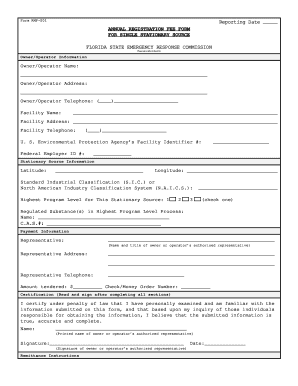
Get Fl Rmp-001
How it works
-

Open form follow the instructions
-

Easily sign the form with your finger
-

Send filled & signed form or save
How to fill out the FL RMP-001 online
This guide provides step-by-step instructions on completing the FL RMP-001 form online. Designed for users with varying levels of experience, this resource will help ensure accurate and efficient form submission.
Follow the steps to complete the FL RMP-001 form online.
- Press the ‘Get Form’ button to obtain the FL RMP-001 form and open it for editing.
- In the ‘Owner/Operator Information’ section, enter the owner/operator name, address, and telephone number.
- Fill in the ‘Facility Name’ and ‘Facility Address’ along with the facility telephone number.
- Provide the U.S. Environmental Protection Agency’s Facility Identifier number and Federal Employer ID number, ensuring accuracy.
- In the ‘Stationary Source Information’ section, input the latitude and longitude of the facility.
- Select the appropriate Standard Industrial Classification (S.I.C.) or North American Industry Classification System (N.A.I.C.S.) code.
- Indicate the highest program level applicable to your stationary source by checking the appropriate box (1, 2, or 3).
- List any regulated substance(s) present in the highest program level process by name and C.A.S. number.
- In the ‘Payment Information’ section, enter the name and title of the authorized representative along with their address and telephone number.
- Specify the amount tendered for the annual registration fee and include the check or money order number.
- Complete the certification section by having the authorized representative sign and print their name.
- Ensure all sections are completed, then save changes, download, print, or share the form as needed.
Complete your FL RMP-001 form online to ensure timely and efficient processing.