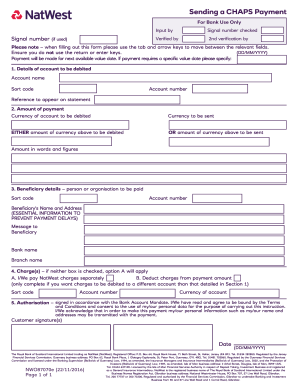
And arrow keys to move between the relevant fields. (DD/MM/YYYY) Ensure you do not use the return or enter keys. Payment will be made for next available value date. If payment requires a specific value date please specify: 1. Details of account to be debited Account name Sort code Account number Reference to appear on statement 2. Amount of payment Currency of account to be debited Currency to be sent EITHER amount of currency above to be debited OR amount of currency above to be sent Amou.
Open form follow the instructions
Easily sign the form with your finger
Send filled & signed form or save
How to fill out the UK NatWest NW087070e online
Filling out the UK NatWest NW087070e form can be straightforward when you know what to do. This guide provides a step-by-step approach to help you complete the form correctly to ensure a smooth transaction.
Follow the steps to successfully complete the NatWest NW087070e form.
- Click the ‘Get Form’ button to obtain the UK NatWest NW087070e form and open it in your chosen editor.
- Start by entering the signal number, if applicable, in the designated field. If you do not have a signal number, you may leave this blank.
- Specify the value date for the payment. If you want the payment to be processed at the earliest opportunity, leave this section blank.
- Section 1 asks for the details of the account to be debited. Fill in the account name, sort code, account number, and an optional reference to appear on your statement.
- In Section 2, enter the amount of payment. Only complete either the 'amount of currency to be debited' or the 'amount of currency to be sent' based on the currency involved, ensuring that you specify both the currency of the account to be debited and the currency to be sent.
- Section 3 requires the beneficiary details. Input the sort code, account number, name and address of the beneficiary, along with an optional message.
- In Section 4, indicate how charges will be handled. Choose whether you will pay NatWest charges separately or deduct them from the payment amount, and complete the additional fields if debiting from a different account.
- Finally, sign in Section 5 in accordance with your bank account's signing mandate, confirming that you understand and agree to the terms and conditions outlined.
Complete the UK NatWest NW087070e form online today for your CHAPS payment needs.
Experience a faster way to fill out and sign forms on the web. Access the most extensive library of templates available.
Get answers to your most pressing questions about US Legal Forms API.
How to get global key code NatWest?
To obtain your global key code from NatWest, log into your online banking. Navigate to the section that displays your financial information, and you should find your global key code listed there. If you're not an online banking user, visit a local NatWest branch or contact customer service for assistance. Remember, your UK NatWest NW087070e account will be vital for identification during this process.
How to get an IBAN number NatWest UK?
To get your IBAN number with NatWest UK, simply log into your online banking account. Your IBAN will be displayed in your account details section. If you do not have online banking, you can also find your IBAN on your bank statement or contact NatWest customer service. Don't forget that your UK NatWest NW087070e account details are essential for this process.
How to access NatWest account?
To access your NatWest account, go to the official NatWest login page. Enter your credentials, such as your customer number and password, to log in securely. If you are a first-time user, you will need to register using your UK NatWest NW087070e account details. Follow the prompts to easily gain access to your banking services.
How to request online banking at NatWest?
To request online banking at NatWest, visit the NatWest website and navigate to the online banking section. You can then select the option for new customers to create an online banking account. Provide the necessary details, including your UK NatWest NW087070e account information. After submitting, you will receive further instructions to complete the setup.
What is the IBAN for NatWest UK?
The IBAN for your NatWest UK account is unique to your account and typically starts with 'GB'. You can find it on your bank statement or through your NatWest online banking portal. Knowing your IBAN, especially the UK NatWest NW087070e code, is essential for making international transactions or receiving funds.
Is NatWest a bank in the UK?
Yes, NatWest is a prominent bank in the UK, offering a variety of financial services, including personal banking, business accounts, and loans. It is widely recognized for its commitment to customer service and financial solutions tailored to individual needs. The UK NatWest NW087070e code is specific to this bank, affirming its importance in the UK's financial landscape.
How do I find my NatWest IBAN number?
To find your NatWest IBAN number, access your account online or check your account statements. You can also request it directly from NatWest customer support. Remember to use the UK NatWest NW087070e code when discussing your account, as it will facilitate a quicker response.
Are IBAN and SWIFT code the same?
No, the IBAN and SWIFT code are not the same. The IBAN identifies your specific bank account for international transactions, while the SWIFT code identifies the bank itself. You will need both when making international transfers involving your UK NatWest NW087070e account to ensure proper delivery of funds.
How do I find my UK bank IBAN number?
You can find your UK bank IBAN number by reviewing your bank statements or by logging into your online banking account. It is often listed under your account details. If you're with NatWest, ensure to check the section that pertains to the UK NatWest NW087070e code, which helps you identify your specific IBAN.
How to close NatWest account in the UK?
To close your NatWest account in the UK, you should first ensure that all standing orders and direct debits are canceled. Next, visit your local branch or call their customer service. You may need to provide your account details, including the UK NatWest NW087070e code for ease of identification, and confirm your identity.
Use professional pre-built templates to fill in and sign documents online faster. Get access to thousands of forms.
If you believe that this page should be taken down, please follow our DMCA take down process here.