Loading
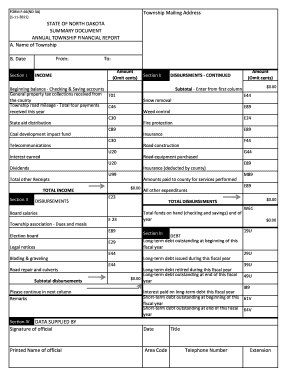
Get Nd F-66(nd-3a) 2011
How it works
-

Open form follow the instructions
-

Easily sign the form with your finger
-

Send filled & signed form or save
How to fill out the ND F-66(ND-3A) online
Filling out the ND F-66(ND-3A) form online is a crucial step for township financial reporting. This guide will support you with detailed instructions to ensure you complete the form accurately and efficiently.
Follow the steps to complete the ND F-66(ND-3A) form online.
- Press the ‘Get Form’ button to access the ND F-66(ND-3A) form and open it in your digital workspace.
- Begin by entering the name of the township in the designated field labeled 'A. Name of Township'. Ensure that the name is correctly spelled as it appears in official documents.
- Next, indicate the date in the 'B. Date' section by entering the appropriate period for the financial report, utilizing the format: From [start date] To [end date].
- Proceed to Section I. In the 'INCOME' section, input the total amount of income the township has received during the specified fiscal year. Ensure to omit cents when entering figures.
- In Section II, 'DISBURSEMENTS', list all relevant expenses, beginning with the township association dues and meals, followed by each category listed. For each item, enter the amount spent in the appropriate fields.
- Continue entering disbursements, including costs for weed control, fire protection, insurance, road construction, and other expenditures. Remember to sum all expenditures to arrive at a subtotal.
- Move to Section III to report on 'DEBT'. Record any long-term debt outstanding at the beginning of the fiscal year and any new debt issued. Ensure that the totals for both long-term and short-term debt reflect accurate values.
- In the remarks section, provide any additional information that may be relevant to the financial report as needed.
- Review all entries for accuracy. Check that totals for income and disbursements are correct and match with supporting documents.
- Once satisfied with the information entered, save your changes to ensure all data is retained. Additionally, you may download, print, or share the completed form as necessary.
Complete your ND F-66(ND-3A) form online today to stay compliant with township financial reporting requirements.
Get form
Experience a faster way to fill out and sign forms on the web. Access the most extensive library of templates available.
Get This Form Now!
Use professional pre-built templates to fill in and sign documents online faster. Get access to thousands of forms.