Loading
Get Uk Quercia Dre234 2010-2026
How it works
-

Open form follow the instructions
-

Easily sign the form with your finger
-

Send filled & signed form or save
How to fill out the UK Quercia DRE234 online
The UK Quercia DRE234 is an essential job application form that allows individuals to present their skills and experience effectively. This guide provides step-by-step instructions to assist users in completing the form accurately and comprehensively.
Follow the steps to complete the UK Quercia DRE234 online.
- Click the ‘Get Form’ button to access the application form and open it in the editor.
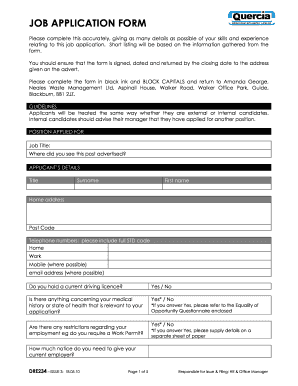
- In the 'Position applied for' section, enter the job title you are applying for and indicate where you found the job advertisement.
- Complete the 'Applicant’s details' section by providing your title, surname, first name, home address, postcode, and telephone numbers (home, work, and mobile if available). Also, include your email address.
- Respond to the questions regarding your driving licence status, medical history, and any employment restrictions. If you answer 'Yes' to any question, supply necessary details on a separate sheet if required.
- Detail how much notice you need to give your current employer in the designated field.
- In the 'Employment record' section, list your most recent employment first, including the employer's name, address, job title, and duration (from and to dates). Provide a brief description of your duties and the reasons for leaving each position.
- Complete the 'Education' section by listing educational institutions attended, subjects studied, qualifications obtained, and the dates of acquisition, starting with the most recent.
- Fill out the 'Professional membership and qualifications' section, indicating any relevant professional bodies you are a member of.
- In the 'Training' section, list any relevant training courses you have completed that did not lead to a qualification.
- Use the 'Experience / skills' section to provide specific information about your skills and experiences relevant to the job. Include examples to support your application.
- Provide the details of two referees in the 'References' section, ensuring one is your current or most recent employer.
- Answer the question about criminal convictions honestly, providing details on a separate sheet if applicable.
- Read the 'Declaration and signature' statement carefully. Sign and date the form, understanding that false statements could lead to dismissal if appointed.
- Once all sections are completed, review your form for accuracy. You can save changes, download, print, or share the completed form as needed.
Complete the job application form online to showcase your qualifications effectively.