Loading
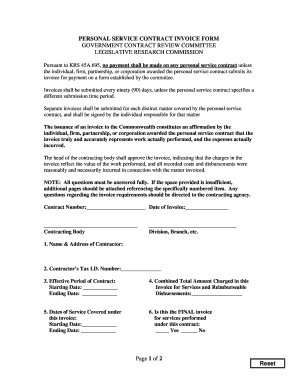
Get University Of Kentucky Personal Service Contract Invoice Form 2018-2025
How it works
-

Open form follow the instructions
-

Easily sign the form with your finger
-

Send filled & signed form or save
How to fill out the University Of Kentucky Personal Service Contract Invoice Form online
This guide provides comprehensive instructions for completing the University Of Kentucky Personal Service Contract Invoice Form online. By following the steps outlined below, users can ensure their invoices are accurately filled out and submitted without delays.
Follow the steps to complete the invoice form effectively.
- Click the ‘Get Form’ button to access the Invoice Form and open it for editing.
- Begin by filling in the Contract Number and Date of Invoice at the top of the form.
- In the section for the Contractor's Name & Address, provide the complete name and mailing details of the contracting entity.
- Enter the Contractor’s Tax I.D. Number in the designated field.
- Specify the Effective Period of the Contract by providing both the Starting Date and Ending Date.
- For the Combined Total Amount Charged in this Invoice for Services and Reimbursable Disbursements, indicate the total amount you are billing.
- Complete the Dates of Service Covered under this invoice by entering the Starting Date and Ending Date.
- Indicate whether this is the FINAL invoice for services performed under this contract by checking 'Yes' or 'No'.
- Fill in the Date of the most recent invoice submitted prior to this invoice.
- Provide the frequency at which the contractor is required to submit invoices as stated in the personal service contract.
- Describe the matter covered by this invoice in detail.
- Include a comprehensive description of each service provided, stating the date, the individual who performed the service, and the time spent.
- List the hourly rate for each individual working on the matter along with the total charge for their services.
- Detail any correspondence related to the work, including the subject matter and intended recipient.
- Provide a full description of any work product generated and how it relates to the invoiced matter.
- Itemize all disbursements being claimed for reimbursement, including totals for each matter invoiced.
- After filling in all required fields, ensure you sign and date the form in the designated Signature section.
- Finally, save your changes, and choose to download, print, or share the completed form as necessary.
Complete your document online today to ensure timely processing.
Filling out a contract form involves entering specific information clearly and accurately. Start by entering the names of the parties involved and the date of the agreement. Follow with descriptions of the services, payment terms, and signing areas. For an efficient way to do this, consider using the University Of Kentucky Personal Service Contract Invoice Form, which guides you through the required steps.
Industry-leading security and compliance
US Legal Forms protects your data by complying with industry-specific security standards.
-
In businnes since 199725+ years providing professional legal documents.
-
Accredited businessGuarantees that a business meets BBB accreditation standards in the US and Canada.
-
Secured by BraintreeValidated Level 1 PCI DSS compliant payment gateway that accepts most major credit and debit card brands from across the globe.