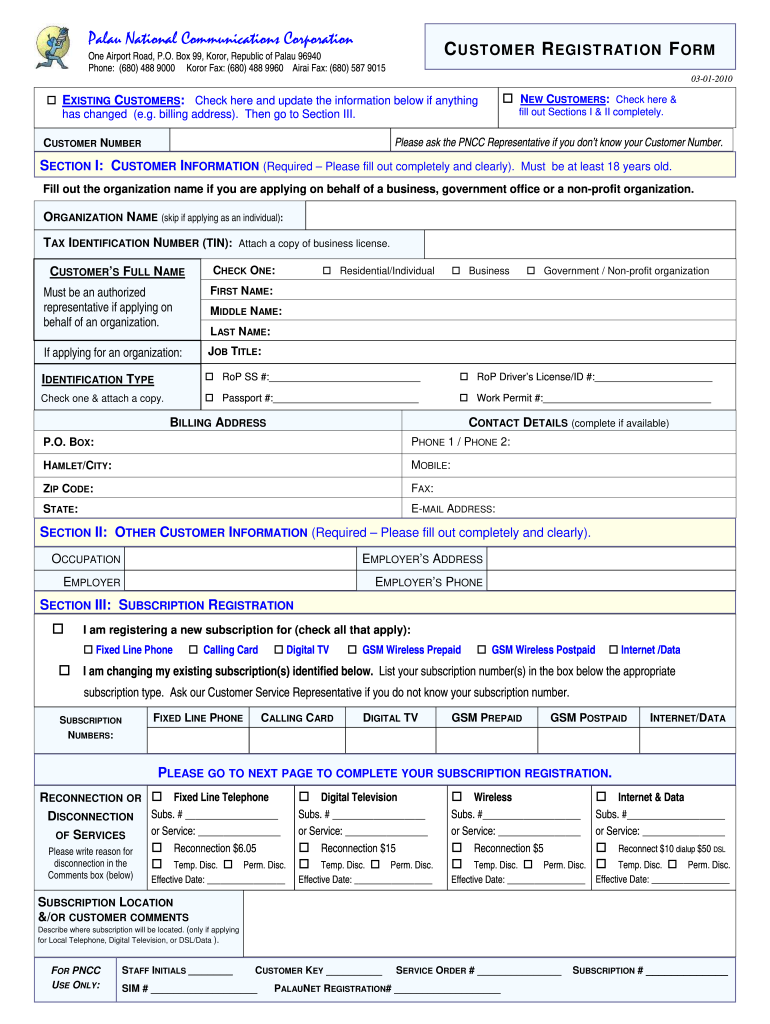
0) 587 9015 03-01-2010 EXISTING CUSTOMERS: Check here and update the information below if anything has changed (e.g. billing address). Then go to Section III. NEW CUSTOMERS: Check here & fill out Sections I & II completely. Please ask the PNCC Representative if you don t know your Customer Number. CUSTOMER NUMBER SECTION I: CUSTOMER INFORMATION (Required Please fill out completely and clearly). Must be at least 18 years old. Fill out the organization name if you are applying.

Open form follow the instructions

Easily sign the form with your finger

Send filled & signed form or save
How to fill out the PW PNCC Customer Registration Form online
Completing the PW PNCC Customer Registration Form online is an essential step for new and existing customers looking to register for services. This guide provides a clear and structured approach to help users navigate the form efficiently.
Follow the steps to complete your customer registration form online.
- Click ‘Get Form’ button to obtain the form and open it in your preferred editor.
- Identify if you are an existing or new customer. If you are an existing customer, check the box indicating your status and proceed to Section III to update your information. If you are a new customer, check the corresponding box and fill out Sections I and II completely.
- In Section I, provide your customer information. Fill out your organization name if applying for a business or governmental entity. Include your tax identification number where applicable. Ensure to complete all required fields clearly, including your full name, identification type (select one), and billing address.
- For identification type, choose one from the options provided and attach a copy of the relevant document. Complete your contact details including phone numbers and email address.
- Move to Section II and provide other customer information, including your occupation and employer's address. These details help the service provider understand your profile better.
- In Section III, indicate the services you wish to subscribe to by checking the relevant boxes. You can register for multiple subscriptions if necessary.
- If you are changing any existing subscriptions, list your subscription numbers in the respective boxes provided. Specify any service disconnections or reconnections as needed and provide the effective date.
- Add any comments or descriptions regarding subscription locations or customer comments, particularly for local telephone or digital television applications.
- Complete the final fields concerning additional services, if applicable. Make any selections regarding directory listings or advertising as required.
- Lastly, sign and date the form where indicated. By signing, you confirm your acceptance of the terms and conditions as stated.
- After completing the form, you can save changes made, download a copy for your records, print the form, or share it as needed.
Begin the registration process by filling out your PW PNCC Customer Registration Form online today.
Experience a faster way to fill out and sign forms on the web. Access the most extensive library of templates available.
Related content
Dec 1, 2025 — PNCC providers must meet all additional requirements described in the...
... PW. A confidential report prepared for. The Accrediting Commission for Community and...
Use professional pre-built templates to fill in and sign documents online faster. Get access to thousands of forms.
If you believe that this page should be taken down, please follow our DMCA take down process here.