Loading
Form preview
  • US Legal Forms
  • Form Library
  • More Forms
  • More Multi-State Forms
  • 7 3 Income Statements Answer Key

Get 7 3 Income Statements Answer Key

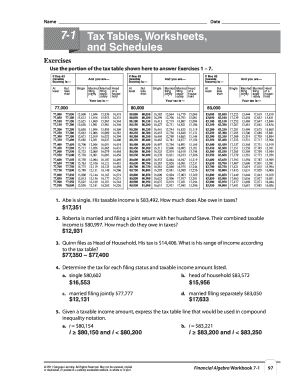
O answer Exercises 1 7. If line 43 (taxable income) is At least But less than If line 43 (taxable income) is And you are Single Married Married filing filing jointly sepa* rately Your tax is Head of a household At least 15,600 15,613 15,625 15,638 15,650 15,663 15,675 15,688 15,700 15,713 15,725 15,738 15,750 15,763 15,775 15,788 15,800 15,813 15,825 15,838 11,944 11,956 11,969 11,981 11,994 12,006 12,019 12,031 12,044 12,056 12,069 12,081 12,094 12,106 12,119 12,131.

How it works

  1. Open form

    Open form follow the instructions

  2. Easily sign form

    Easily sign the form with your finger

  3. Share form

    Send filled & signed form or save

How to fill out the 7 3 Income Statements Answer Key online

This guide provides a comprehensive walkthrough for completing the 7 3 Income Statements Answer Key online. It is designed to assist users at all experience levels in accurately filling out the necessary information to ensure correct calculations of income and deductions.

Follow the steps to complete the 7 3 Income Statements Answer Key.

  1. Click the ‘Get Form’ button to retrieve the 7 3 Income Statements Answer Key. Ensure that the form is opened in an appropriate editor for online completion.
  2. Begin by entering your name at the top of the form. This identifies who the income statement pertains to.
  3. Next, input the date of completion. This is important for documentation and record-keeping.
  4. Proceed to record your gross pay per pay period. This is the total amount earned before any deductions.
  5. List all deductions individually. This includes Social Security tax, Medicare tax, federal and state withholding taxes, as well as any contributions to retirement plans or health insurance.
  6. Calculate your net pay. Subtract all deductions from your gross pay to determine the amount received after all withholdings.
  7. Review all entries for accuracy. Ensure that the correct figures were used and that calculations are correct.
  8. Once completed, save your changes. You can download, print, or share the form, ensuring you keep a copy for your records.

Take the next step in your financial management by completing your income statement online today.

Get form

Experience a faster way to fill out and sign forms on the web. Access the most extensive library of templates available.
Get form

Related content

INFINITE ENERGY, INC
... 7-3 } (MARKETER CERTIFICATE }. OF AUTHORITY ... Ensure each category is provided for...
Learn more
Chapter 3 Study Guide: The Income Statement
7. Income Before Taxes: Operating income plus or minus other revenues/expenses. 8. Income...
Learn more
2017 General Instructions for Forms W-2 and W-3
May 2, 2017 — You must give your employee Notice. 797, Possible Federal Tax Refund Due...
Learn more

Related links form

Application For Amended Authority To Transact Business In Illinois. Application For Amended Bca 12 45 Ic134 Nj W4 2015

Questions & Answers

Get answers to your most pressing questions about US Legal Forms API.

Contact support

To get the income statement formula, simply remember the fundamental equation: Total Revenues - Total Expenses = Net Income. Having this formula handy allows you to analyze financial results easily. For additional assistance, the 7 3 Income Statements Answer Key offers clear guidance to help you apply this formula correctly.

The key to an income statement lies in accurately understanding the relationship between revenues and expenses. A well-prepared income statement reveals the operational efficiency of a business and its ability to generate profit. By utilizing our 7 3 Income Statements Answer Key, you can grasp this key concept more effectively.

The key equation for an income statement is: Revenues - Expenses = Net Income. This equation underpins the entire concept of profitability within the income statement. Understanding this formula is vital to financial analysis, and the 7 3 Income Statements Answer Key provides a helpful reference to reinforce this fundamental concept.

Key items on the income statement include revenues, expenses, and net income. Revenues represent the sales generated, while expenses cover all costs incurred in earning those revenues. This interplay between revenues and expenses leads to the net income figure, providing a snapshot of the company's financial health, making our 7 3 Income Statements Answer Key a valuable resource.

The most important element on an income statement is the net income, which reflects the company's profitability. Net income represents total revenues minus total expenses, and it provides critical insight into an organization's financial performance. Understanding net income is key to analyzing trends and making informed business decisions, which is why our 7 3 Income Statements Answer Key is essential for your financial understanding.

The four essential steps to prepare an income statement include gathering financial data, listing revenues, calculating expenses, and subtracting expenses from revenues to find net income. It is crucial to organize this information clearly for effective reporting. To deepen your understanding, review our 7 3 Income Statements Answer Key.

An income statement typically follows a structured format that includes sections for revenues, expenses, and net income. It begins with total revenues, lists the various expenses, and concludes with the calculation of net income. For better insights into this format, refer to our 7 3 Income Statements Answer Key, which provides practical examples.

Filing an income tax statement requires you to gather income data, deductions, and credits. This information should be organized and summarized before using the appropriate tax form. Ensure compliance with tax laws by referring to valuable resources like our 7 3 Income Statements Answer Key for more detailed instructions.

Creating an income statement step by step begins with listing revenues, followed by detailing your expenses. Next, subtract total expenses from total revenues to determine net income. To enhance your understanding, consult our 7 3 Income Statements Answer Key, which covers this process thoroughly.

To effectively answer a statement of comprehensive income, start by identifying all sources of income and expenses, including unrealized gains and losses. You will present this information in a structured format that outlines total income, other comprehensive income, and total equity. For clear examples, check out our 7 3 Income Statements Answer Key, which offers useful insights.

Get This Form Now!

Use professional pre-built templates to fill in and sign documents online faster. Get access to thousands of forms.
Get form
If you believe that this page should be taken down, please follow our DMCA take down processhere.
Get 7 3 Income Statements Answer Key
Get form
  • Adoption
  • Bankruptcy
  • Contractors
  • Divorce
  • Home Sales
  • Employment
  • Identity Theft
  • Incorporation
  • Landlord Tenant
  • Living Trust
  • Name Change
  • Personal Planning
  • Small Business
  • Wills & Estates
  • Packages A-Z
  • Affidavits
  • Bankruptcy
  • Bill of Sale
  • Corporate - LLC
  • Divorce
  • Employment
  • Identity Theft
  • Internet Technology
  • Landlord Tenant
  • Living Wills
  • Name Change
  • Power of Attorney
  • Real Estate
  • Small Estates
  • Wills
  • All Forms
  • Forms A-Z
  • Form Library
  • Legal Hub
  • About Us
  • Help Portal
  • Legal Resources
  • Blog
  • Affiliates
  • Contact Us
  • Delete My Account
  • Site Map
  • Industries
  • Forms in Spanish
  • Localized Forms
  • State-specific Forms
  • Forms Kit
  • Real Estate Handbook
  • All Guides
  • Notarize
  • Incorporation services
  • For Consumers
  • For Small Business
  • For Attorneys
  • USLegal
  • FormsPass
  • pdfFiller
  • signNow
  • altaFlow
  • DocHub
  • Instapage
Form Packages
  • Adoption
  • Bankruptcy
  • Contractors
  • Divorce
  • Home Sales
  • Employment
  • Identity Theft
  • Incorporation
  • Landlord Tenant
  • Living Trust
  • Name Change
  • Personal Planning
  • Small Business
  • Wills & Estates
  • Packages A-Z
Form Categories
  • Affidavits
  • Bankruptcy
  • Bill of Sale
  • Corporate - LLC
  • Divorce
  • Employment
  • Identity Theft
  • Internet Technology
  • Landlord Tenant
  • Living Wills
  • Name Change
  • Power of Attorney
  • Real Estate
  • Small Estates
  • Wills
  • All Forms
  • Forms A-Z
  • Form Library
Customer Service
  • Legal Hub
  • About Us
  • Help Portal
  • Legal Resources
  • Blog
  • Affiliates
  • Contact Us
  • Delete My Account
  • Site Map
  • Industries
  • Forms in Spanish
  • Localized Forms
  • State-specific Forms
  • Forms Kit
Legal Guides
  • Real Estate Handbook
  • All Guides
Prepared for you
  • Notarize
  • Incorporation services
Our Customers
  • For Consumers
  • For Small Business
  • For Attorneys
Our Sites
  • USLegal
  • FormsPass
  • pdfFiller
  • signNow
  • altaFlow
  • DocHub
  • Instapage
Social Media
Call us now toll free:
+1 833 426 79 33
As seen in:
© Copyright 1999-2026 airSlate Legal Forms, Inc. 3720 Flowood Dr, Flowood, Mississippi 39232
  • Your Privacy Choices
  • Terms of Service
  • Privacy Notice
  • Content Takedown Policy
  • Bug Bounty Program