Loading
Form preview
  • US Legal Forms
  • Form Library
  • More Forms
  • More Multi-State Forms
  • State Farm Vendor Registration

Get State Farm Vendor Registration

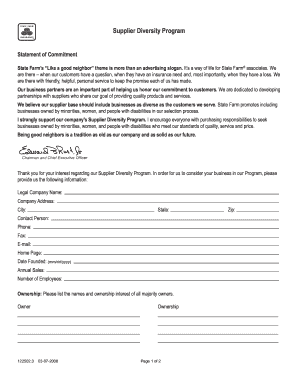
S. We are there when our customers have a question, when they have an insurance need and, most importantly, when they have a loss. We are there with friendly, helpful, personal service to keep the promise each of us has made. Our business partners are an important part of helping us honor our commitment to customers. We are dedicated to developing partnerships with suppliers who share our goal of providing quality products and services. We believe our supplier base should include businesses.

How it works

  1. Open form

    Open form follow the instructions

  2. Easily sign form

    Easily sign the form with your finger

  3. Share form

    Send filled & signed form or save

How to fill out the State Farm Vendor Registration online

This guide provides a comprehensive overview of the steps required to complete the State Farm Vendor Registration form online. By following these detailed instructions, users will be able to effectively fill out the necessary information for consideration in State Farm's Supplier Diversity Program.

Follow the steps to successfully complete the vendor registration form.

  1. Click ‘Get Form’ button to obtain the form and open it for your completion.
  2. Enter your legal company name in the designated field. Ensure that the name reflects the official registration of your business.
  3. Fill in the contact person's details, including their name, phone number, fax number, email address, and company home page. This ensures that State Farm can reach someone if needed.
  4. Indicate the date your company was founded in the specified format (mm/dd/yyyy). This provides context about your company's history.
  5. In the ownership section, list the names and ownership interest of all majority owners of the company. This information is essential for understanding company structure.
  6. Select your classification from the provided options, which include various demographics. This selection helps State Farm understand the diversity of the vendor pool.
  7. In the type of business section, provide a detailed description of the products and services your company offers. This information is vital for buyers in the Supplier Database to find relevant vendors.
  8. After reviewing all entered information for accuracy, sign the form where indicated to certify that the information provided is complete and accurate.
  9. Once completed, save any changes made to the document. You may choose to download, print, or share the form as required.

Complete your State Farm Vendor Registration online today to take the next step in building your partnership.

Get form

Experience a faster way to fill out and sign forms on the web. Access the most extensive library of templates available.
Get form

Related content

Vendor Registration Information
Vendors can register via the web at sam.gov/content/home. User guides, demonstration...
Learn more
Retirees Information
Access this site to review pension, medical, life, & HRA benefits you may be eligible for...
Learn more
best practices audit guide
The audit period will cover at least one registration year, and up to four registration...
Learn more

Related links form

SKIN SUBSTITUTE APPLICATION The Scales Of Socially Engaged Practice - Hannahhull Co Employment Training And Culinary Arts Program Application - Cafebozeman 2nd Option SCERT Online Admission Form 2016 25 05 2016 - Scertdelhiadmission

Questions & Answers

Get answers to your most pressing questions about US Legal Forms API.

Contact support

The CEO of State Farm Insurance is Jane Doe, who is committed to fostering strong relationships with all stakeholders. Her leadership style emphasizes transparency, innovation, and inclusivity, especially in critical areas like State Farm Vendor Registration. By prioritizing these elements, she aims to enhance collaboration and efficiency between the company and its vendor partners.

Jane Doe took over State Farm's leadership recently, bringing fresh perspectives and strategies to the company. With her experience in the insurance industry, she aims to enhance operational efficiencies, including those related to State Farm Vendor Registration. Vendors can expect a more user-friendly registration process under her guidance, ensuring their capabilities align with State Farm's standards.

Determining whether State Farm is cheaper than Progressive depends on various factors like location, coverage, and personal circumstances. Many customers find that Progressive offers lower rates for certain types of insurance. To make an informed decision, gather quotes from both companies. For seamless vendor registration, consider using the services of US Legal Forms.

Generally, USAA is known for competitive rates, especially for military families. Their focus on customer satisfaction often results in lower premiums, depending on individual circumstances. However, it’s essential to compare quotes directly to find the best fit for your needs. For effective vendor registration with other companies, consider using US Legal Forms.

Finding the cheapest insurance often depends on various factors, including your location, driving history, and specific needs. Providers such as Geico and Allstate frequently compete for budget-conscious consumers. However, don't forget to research companies that might cater to your unique situation. Use US Legal Forms to manage your vendor registration and explore these options thoroughly.

You can contact State Farm USA through multiple channels. Their website provides a convenient chat option, or you can call their customer service line for immediate assistance. Additionally, you can find local agents in your area for personalized service. For vendors looking to collaborate, ensure your State Farm Vendor Registration is up to date.

Several insurance providers may offer lower rates than State Farm. It's important to shop around and compare quotes from different companies. Factors such as your driving history and coverage needs can impact prices. Utilize platforms like US Legal Forms to streamline your vendor registration process for other insurance options.

State Farm operates as a mutual company, meaning that its policyholders collectively act as its shareholders. Thus, there isn't a single majority shareholder; instead, it's owned by the members who benefit from the products provided. This model aligns with the ethos of the State Farm Vendor Registration, aiming to support both policyholders and partners alike.

Before Mike Tipsord, the role of CEO was held by Edward B. Rust Jr., who led the company for more than two decades. His legacy includes the establishment of solid foundations for vendor partnerships, such as the State Farm Vendor Registration. This framework remains essential for ensuring that State Farm works with qualified and trusted vendors.

Currently, Mike Tipsord serves as the CEO of State Farm Insurance Company. Under his guidance, the company focuses on improving customer experiences, particularly through initiatives like the State Farm Vendor Registration. His strategic vision aligns with the goal of maintaining high standards for partnerships and services.

Get This Form Now!

Use professional pre-built templates to fill in and sign documents online faster. Get access to thousands of forms.
Get form
If you believe that this page should be taken down, please follow our DMCA take down processhere.
Get State Farm Vendor Registration
Get form
  • Adoption
  • Bankruptcy
  • Contractors
  • Divorce
  • Home Sales
  • Employment
  • Identity Theft
  • Incorporation
  • Landlord Tenant
  • Living Trust
  • Name Change
  • Personal Planning
  • Small Business
  • Wills & Estates
  • Packages A-Z
  • Affidavits
  • Bankruptcy
  • Bill of Sale
  • Corporate - LLC
  • Divorce
  • Employment
  • Identity Theft
  • Internet Technology
  • Landlord Tenant
  • Living Wills
  • Name Change
  • Power of Attorney
  • Real Estate
  • Small Estates
  • Wills
  • All Forms
  • Forms A-Z
  • Form Library
  • Legal Hub
  • About Us
  • Help Portal
  • Legal Resources
  • Blog
  • Affiliates
  • Contact Us
  • Delete My Account
  • Site Map
  • Industries
  • Forms in Spanish
  • Localized Forms
  • State-specific Forms
  • Forms Kit
  • Real Estate Handbook
  • All Guides
  • Notarize
  • Incorporation services
  • For Consumers
  • For Small Business
  • For Attorneys
  • USLegal
  • FormsPass
  • pdfFiller
  • signNow
  • altaFlow
  • DocHub
  • Instapage
Form Packages
  • Adoption
  • Bankruptcy
  • Contractors
  • Divorce
  • Home Sales
  • Employment
  • Identity Theft
  • Incorporation
  • Landlord Tenant
  • Living Trust
  • Name Change
  • Personal Planning
  • Small Business
  • Wills & Estates
  • Packages A-Z
Form Categories
  • Affidavits
  • Bankruptcy
  • Bill of Sale
  • Corporate - LLC
  • Divorce
  • Employment
  • Identity Theft
  • Internet Technology
  • Landlord Tenant
  • Living Wills
  • Name Change
  • Power of Attorney
  • Real Estate
  • Small Estates
  • Wills
  • All Forms
  • Forms A-Z
  • Form Library
Customer Service
  • Legal Hub
  • About Us
  • Help Portal
  • Legal Resources
  • Blog
  • Affiliates
  • Contact Us
  • Delete My Account
  • Site Map
  • Industries
  • Forms in Spanish
  • Localized Forms
  • State-specific Forms
  • Forms Kit
Legal Guides
  • Real Estate Handbook
  • All Guides
Prepared for you
  • Notarize
  • Incorporation services
Our Customers
  • For Consumers
  • For Small Business
  • For Attorneys
Our Sites
  • USLegal
  • FormsPass
  • pdfFiller
  • signNow
  • altaFlow
  • DocHub
  • Instapage
Social Media
Call us now toll free:
+1 833 426 79 33
As seen in:
© Copyright 1999-2026 airSlate Legal Forms, Inc. 17 Station Street, Suite 303, Brookline, MA 02445
  • Your Privacy Choices
  • Terms of Service
  • Privacy Notice
  • Content Takedown Policy
  • Bug Bounty Program