Get Health Statement Dfps
How it works
-

Open form follow the instructions
-

Easily sign the form with your finger
-

Send filled & signed form or save
How to fill out the Health Statement DFPS online
Completing the Health Statement DFPS is an essential step in ensuring that your child is prepared for enrollment in daycare programs. This guide provides clear, step-by-step instructions to help you navigate the process of filling out this important form online.
Follow the steps to complete the Health Statement DFPS accurately
- Press the ‘Get Form’ button to access the Health Statement DFPS and open it for editing.
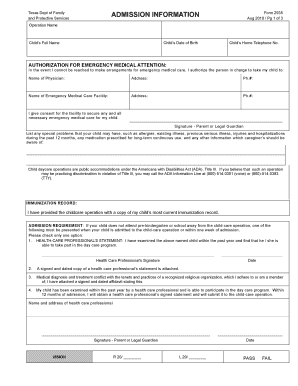
- Begin by providing the admission information required, including the operation name, child's full name, and date of birth, as well as the child's home telephone number.
- Fill out the authorization for emergency medical attention section, ensuring to include the physician’s name, address, and phone number, as well as the contact details for the emergency medical care facility.
- Indicate any special health concerns the child may have, such as allergies, long-term medications, or previous serious illnesses.
- Supply your signature as the parent or legal guardian to grant consent for necessary medical care and complete the immunization record.
- Select and indicate one of the options from the admission requirement section regarding the child's health status, whether it be a health care professional's statement or alternative options.
- Complete the vision and hearing sections by entering the results in the specified fields and providing your signature where required.
- Add the health requirements specifics, including the child’s immunization details, specifying any vaccines received and ensuring to sign and date the verification by a physician or public health personnel.
- If applicable, provide a statement regarding the child having chickenpox disease and exclude the child from immunization requirements for reasons of conscience, ensuring to attach the necessary affidavit.
- Once all sections are completed, you can save your changes, download, print, or share the completed Health Statement DFPS.
Complete your Health Statement DFPS online today to ensure your child's enrollment in daycare!
CPS in Texas has significant authority to investigate allegations of child abuse or neglect and take necessary actions to ensure a child's safety. This authority includes the power to remove children from unsafe environments when required. Understanding the Health Statement DFPS and your rights can guide you through interactions with CPS, ensuring you are well-prepared to advocate for your child. Staying informed through resources like US Legal Forms can help demystify the processes involved.