Loading
Get Vinayaka Mission University Certificate Verification
How it works
-

Open form follow the instructions
-

Easily sign the form with your finger
-

Send filled & signed form or save
How to fill out the Vinayaka Mission University Certificate Verification online
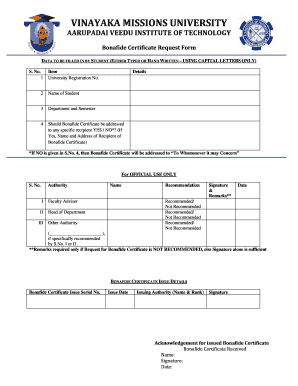
Filling out the Vinayaka Mission University Certificate Verification is a straightforward process that requires careful attention to detail. This guide will help you navigate each section of the form effectively.
Follow the steps to complete your certificate verification form.
- Press the ‘Get Form’ button to access the certificate verification form and open it for completion.
- In the first field, input your University Registration Number accurately to ensure correct identification.
- Enter your full name in the designated field, ensuring to use capital letters as specified.
- Provide your department and semester details in the next field to inform the university of your current academic standing.
- Indicate whether the Bonafide Certificate should be addressed to a specific recipient by selecting YES or NO. If YES, be sure to include the recipient's name and address.
- If NO is selected in step 5, the certificate will be addressed to “To Whomsoever it may Concern” automatically.
- Once all fields are complete, review your entries for accuracy before proceeding.
- You can save the changes, and if desired, download, print, or share the completed form for your records.
Complete your certificate verification online today to ensure timely processing.
Related links form
To obtain a bonafide certificate from Vinayaka Mission University, you must apply through the university’s student services. Provide all necessary documents and fulfill any requirements they have listed. If you need assistance with the application or verification process, consider using services like uslegalforms for a smooth experience.