Loading
Form preview
  • US Legal Forms
  • Form Library
  • More Forms
  • More Multi-State Forms
  • Unregistered / Uninsured Statutory Declaration

Get Unregistered / Uninsured Statutory Declaration

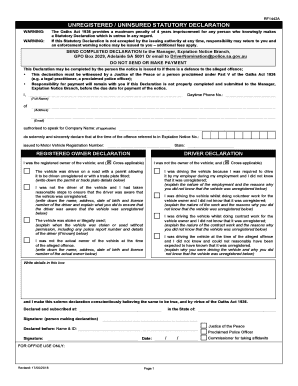
RF1442AUNREGISTERED / UNINSURED STATUTORY DECLARATION WARNING: WARNING:The Oaths Act 1936 provides a maximum penalty of 4 years imprisonment for any person who knowingly makes a Statutory Declaration.

How it works

  1. Open form

    Open form follow the instructions

  2. Easily sign form

    Easily sign the form with your finger

  3. Share form

    Send filled & signed form or save

How to fill out the unregistered / uninsured statutory declaration online

Filling out the unregistered / uninsured statutory declaration can seem daunting, but it is essential for contesting an expiation notice issued for an unregistered vehicle. This guide provides a clear and structured approach to help you complete this document online with confidence.

Follow the steps to successfully complete the declaration.

  1. Click ‘Get Form’ button to obtain the form and open it in a digital editing tool.
  2. Begin by entering your full name, daytime phone number, address, and email address in the designated fields. If applicable, provide the name of the company you represent.
  3. Reference the expiation notice number and the vehicle registration number that pertains to the notice; ensure these details are accurate.
  4. Choose the appropriate declaration options by marking the applicable boxes. This includes indicating whether you were the registered owner or the driver of the vehicle, or if other specific circumstances were relevant.
  5. For each selected declaration, provide additional explanations as required. For instance, if you were not aware the vehicle was unregistered, specify the nature of your employment or circumstances surrounding the driving of the vehicle.
  6. If applicable, include information about the actual owner of the vehicle, such as their name, address, date of birth, and license number.
  7. Conclude the declaration by signing and dating it in the specified section. Ensure you have a witness, either a Justice of the Peace or relevant authority, to sign and provide their identification details.
  8. Once all relevant fields are completed, review the form to ensure all information is correct. Save changes to the document, and proceed to download, print, or share the completed form based on your needs.

Complete your unregistered / uninsured statutory declaration online today and ensure your submission is accurate and timely.

Get form

Experience a faster way to fill out and sign forms on the web. Access the most extensive library of templates available.
Get form

Related content

Insurance Requirements for Vehicle Registration
After filing the ANU, the vehicle's insurance may be cancelled. However, if the vehicle is...
Learn more
The Uninsured Automobile
by LJ Mlakar · 1970 · Cited by 2 — The court held that the vehicle in which the...
Learn more
California SB 771: What Social Media Platforms...
Sep 24, 2025 — California SB 771 represents a significant evolution in social media...
Learn more

Related links form

As Parent Or Legal Guardian Of , - Ocps FERPA.waiver - University Of Baltimore - Ubalt Download Our Debt Collection Form (PDF) - Langsam Stevens ... Novaco Anger Inventory Short Form Scoring - Pdfslibforyou.com

Questions & Answers

Get answers to your most pressing questions about US Legal Forms API.

Contact support

To fill up a statutory declaration, begin by ensuring you have the correct form and understand its requirements. Complete the sections with accurate details, and include a clear statement of the facts you intend to declare. This process is vital for matters related to UNREGISTERED / UNINSURED STATUTORY DECLARATION, as it reinforces the legitimacy of your assertions.

Filling out a statutory declaration form requires you to provide correct and accurate information in the designated fields. Begin with your personal details, then clearly state the facts you are declaring. This straightforward process is essential, particularly in matters involving UNREGISTERED / UNINSURED STATUTORY DECLARATION, where precision can significantly impact outcomes.

A statutory declaration for a partner visa applicant is a formal document that provides evidence of the relationship between partners. This declaration typically includes personal details, the nature of the relationship, and the duration of cohabitation. Accurately preparing this unregistered / uninsured statutory declaration is crucial to support your visa application.

An example of a statutory declaration in the UK can generally include a document that formalizes a statement made under oath, often related to personal circumstances or legal matters. Such declarations may involve affirmations regarding identity or residency. For a proper format, consult a legal resource or use platforms like uslegalforms that can assist you with unregistered / uninsured statutory declarations.

To make a statutory declaration in NSW, first, draft your declaration with all relevant personal information and the facts you wish to declare. You must then sign it in front of an approved witness, such as a lawyer or a justice of the peace. This process ensures the legal robustness of your unregistered / uninsured statutory declaration.

Filling in the statutory declaration form requires clear understanding and attention to detail. Begin by entering your personal information, such as name and address. Next, correctly state the facts you wish to declare. It is important to follow the guidelines provided on the form to ensure your unregistered / uninsured statutory declaration meets legal standards.

The words for a statutory declaration typically begin with a title, followed by an introductory statement declaring the intent. You should use phrases like 'I, your name, do solemnly and sincerely declare that...' to initiate your declaration. Including clear and direct language helps maintain the integrity of your unregistered / uninsured statutory declaration.

To write a signed declaration, start with an introductory statement that clearly identifies the document as a statutory declaration. Include your full name, address, and the date. Clearly state the facts you are declaring, ensuring they are truthful and precise. Finally, sign the document in the presence of a witness, who should also sign it to validate the unregistered / uninsured statutory declaration.

A completed statutory declaration form is a document that has been filled out in accordance with legal requirements and includes a signature, date, and witness acknowledgment. This form serves as an official declaration of certain facts or statements made by the signer. For those working with an "UNREGISTERED / UNINSURED STATUTORY DECLARATION", ensuring the form is completed accurately is crucial to its validity.

The term statutory refers to something that is enacted, established, or regulated by law. It indicates the legality or formal recognition of documents and actions under specific statutes. Thus, a statutory declaration carries significant legal implications, especially when it pertains to an "UNREGISTERED / UNINSURED STATUTORY DECLARATION" that you may need to confirm facts without lengthy procedures.

Get This Form Now!

Use professional pre-built templates to fill in and sign documents online faster. Get access to thousands of forms.
Get form
If you believe that this page should be taken down, please follow our DMCA take down processhere.

Industry-leading security and compliance

US Legal Forms protects your data by complying with industry-specific security standards.
  • In businnes since 1997
    25+ years providing professional legal documents.
  • Accredited business
    Guarantees that a business meets BBB accreditation standards in the US and Canada.
  • Secured by Braintree
    Validated Level 1 PCI DSS compliant payment gateway that accepts most major credit and debit card brands from across the globe.
Get UNREGISTERED / UNINSURED STATUTORY DECLARATION
Get form
  • Adoption
  • Bankruptcy
  • Contractors
  • Divorce
  • Home Sales
  • Employment
  • Identity Theft
  • Incorporation
  • Landlord Tenant
  • Living Trust
  • Name Change
  • Personal Planning
  • Small Business
  • Wills & Estates
  • Packages A-Z
  • Affidavits
  • Bankruptcy
  • Bill of Sale
  • Corporate - LLC
  • Divorce
  • Employment
  • Identity Theft
  • Internet Technology
  • Landlord Tenant
  • Living Wills
  • Name Change
  • Power of Attorney
  • Real Estate
  • Small Estates
  • Wills
  • All Forms
  • Forms A-Z
  • Form Library
  • Legal Hub
  • About Us
  • Help Portal
  • Legal Resources
  • Blog
  • Affiliates
  • Contact Us
  • Delete My Account
  • Site Map
  • Industries
  • Forms in Spanish
  • Localized Forms
  • State-specific Forms
  • Forms Kit
  • Real Estate Handbook
  • All Guides
  • Notarize
  • Incorporation services
  • For Consumers
  • For Small Business
  • For Attorneys
  • USLegal
  • FormsPass
  • pdfFiller
  • signNow
  • altaFlow
  • DocHub
  • Instapage
Form Packages
  • Adoption
  • Bankruptcy
  • Contractors
  • Divorce
  • Home Sales
  • Employment
  • Identity Theft
  • Incorporation
  • Landlord Tenant
  • Living Trust
  • Name Change
  • Personal Planning
  • Small Business
  • Wills & Estates
  • Packages A-Z
Form Categories
  • Affidavits
  • Bankruptcy
  • Bill of Sale
  • Corporate - LLC
  • Divorce
  • Employment
  • Identity Theft
  • Internet Technology
  • Landlord Tenant
  • Living Wills
  • Name Change
  • Power of Attorney
  • Real Estate
  • Small Estates
  • Wills
  • All Forms
  • Forms A-Z
  • Form Library
Customer Service
  • Legal Hub
  • About Us
  • Help Portal
  • Legal Resources
  • Blog
  • Affiliates
  • Contact Us
  • Delete My Account
  • Site Map
  • Industries
  • Forms in Spanish
  • Localized Forms
  • State-specific Forms
  • Forms Kit
Legal Guides
  • Real Estate Handbook
  • All Guides
Prepared for you
  • Notarize
  • Incorporation services
Our Customers
  • For Consumers
  • For Small Business
  • For Attorneys
Our Sites
  • USLegal
  • FormsPass
  • pdfFiller
  • signNow
  • altaFlow
  • DocHub
  • Instapage
Social Media
Call us now toll free:
+1 833 426 79 33
As seen in:
© Copyright 1999-2026 airSlate Legal Forms, Inc. 3720 Flowood Dr, Flowood, Mississippi 39232
  • Your Privacy Choices
  • Terms of Service
  • Privacy Notice
  • Content Takedown Policy
  • Bug Bounty Program