Get Talent Release Form
How it works
-

Open form follow the instructions
-

Easily sign the form with your finger
-

Send filled & signed form or save
How to fill out the Talent Release Form online
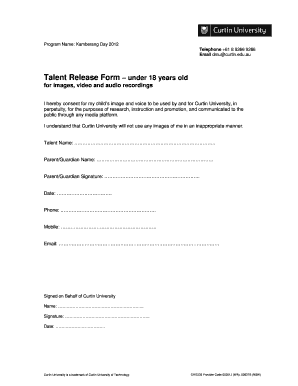
Filling out the Talent Release Form online is a straightforward process that ensures your child's image and voice can be used for various purposes by Curtin University. This guide provides clear step-by-step instructions to help you complete the form accurately and efficiently.
Follow the steps to complete the Talent Release Form online
- To begin, locate the ‘Get Form’ button to access the Talent Release Form. Click the button to open the form in your editor of choice.
- In the first section of the form, enter the talent's name as it appears on official documents.
- Next, provide the name of the parent or guardian. This is necessary for the consent process.
- In the following field, the parent or guardian should sign their name to indicate consent.
- Enter the date when the form is being filled out. This is important for record-keeping.
- Fill in the telephone number, providing a contact number where the parent or guardian can be reached.
- Input the mobile number of the parent or guardian for immediate communication.
- Lastly, enter the email address for any further correspondence regarding the consent.
- Once all fields are completed, you can save changes, download a copy of the form, print it for your records, or share it if needed.
Complete the Talent Release Form online today!
Yes, OnlyFans requires a release form to protect content creators and ensure they have permission to use the content shared on the platform. This form is crucial for safeguarding against future disputes regarding ownership and content rights. By utilizing a talent release form, creators can confidently share their work, knowing that they have the proper permissions in place. A thorough understanding of this requirement can help you flourish on platforms like OnlyFans.