Loading
Get Dhs 1929
How it works
-

Open form follow the instructions
-

Easily sign the form with your finger
-

Send filled & signed form or save
How to fill out the Dhs 1929 online
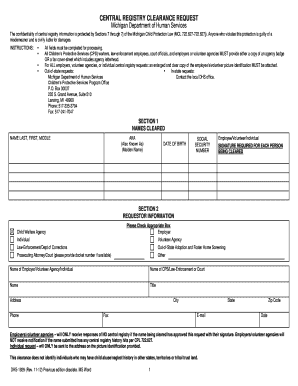
The Dhs 1929 is a crucial form used to request a central registry clearance, which is essential for various positions in Michigan related to child welfare. This guide will walk you through the process of filling out this form online with clarity and ease.
Follow the steps to successfully complete the Dhs 1929 online.
- Click ‘Get Form’ button to obtain the document and open it for editing.
- In 'Section 1', enter the names of individuals being cleared. Provide their last name, first name, middle name, any aliases, date of birth, and Social Security number. Ensure that each person’s signature is included as it is required for processing.
- Proceed to 'Section 2', where you need to provide requestor information. Select the appropriate box indicating whether you are an employer, individual, volunteer agency, law enforcement, or other. Fill in the name of the organization or agency as well as your title.
- Enter the address, phone number, city, state, zip code, and email for the requestor. Additionally, include the date of the request.
- If you are an employer or volunteer agency, remember that responses indicating no central registry report only occur with the individual's authorization. Make sure all necessary attachments are included, such as a clear copy of the individual’s picture identification.
- For out-of-state requests, ensure that you contact the local DHS office for further instructions. If you are in-state, the clearance response will be sent to the address provided.
- Once all sections are completed, review the information for accuracy. Then you can save your changes, download the form, print it, or share it as needed.
Complete the Dhs 1929 online today to ensure timely processing of your clearance request.
To speak to someone at DHS in Michigan, you can call their customer service hotline or visit your local office. Have your questions ready to make the conversation efficient. Alternatively, consider using the uLegalForms platform for answers to common inquiries or assistance with document preparation. This can save you time while ensuring your concerns are addressed.