If other, please specify Last name First name Middle name Company name (if relevant) Address 1 Address 2 Address 3 Town/City County DX number Postcode Date of birth D D M M Y Y Y Y DX Exchange Daytime Tel. no. Occupation e-mail address Place a cross (x) against one option that best describes your relationship to the donor Civil partner / Spouse Child Solicitor Other If Other or Other professional , please specify 5 Other professional Part 4 - Attorney four If there a.
Loading

Open form follow the instructions

Easily sign the form with your finger

Send filled & signed form or save
How to fill out the Lpa002 online
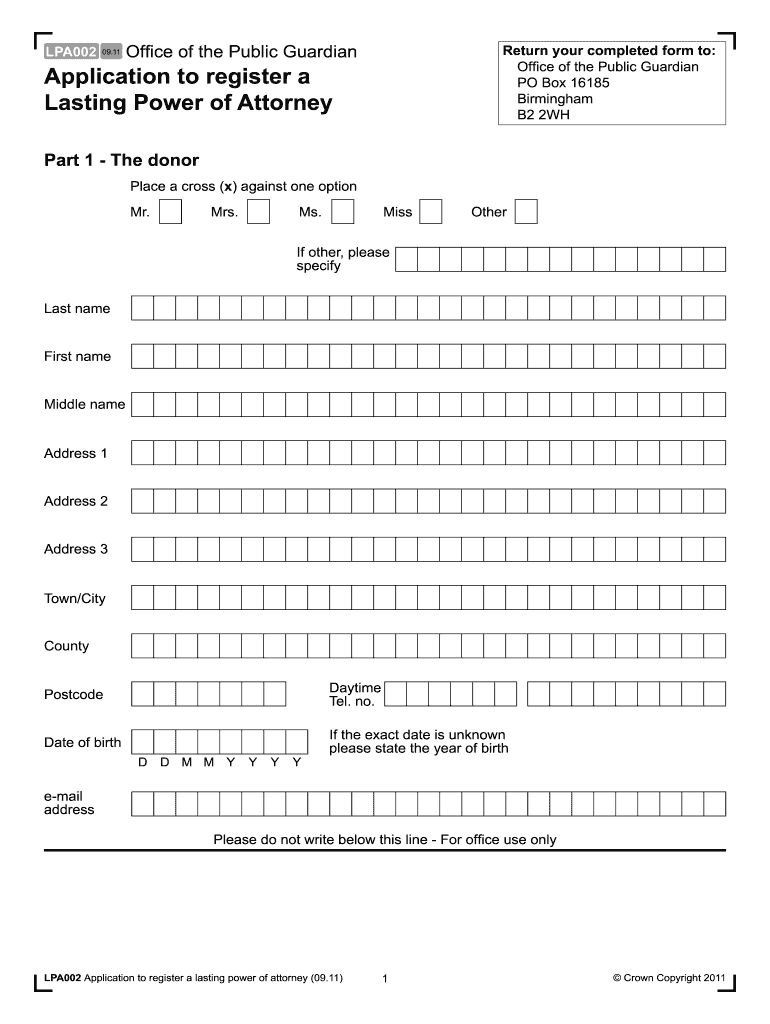
The Lpa002 form is required for the application to register a lasting power of attorney. This guide provides clear, step-by-step instructions to help users, regardless of their legal background, fill out the form accurately and efficiently.
Follow the steps to complete the Lpa002 online
- Click ‘Get Form’ button to obtain the form and open it in the editor.
- In Part 1, provide the donor's details. Indicate the donor's preferred title by placing a cross beside one of the options. Fill in their last name, first name, and middle name, followed by their complete address, including town/city, county, and postcode. Enter the daytime telephone number, date of birth, and email address.
- Move to Part 2 to clarify who is applying for the registration. Indicate whether the donor or the attorney(s) are making the application by checking the corresponding box.
- In Part 3, specify how the attorney(s) have been appointed by placing a cross next to the appropriate option, such as whether there is one attorney or multiple attorneys acting jointly or jointly and severally.
- Complete Part 4 by providing details of each attorney. For each attorney, place a cross if they are applying to register, select their title, and fill in the required information, including their name, address, date of birth, and occupation.
- In Part 5, indicate whether notice has been given to the people specified by the donor. Provide the names and addresses of those notified along with the date of notice.
- Part 6 addresses fees. Indicate the payment method by selecting options regarding credit or debit card payment and whether you are applying for fee exemption or remission.
- In Part 7, indicate the type of lasting power of attorney you are registering by placing a cross in the applicable box and provide the date the donor signed the lasting power of attorney.
- Complete Parts 8 and 9 for the donor's and attorney(s)' declarations, respectively. Ensure that they certify that all provided information is accurate and sign and date the declarations.
- For any additional attorneys, provide their details in the same manner as before and note any extra information in Part 12.
- Once all sections are complete, carefully review the form for accuracy. Save changes as needed, and then download, print, or share the form.
Complete your forms online with confidence today.
Experience a faster way to fill out and sign forms on the web. Access the most extensive library of templates available.
Related content
Form LPA-002. 1. LOCAL AGENCY. CONSULTANT SELECTION PROCEDURES. Section I – Application...
THIS CODE CREATES THE SAS DATA SET C1LPA (LP(a)). * VERSION 3.1 OF THE CARDIA SAS FILES. *...
Get answers to your most pressing questions about US Legal Forms API.
How to fill out a reimbursement form?
To fill out a reimbursement form successfully, start by providing personal identification, then list all expenses with specific details. Make sure to attach any supporting documents, such as receipts. The Lpa002 feature can streamline your submission, ensuring efficiency and accuracy in expense tracking.
How to make a LPA in Singapore?
Creating a Lasting Power of Attorney (LPA) in Singapore involves filling out the necessary forms with your personal details and the powers you wish to grant. Once completed, submit your LPA application through the appropriate channels. The Lpa002 service can help simplify this legal process by guiding you through each step.
How to fill out a customs declaration?
To fill out a customs declaration, begin by identifying what goods you are bringing into the country and their total value. Clearly state the nature of the items and any applicable duty or tax you owe. Utilizing resources like Lpa002 can aid in ensuring that you provide all necessary information accurately.
How do I activate my LPA UK online?
Activating your LPA UK online involves visiting the official government website. You'll need to provide your details and follow the prompts to register. Make sure you have your reference number handy, as it directly connects to your Lpa002 application.
What is an example of reimbursement?
An example of reimbursement can be when an employee pays for travel expenses out of pocket while on a business trip. Upon returning, they can submit a reimbursement request through Lpa002, providing receipts for hotel stays, meals, and transportation. This allows for a prompt return of funds to the employee.
How to fill out an expense reimbursement form?
To fill out an expense reimbursement form, list your expenses in detail, including the date, type of expense, and amount. Attach all necessary receipts to validate your claims. Using the Lpa002 system can streamline this process, ensuring that every detail is accounted for efficiently.
How do I fill out a reimbursement claim form?
Filling out a reimbursement claim form requires careful attention. First, provide your identifying information and the total amount you are claiming. Include individual expenses with their corresponding receipts, ensuring that you clearly describe each item, as this will make processing through Lpa002 smoother.
How to do a reimbursement form?
To complete a reimbursement form, start by gathering all necessary receipts and relevant details of your expenses. Ensure you enter the correct amount, date, and purpose of each expense on the Lpa002 form. After filling it out, review the details for accuracy before submitting it to the appropriate department.
How to apply for LPA in Singapore?
To apply for an LPA in Singapore, you need to complete the necessary forms available on the Office of the Public Guardian's website. Be sure to gather all required documents for submission. After filling out the application, submit it online or in person for processing. Taking these steps ensures that your Lpa002 is created and accepted smoothly.
How to activate power of attorney for health and welfare in the UK?
Activating your power of attorney for health and welfare in the UK requires you to register the document with the Office of the Public Guardian. Ensure all required information is filled out correctly. Once registered, you will receive confirmation, and your Lpa002 will be effective immediately. This process guarantees that your healthcare preferences are respected when necessary.
Use professional pre-built templates to fill in and sign documents online faster. Get access to thousands of forms.
If you believe that this page should be taken down, please follow our DMCA take down process here.