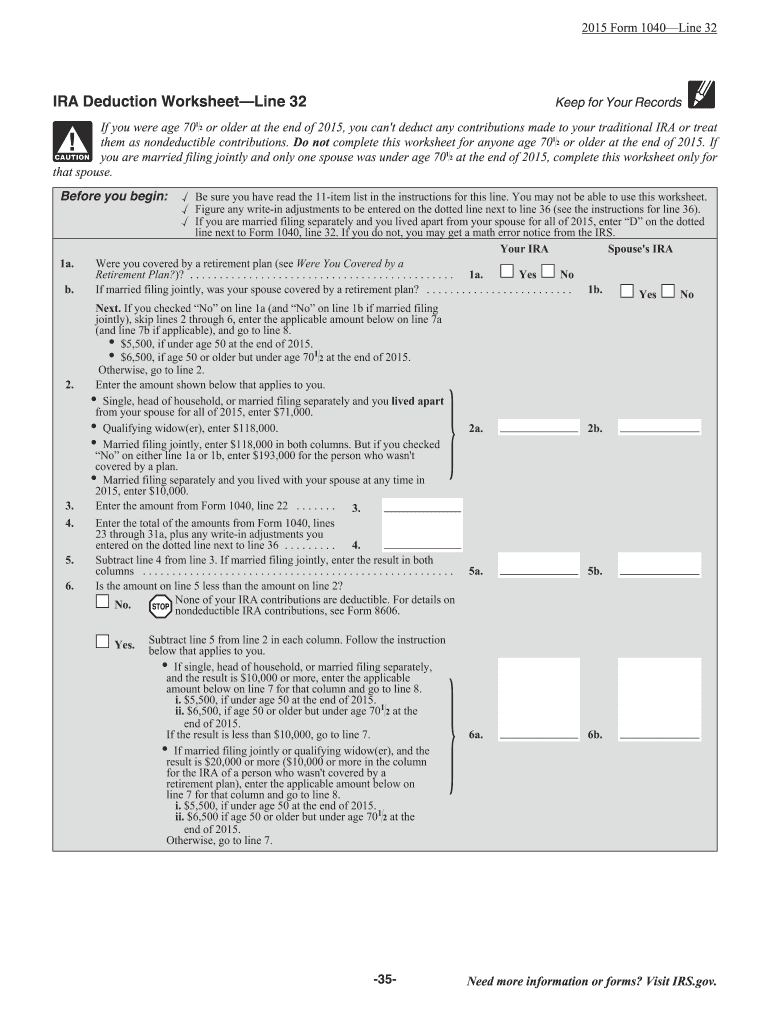
S than $10,000, go to line 7. If married filing jointly or qualifying widow(er), and the result is $20,000 or more ($10,000 or more in the column for the IRA of a person who was not covered by a retirement plan), enter the applicable amount below on line 7 for that column and go to line 8. i. $5,500, if under age 50 at the end of 2013. ii. $6,500 if age 50 or older but under age 701 2 at the end of 2013. Otherwise, go to line 7. Need more information or forms? Visit IRS.gov. -34- 2a. 2b. 5a.
Loading

Open form follow the instructions

Easily sign the form with your finger

Send filled & signed form or save
How to fill out the IRA deduction worksheet 2019 online
Filling out the IRA deduction worksheet can be a straightforward process when you know the steps and have the necessary information. This guide will provide you with clear instructions on how to complete the IRA deduction worksheet for the year 2019 online, ensuring you understand each section and field of the form.
Follow the steps to complete the IRA deduction worksheet effectively.
- Click ‘Get Form’ button to obtain the IRA deduction worksheet and open it in the editor.
- Before beginning the form, ensure you have reviewed the 11-item list in the instructions for line 32 to confirm this worksheet applies to you.
- Identify whether you were covered by a retirement plan by answering ‘Yes’ or ‘No’ on line 1a. If married filing jointly, this also applies to your spouse as indicated in line 1b.
- If both you and your spouse answered ‘No’ to line 1a and line 1b, skip lines 2 through 6, and enter the applicable contribution limit on line 7a and 7b.
- For individuals covered by a retirement plan, refer to the appropriate income thresholds for your filing status and input the applicable amount on line 2.
- Input the total amounts from the specified lines of Form 1040 on line 3 and any write-in adjustments next to line 36.
- Subtract the total entered in line 4 from the total in line 3. Enter the result in the appropriate columns.
- Determine if the amount on line 5 is less than the amount on line 2. Follow the indications based on your scenario.
- For those filing jointly or as qualifying widow(er), calculate your applicable deduction by following the instructions for entering information on lines 7.
- Finally, enter your traditional IRA contributions on lines 11a and 11b, and determine your deduction limits by completing lines 12a and 12b. Summarize your deductible total on Form 1040, line 32.
- After your form is complete, you can choose to save changes, download, print, or share the completed worksheet.
Start preparing your IRS forms online today!
Experience a faster way to fill out and sign forms on the web. Access the most extensive library of templates available.
Related content
Enter traditional IRA contributions made, or that will be made by the due date of your...
Complete this worksheet to determine if you're able to reduce the tax withheld from your...
Jan 19, 2017 — This includes income and de- duction items used to figure adjusted gross...
Get answers to your most pressing questions about US Legal Forms API.
What is the maximum IRA deduction for 2019?
In 2019, the maximum IRA deduction depends on whether you or your spouse are covered by a retirement plan at work. Generally, the deduction limit is $6,000, or $7,000 if you are age 50 or older. Refer to the IRA Deduction Worksheet 2019 for guidelines on how to calculate your specific deduction eligibility. For more information and assistance, US Legal Forms offers valuable resources.
How to report an IRA deduction?
To report an IRA deduction, complete the IRA Deduction Worksheet 2019 and include the deduction amount on your Form 1040. It’s essential to provide accurate information to ensure compliance with IRS rules. This deduction can lower your taxable income, so take care in your reporting. Resources from US Legal Forms can facilitate this process efficiently.
Can I claim an IRA deduction?
You may claim an IRA deduction if you meet certain criteria set by the IRS, which include your income levels and whether you or your spouse are covered by a retirement plan at work. Use the IRA Deduction Worksheet 2019 to determine your eligibility. Making the most of your IRA deductions can significantly improve your tax situation. For assistance, consider using US Legal Forms.
Can I file form 8606 for prior years?
You can file Form 8606 for prior years if you need to report after-tax contributions or correct previous filings. However, the IRS has specific guidelines regarding the timeliness of such submissions. It’s wise to double-check whether the deductions from the IRA Deduction Worksheet 2019 affect your prior year filings. US Legal Forms can also help you navigate this complex process.
Where do I put my IRA deduction on 1040?
You should enter your IRA deduction on Line 32 of Form 1040 for the tax year 2019. The IRA Deduction Worksheet 2019 will help you calculate the exact amount to report. Accurate reporting of your deductions ensures that you minimize your tax liability and maximize your savings. US Legal Forms provides the necessary forms and tools to assist in this process.
Do I need to report after tax IRA contributions?
After-tax IRA contributions must be reported on your tax return, but they are not subject to the same tax implications as pre-tax contributions. You should use Form 8606 to report these contributions, which also helps track any basis in your traditional IRA. Using the IRA Deduction Worksheet 2019 can clarify your total contributions and their impact on your taxes. Resources like US Legal Forms offer forms and guidance to assist you.
How do you report IRA contributions?
You report IRA contributions on your tax return by completing the relevant sections on IRS Form 1040. It is important to correctly fill out the IRA Deduction Worksheet 2019 to determine the amount you can deduct. This helps ensure that you maximize your tax benefits and comply with IRS regulations. If you need assistance, consider using resources like US Legal Forms for guidance.
Where to enter IRA deduction on 1040?
When filing your tax return on Form 1040, you will report your IRA deduction on line 32. This amount is subtracted from your taxable income, potentially lowering your tax liability. Ensure that you have calculated the deduction correctly using the Ira Deduction Worksheet 2019, as reporting inaccuracies can lead to issues.
How do I calculate my IRA deduction?
To calculate your IRA deduction, start by identifying your eligible contribution amount based on your income and retirement plan coverage. Deductible contributions reduce your taxable income, so it’s essential to know how much you can contribute. The Ira Deduction Worksheet 2019 is an effective tool to assist you in accurately determining your deduction.
How are IRA contribution limits calculated?
IRA contribution limits are set by the IRS and can vary based on your age and filing status. For 2019, the maximum contribution limit for individuals under 50 is $6,000, while those 50 and older can contribute up to $7,000. It's important to stay within these limits to avoid penalties. For precise calculations, refer to the Ira Deduction Worksheet 2019.
Use professional pre-built templates to fill in and sign documents online faster. Get access to thousands of forms.
If you believe that this page should be taken down, please follow our DMCA take down process here.