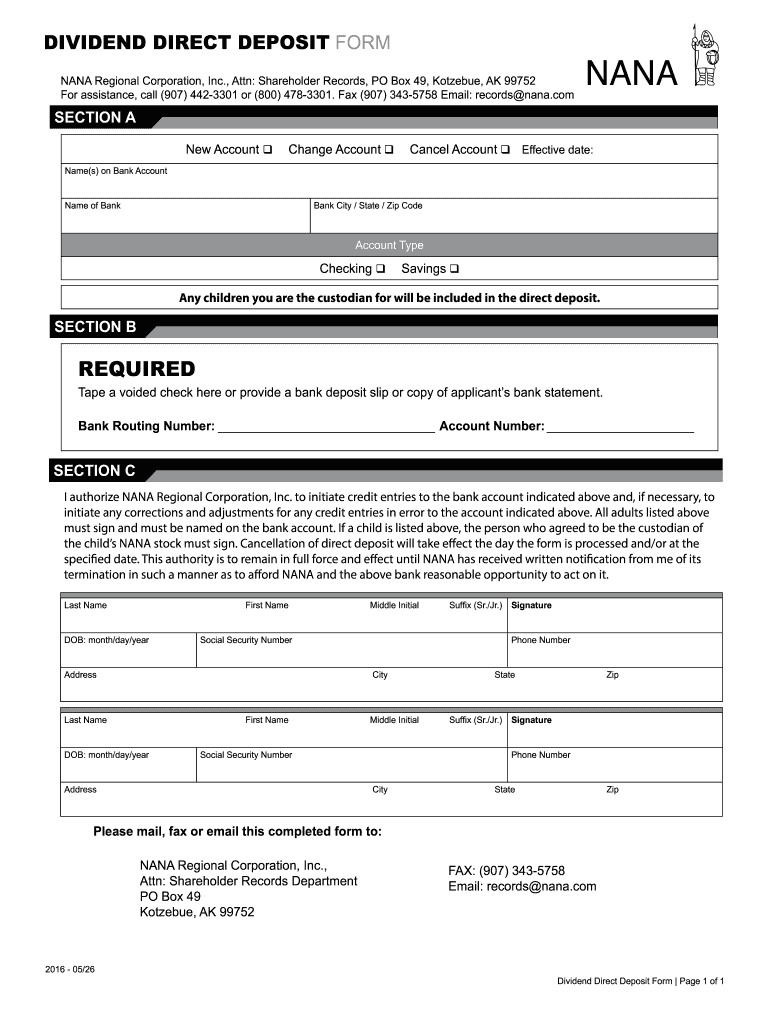
DIVIDEND DIRECT DEPOSIT FORM NANA Regional Corporation, Inc., Attn: Shareholder Records, PO Box 49, Kotzebue, AK 99752 For assistance, call (907) 4423301 or (800) 4783301. Fax (907) 3435758 Email:.
Loading

Open form follow the instructions

Easily sign the form with your finger

Send filled & signed form or save
How to fill out the Nana Regional Corporation Dividend online
This guide provides clear and comprehensive instructions on how to fill out the Nana Regional Corporation Dividend form online. Whether you are setting up a new account or making changes, this step-by-step guide will ensure you complete the process with ease.
Follow the steps to complete your dividend direct deposit form online.
- Press the ‘Get Form’ button to access the Nana Regional Corporation Dividend form and open it in your preferred editing software.
- In Section A, select whether this is a new account, a change of account, or a cancellation of the account. Indicate the effective date for changes if applicable.
- Provide the name(s) that are listed on your bank account and the name of your bank. Include the city, state, and zip code of the bank to ensure accurate processing.
- Choose the type of account by selecting either checking or savings. If you are the custodian for any children, note that their accounts will be included in this direct deposit.
- In Section B, attach a voided check, a bank deposit slip, or a copy of your bank statement as required. Fill in your bank routing number and account number to facilitate direct deposits.
- In Section C, authorize the NANA Regional Corporation to initiate credit entries to your bank account. Ensure that all adults listed provide their names, signatures, phone numbers, and other required information, including social security numbers and addresses.
- Review all information for completeness and accuracy before submitting. You can mail, fax, or email the completed form to NANA Regional Corporation, Inc., Attn: Shareholder Records Department at the provided contact details.
Complete and submit your NANA Regional Corporation Dividend form online today.
Experience a faster way to fill out and sign forms on the web. Access the most extensive library of templates available.
Related content
Committee information ; Connected organization: NANA REGIONAL CORPORATION ; Mailing...
by S Colt · 1991 — also collected substantial amounts from other sources. • Dividends...
unpaid dividend. 800.00 05-Nov-. 2026. 772 RAKESH. CHUCKHANSINGH. C/O RAMKISHORE. UNION...
Get answers to your most pressing questions about US Legal Forms API.
What are the benefits of Nana shareholders?
Nana shareholders enjoy several benefits, including receiving regular dividends and gaining insights into the corporation's performance. Additionally, being a shareholder allows you to participate in the decision-making processes, such as voting on key issues. By understanding these benefits, you can make informed decisions about your investment with Nana Regional Corporation.
Are dividends taxable or not?
Dividends are generally considered taxable. This means that when you receive a Nana Regional Corporation Dividend, you may need to report it as part of your income for tax purposes. It is always wise to consult a tax professional for personalized advice on managing your taxes related to dividends.
What is the dividend for Nana Elders?
Nana Elders may receive dividends similar to those from Nana Regional Corporation, depending on the organization's financial performance. Keep an eye on official communications to know the latest on any dividend declarations for Nana Elders. Understanding these dividends helps you gauge your potential earnings as a shareholder.
What is the dividend for Nana Regional Corporation 2025?
The dividend amount for Nana Regional Corporation in 2025 has not yet been officially announced. However, shareholders can expect information regarding dividends to be disclosed in advance of the payout. Stay updated through official sources or connect with Nana Regional Corporation for the latest announcements.
Are Nana dividends taxable?
Yes, Nana dividends are taxable income. As a shareholder of Nana Regional Corporation, you must report dividends received on your tax return. The IRS typically classifies dividends as ordinary income, which might affect your overall tax obligation.
Who owns Nana Regional Corporation?
Nana Regional Corporation is owned by its shareholders, who are primarily Alaska Native individuals and communities. This structure allows for shared ownership and participation in corporate benefits. The corporation’s commitment to its shareholders reflects its dedication to serving the community and prioritizing their interests.
What is the Nana distribution for 2025?
Nana Regional Corporation’s distribution plan for 2025 is still under development, as the company assesses its performance and community needs. Typically, distributions include dividends and other benefits to shareholders. For the most recent updates, shareholders are encouraged to check company communications.
What is the msty dividend for February 2025?
The specific Nana Regional Corporation Dividend for February 2025 is yet to be announced, as it typically depends on market conditions and corporate performance. However, shareholders can expect updates through official announcements. Staying informed about these details ensures shareholders can plan accordingly.
How many shareholders does Nana Corporation have?
Nana Corporation boasts a diverse group of shareholders. Currently, it has thousands of shareholders, representing a wide range of communities and interests. This robust ownership structure helps reinforce the corporation's mission and contributes to its continued success.
How much are Nana dividends this year?
NANA DIVIDEND ANNOUNCEMENT: At today's board meeting, the NRC Shareholder Trust declared a spring dividend in the amount of $6.00 per share, payable on or about June 1, 2022, to beneficiaries of record as of May 23, 2022.
Use professional pre-built templates to fill in and sign documents online faster. Get access to thousands of forms.
If you believe that this page should be taken down, please follow our DMCA take down process here.