Loading
Form preview
  • US Legal Forms
  • Other Templates
  • More Forms
  • More Multi-State Forms
  • Vat 3 Form Download Kenya

Get Vat 3 Form Download Kenya

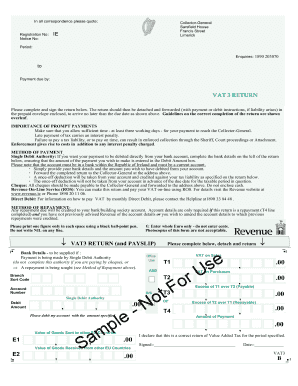
Plete and sign the return below. The return should then be detached and forwarded (with payment or debit instructions, if liability arises) in the prepaid envelope enclosed, to arrive no later than the due date as shown above. Guidelines on the correct completion of the return are shown overleaf. IMPORTANCE OF PROMPT PAYMENTS Make sure that you allow sufficient time - at least three working days - for your payment to reach the Collector-General. Late payment of tax carries an interest pena.

How it works

  1. Open form

    Open form follow the instructions

  2. Easily sign form

    Easily sign the form with your finger

  3. Share form

    Send filled & signed form or save

How to fill out the VAT 3 Form Download Kenya online

The VAT 3 form is an essential document required for Value Added Tax reporting in Kenya. This guide provides a clear, step-by-step approach to help users efficiently complete the VAT 3 form online, ensuring compliance with tax regulations.

Follow the steps to fill out the VAT 3 form accurately.

  1. Click ‘Get Form’ button to obtain the form and open it in the editor.
  2. Locate the registration number field at the top of the form. Enter your unique registration number, which identifies your business for VAT purposes.
  3. Complete the period section by indicating the tax period for which you are submitting the return. Ensure that the dates specified correspond to the correct reporting period.
  4. In the section labeled 'VAT on Sales', provide the total amount of VAT accumulated from sales during the period. Be precise and ensure all figures are correct.
  5. Next, fill in the 'VAT on Purchases' section with the total deductible VAT you have incurred on purchases and intra-EU acquisitions.
  6. Calculate the excess of VAT on Sales over VAT on Purchases. If the VAT on Sales (T1) exceeds VAT on Purchases (T2), enter this amount in the designated field.
  7. If the VAT on Purchases exceeds that of Sales, you may be eligible for a repayment. Enter the difference in the 'Excess of Purchases over Sales' line.
  8. Fill out the payment details if you choose to make a payment via Single Debit Authority. Enter your bank details along with the debit amount.
  9. Review all entered details for accuracy. Once confirmed, you can save your changes, download the form, or print it for submission.
  10. If necessary, share the completed form with relevant parties or submit it as required by tax authorities.

Complete your VAT 3 form online today to ensure timely submission and compliance.

Get form

Experience a faster way to fill out and sign forms on the web. Access the most extensive library of templates available.
Get form

Related content

VAT in Africa
3 All VAT exempt sales in China and construction related transactions are subject to a...
Learn more
Tax Reform in Kenya: Policy and Administrative...
by NO Eissa · 2009 · Cited by 26 — All businesses with annual turnover greater than...
Learn more
Tobacco Tax Reform
by PV Marquez · Cited by 1 — Executive Summary. 11. The Tobacco Use Challenge. 12. The...
Learn more

Related links form

TEXAS BLUEBONNET AWARD SUPPLY ORDER - Txla.org Employee Application Form - Tuscan Sun Spa & Salon Time And Talent Survey - Tahoe Community Church Intent To Sell Property

Questions & Answers

Get answers to your most pressing questions about US Legal Forms API.

Contact support

Yes, filing your VAT return yourself is possible. Simply download the VAT 3 Form using the Vat 3 Form Download Kenya option, fill it out with the necessary details, and submit it directly through the KRA online service. This empowers you to maintain control over your business finances.

Box 3 of the VAT return typically requires you to enter totals from your sales transactions. It is essential to provide accurate figures to avoid discrepancies. When using the Vat 3 Form Download Kenya, ensure you gather your sales data correctly for this section.

Absolutely, you can submit your VAT return yourself if you are familiar with the process. By downloading the VAT 3 Form from the Vat 3 Form Download Kenya, you can complete it with the required information and file it through the KRA portal.

To file your VAT 3 return, visit the KRA website to access the VAT section. You can download the necessary form through the Vat 3 Form Download Kenya link. Once you have filled out the form with your business's financial data, submit it online for official processing.

Yes, you can submit a VAT return without an accountant. If you understand your financials and follow the steps required, you can navigate the process successfully. Utilize the Vat 3 Form Download Kenya for a smooth submission experience.

To file VAT returns online in Kenya, first visit the Kenya Revenue Authority (KRA) website. You will need to log into your KRA account and navigate to the VAT return section. There, you can access the VAT 3 Form Download Kenya, fill it out, and submit it electronically for seamless processing.

The VAT form can be accessed online through the Kenya Revenue Authority's portal. Additionally, local revenue offices provide physical copies if you prefer to fill them out manually. This accessibility ensures that all business owners can meet their tax obligations. Don't forget the convenience of the Vat 3 Form Download Kenya, which allows you to handle this task with ease.

You can apply for VAT registration through the Kenya Revenue Authority's website or at their local offices. Ensure you have the required documentation prepared to facilitate the application process. Once registered, you will receive your VAT number, which is essential for your tax transactions. To simplify your record-keeping, use the Vat 3 Form Download Kenya options.

To download your VAT statement as a PDF, log in to your account on the Kenya Revenue Authority's official website. Locate the VAT statement section and follow the prompts to generate the PDF file. This offers a straightforward way to keep your records organized. With the Vat 3 Form Download Kenya, you can also download your necessary forms efficiently.

You can get your VAT form stamped at the nearest Kenya Revenue Authority office. It is advisable to bring your completed VAT 3 form along with necessary business documents for validation. Stamping ensures your form is officially recognized by the tax authorities. Remember, having the right documents is crucial for a smooth process, so use the Vat 3 Form Download Kenya to make things easier.

Get This Form Now!

Use professional pre-built templates to fill in and sign documents online faster. Get access to thousands of forms.
Get form
If you believe that this page should be taken down, please follow our DMCA take down processhere.
Get Vat 3 Form Download Kenya
Get form
  • Adoption
  • Bankruptcy
  • Contractors
  • Divorce
  • Home Sales
  • Employment
  • Identity Theft
  • Incorporation
  • Landlord Tenant
  • Living Trust
  • Name Change
  • Personal Planning
  • Small Business
  • Wills & Estates
  • Packages A-Z
  • Affidavits
  • Bankruptcy
  • Bill of Sale
  • Corporate - LLC
  • Divorce
  • Employment
  • Identity Theft
  • Internet Technology
  • Landlord Tenant
  • Living Wills
  • Name Change
  • Power of Attorney
  • Real Estate
  • Small Estates
  • Wills
  • All Forms
  • Forms A-Z
  • Other Templates
  • Legal Hub
  • About Us
  • Help Portal
  • Legal Resources
  • Blog
  • Affiliates
  • Contact Us
  • Delete My Account
  • Site Map
  • Industries
  • Forms in Spanish
  • Localized Forms
  • State-specific Forms
  • Forms Kit
  • Real Estate Handbook
  • All Guides
  • Notarize
  • Incorporation services
  • For Consumers
  • For Small Business
  • For Attorneys
  • USLegal
  • FormsPass
  • pdfFiller
  • signNow
  • altaFlow
  • DocHub
  • Instapage
Form Packages
  • Adoption
  • Bankruptcy
  • Contractors
  • Divorce
  • Home Sales
  • Employment
  • Identity Theft
  • Incorporation
  • Landlord Tenant
  • Living Trust
  • Name Change
  • Personal Planning
  • Small Business
  • Wills & Estates
  • Packages A-Z
Form Categories
  • Affidavits
  • Bankruptcy
  • Bill of Sale
  • Corporate - LLC
  • Divorce
  • Employment
  • Identity Theft
  • Internet Technology
  • Landlord Tenant
  • Living Wills
  • Name Change
  • Power of Attorney
  • Real Estate
  • Small Estates
  • Wills
  • All Forms
  • Forms A-Z
  • Other Templates
Customer Service
  • Legal Hub
  • About Us
  • Help Portal
  • Legal Resources
  • Blog
  • Affiliates
  • Contact Us
  • Delete My Account
  • Site Map
  • Industries
  • Forms in Spanish
  • Localized Forms
  • State-specific Forms
  • Forms Kit
Legal Guides
  • Real Estate Handbook
  • All Guides
Prepared for you
  • Notarize
  • Incorporation services
Our Customers
  • For Consumers
  • For Small Business
  • For Attorneys
Our Sites
  • USLegal
  • FormsPass
  • pdfFiller
  • signNow
  • altaFlow
  • DocHub
  • Instapage
Social Media
Call us now toll free:
+1 833 426 79 33
As seen in:
© Copyright 1999-2026 airSlate Legal Forms, Inc. 17 Station Street, Ste. 203, Brookline, MA 02445
  • Your Privacy Choices
  • Terms of Service
  • Privacy Notice
  • Content Takedown Policy
  • Bug Bounty Program