Loading
Form preview
  • US Legal Forms
  • Other Templates
  • More Forms
  • More Multi-State Forms
  • Moneygram Transaction History

Get Moneygram Transaction History

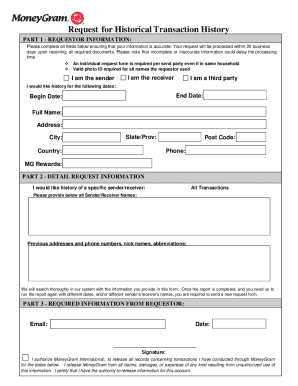
Historical Request Form Instructions Please ensure the following items are completed before submitting to MoneyGrams Historical Transaction Department: Complete and accurately fill out Historical.

How it works

  1. Open form

    Open form follow the instructions

  2. Easily sign form

    Easily sign the form with your finger

  3. Share form

    Send filled & signed form or save

How to fill out the Moneygram Transaction History online

This guide provides a step-by-step approach to filling out the Moneygram Transaction History form online. By following these instructions, you will ensure a complete and accurate submission to Moneygram’s Historical Transaction Department.

Follow the steps to accurately complete the Moneygram Transaction History form

  1. Press the ‘Get Form’ button to obtain the form and open it in the editor.
  2. Begin with Part 1 - Requestor Information. Fill in your full name accurately, along with your current address, city, state, country, and postal code. Ensure that the phone number and email fields are also completed correctly.
  3. Indicate your relationship to the transaction by selecting which option applies: 'I am the sender', 'I am the receiver', or 'I am a third party'. Provide the specific dates for which you are requesting transaction history.
  4. In Part 2 - Detail Request Information, specify whether you would like history for all transactions or for specific senders/receivers. If applicable, list all sender or receiver names, as well as any previous addresses or phone numbers that may assist in locating your records.
  5. Move to Part 3 - Required Information from Requestor. Enter the date of your request and confirm the fee paid for this request. You must also provide your signature authorizing Moneygram to release the requested transaction records.
  6. After completing the form, review all entries for accuracy. Incomplete or incorrect information may lead to delays in processing.
  7. Send your completed transaction history form along with a valid photocopy of your identification. You can fax it to +1 303 586 4660 or email it to historicaltrnx@moneygram.com.
  8. Once submitted, please wait for the processing time, which typically takes up to 20 business days. If additional information is required, you might need to submit a new request.

Complete your Moneygram Transaction History request online today for a hassle-free experience.

Get form

Experience a faster way to fill out and sign forms on the web. Access the most extensive library of templates available.
Get form

Related content

MoneyGram fraud refunds get closer | Consumer...
Dec 7, 2022 — You can request a transaction history report on the MoneyGram website....
Learn more
How To Get Moneygram Transaction History how to...
How to get MoneyGram transaction history is a common question for users who want to track...
Learn more
Annual Report
Mar 1, 2017 — To date, in. 2017, we announced acquisitions augmenting our data analytics...
Learn more

Related links form

Download File - DMZ Paintball IGIV And General Immune Disorders Superior Biologics ... 7 6 Practice Exponential Functions Answer Key Mn1 Form Guide

Questions & Answers

Get answers to your most pressing questions about US Legal Forms API.

Contact support

To get your transaction history from MoneyGram, log into your MoneyGram online account and navigate to the transaction history section. Here, you will find a comprehensive list of your past transactions, including dates and amounts. In case you need further assistance, MoneyGram's customer support can guide you through the process to ensure you retrieve your MoneyGram transaction history seamlessly.

Yes, you can obtain your MoneyGram transaction history by logging into your account on the MoneyGram website. If you do not have an online account, consider creating one to simplify access to your transaction details. This history allows you to keep track of your past transactions easily and manage your finances better.

To complete a MoneyGram transaction, you need to provide essential details such as the sender's full name, address, and phone number. Additionally, you will need the recipient's full name, location, and contact details. Properly filling out these fields ensures that the transaction can be processed without issues, making it easier for you to access your MoneyGram transaction history.

When filling out a MoneyGram form, you need to provide accurate sender and receiver information, including names, addresses, and contact details. Make sure to include the correct amount being sent and any necessary payment information. Taking your time to review the form before submitting can help prevent errors and ensure a smooth transaction.

You can track a MoneyGram transaction by visiting the MoneyGram website and entering the MTCN in the designated tracking section. This method provides you with real-time updates on your transaction status. Alternatively, you can call the MoneyGram customer service for assistance with your MoneyGram transaction history and tracking inquiries.

To obtain a copy of your Western Union transaction history, you can visit their official website or contact their customer service. They usually allow you to access your account online, where you can view and download your transaction details. Additionally, you might find it helpful to keep your transaction reference numbers handy for a smoother process.

If you need to download your Western Union transaction history, log in to your Western Union account. Navigate to the account activity or transaction history section, where you will find options to view and download your records. Remember, this process is quite similar to accessing your MoneyGram transaction history.

To check if a MoneyGram has been cashed, you can use the tracking feature on the MoneyGram website. Inputting the transaction reference number will show whether the funds have been claimed. If you need additional help with documentation or record-keeping, visiting USLegalForms can offer you handy solutions.

To get your transaction history from Western Union, log into your online account and navigate to the transaction history section. If you don't have an account, you might need to contact customer service with your identification details. While Western Union and MoneyGram offer different services, using USLegalForms can help you manage and compare transaction histories efficiently.

You can track a MoneyGram transaction online by visiting their official website and entering the transaction reference number. This allows you to see the current status of your funds and obtain details about any updates. For a more organized approach to all your transaction inquiries, consider utilizing platforms like USLegalForms.

Get This Form Now!

Use professional pre-built templates to fill in and sign documents online faster. Get access to thousands of forms.
Get form
If you believe that this page should be taken down, please follow our DMCA take down processhere.
Get Moneygram Transaction History
Get form
  • Adoption
  • Bankruptcy
  • Contractors
  • Divorce
  • Home Sales
  • Employment
  • Identity Theft
  • Incorporation
  • Landlord Tenant
  • Living Trust
  • Name Change
  • Personal Planning
  • Small Business
  • Wills & Estates
  • Packages A-Z
  • Affidavits
  • Bankruptcy
  • Bill of Sale
  • Corporate - LLC
  • Divorce
  • Employment
  • Identity Theft
  • Internet Technology
  • Landlord Tenant
  • Living Wills
  • Name Change
  • Power of Attorney
  • Real Estate
  • Small Estates
  • Wills
  • All Forms
  • Forms A-Z
  • Other Templates
  • Legal Hub
  • About Us
  • Help Portal
  • Legal Resources
  • Blog
  • Affiliates
  • Contact Us
  • Delete My Account
  • Site Map
  • Industries
  • Forms in Spanish
  • Localized Forms
  • State-specific Forms
  • Forms Kit
  • Real Estate Handbook
  • All Guides
  • Notarize
  • Incorporation services
  • For Consumers
  • For Small Business
  • For Attorneys
  • USLegal
  • FormsPass
  • pdfFiller
  • signNow
  • altaFlow
  • DocHub
  • Instapage
Form Packages
  • Adoption
  • Bankruptcy
  • Contractors
  • Divorce
  • Home Sales
  • Employment
  • Identity Theft
  • Incorporation
  • Landlord Tenant
  • Living Trust
  • Name Change
  • Personal Planning
  • Small Business
  • Wills & Estates
  • Packages A-Z
Form Categories
  • Affidavits
  • Bankruptcy
  • Bill of Sale
  • Corporate - LLC
  • Divorce
  • Employment
  • Identity Theft
  • Internet Technology
  • Landlord Tenant
  • Living Wills
  • Name Change
  • Power of Attorney
  • Real Estate
  • Small Estates
  • Wills
  • All Forms
  • Forms A-Z
  • Other Templates
Customer Service
  • Legal Hub
  • About Us
  • Help Portal
  • Legal Resources
  • Blog
  • Affiliates
  • Contact Us
  • Delete My Account
  • Site Map
  • Industries
  • Forms in Spanish
  • Localized Forms
  • State-specific Forms
  • Forms Kit
Legal Guides
  • Real Estate Handbook
  • All Guides
Prepared for you
  • Notarize
  • Incorporation services
Our Customers
  • For Consumers
  • For Small Business
  • For Attorneys
Our Sites
  • USLegal
  • FormsPass
  • pdfFiller
  • signNow
  • altaFlow
  • DocHub
  • Instapage
Social Media
Call us now toll free:
+1 833 426 79 33
As seen in:
© Copyright 1999-2026 airSlate Legal Forms, Inc. 17 Station Street, Ste. 203, Brookline, MA 02445
  • Your Privacy Choices
  • Terms of Service
  • Privacy Notice
  • Content Takedown Policy
  • Bug Bounty Program