Loading
Form preview
  • US Legal Forms
  • Form Library
  • More Forms
  • More Multi-State Forms
  • Shop'ngo Application Form - Pak'nsave

Get Shop'ngo Application Form - Pak'nsave

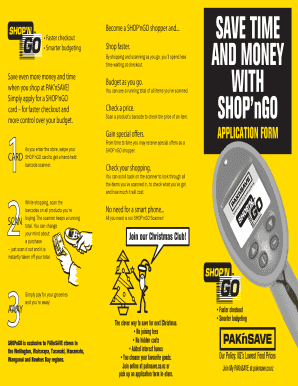
Faster checkout Smarter budgeting Become a SHOP nGO shopper and... Shop faster. By shopping and scanning as you go, you ll spend less time waiting at checkout. Save even more money and time when you.

How it works

  1. Open form

    Open form follow the instructions

  2. Easily sign form

    Easily sign the form with your finger

  3. Share form

    Send filled & signed form or save

How to fill out the SHOP'nGO Application Form - PAK'nSAVE online

Filling out the SHOP'nGO application form for PAK'nSAVE is a straightforward process designed to enhance your shopping experience. This guide will provide clear instructions on each section of the form to ensure you complete it accurately and efficiently.

Follow the steps to successfully complete your application form.

  1. Press the ‘Get Form’ button to access the SHOP'nGO application form and open it in your document editor.
  2. Begin by entering your name in the designated fields. Include your title (Dr, Mr, Ms, Mrs, Miss, or Other), first name, and surname.
  3. Fill in your home address. Include any flat or unit numbers, followed by Address 1, Address 2, city, suburb, and postcode.
  4. Provide your contact information, including your phone number, mobile number, and email address.
  5. Enter your identification information. You can choose to provide either your driver’s licence number or your credit card number, along with its expiry date.
  6. Indicate your date of birth in the specified field.
  7. Read through the terms and conditions section carefully. Ensure you understand your rights and responsibilities as a SHOP'nGO customer.
  8. Sign and date the application form to certify that you agree with the terms and conditions.
  9. Once you have completed all sections, save your changes. You can download, print, or share the form as needed before submitting it to the customer service staff at your chosen PAK'nSAVE location.

Complete your SHOP'nGO application form online today to start enjoying faster checkout and smarter budgeting!

Get form

Experience a faster way to fill out and sign forms on the web. Access the most extensive library of templates available.
Get form

Related content

pending or settled ca ses - Oklahoma.gov
Jun 5, 2023 — CSE-23-000798 HOP N SHOP #1. MC-P.VALLEY. SETTLED. REB-930697. AT ISSUE:...
Learn more
Evaluation of Legal Strategies for the Reduction...
by C Chasse · 2019 · Cited by 12 — They also charge for plastic bags in their...
Learn more
70631200K_FA7A6_Disk_Contr...
User Manual: Pdf 70631200K_FA7A6_Disk_Controller_Microprogram_Manual_Apr1975.
Learn more

Related links form

Science A Closer Look Grade 1 Pdf No Download Needed User Guide EnTouch One - Energy Conscious GPS Handbook Form Receipt FORM2605-08-EE-HB - SPI16 SnapFi Original Absolute Power RIC Order Form. FORM2605-08-EE-HB - SPI16

Questions & Answers

Get answers to your most pressing questions about US Legal Forms API.

Contact support

How to join Pick up a Sticky Club tag in-store. (South Island stores only) Register it here, in-store or call 0800 80 75 75. Activate your tag by scanning it at the checkout.

Please contact our Customer Support Centre on 0800 PAKNSAVE (0800 725672) if you receive an item that you consider to be damaged, faulty or spoiled.

“Sticky Club is a special programme that allows PAK'nSAVE customers to collect fuel savings each month just by shopping at PAK'nSAVE and scanning their Sticky Club tag at the checkout,” Donaldson says. “This is a new offering, separate to our other fuel deals in-store.

PAK'nSAVE is part of the Foodstuffs family, a co-operative made up of New World, PAK'nSAVE and Four Square. Foodstuffs was founded in 1922 by members of the Auckland Master Grocers Association, who formed a co-operative buying group.

PAK'nSAVE Gift Cards are available at the check-out in all stores and come in a variety of values to suit everyone.

Yes. Pak'n Save accepts Winz Payment cards. Just shop as normal and then use your payment card to pay at the terminal like an Eftpos card.

Find out more about PAK'nSAVE Gift Cards here. How do I check my gift card balance? Can I use my gift card at the store's fuel station? No.

To join, simply pick up a Sticky Club Tag in-store and register either at the Customer Service Desk or by phoning the Sticky Club call centre 0800 80 75 75 during normal business hours.

0:03 2:28 How to Redeem eGift Cards - YouTube YouTube Start of suggested clip End of suggested clip Email. When you're ready to enter the sale. Add items or a custom amount to their cart tap charge.MoreEmail. When you're ready to enter the sale. Add items or a custom amount to their cart tap charge. And enter the 16 digit redemption code and tap charge. Again.

“Sticky Club is a special programme that allows PAK'nSAVE customers to collect fuel savings each month just by shopping at PAK'nSAVE and scanning their Sticky Club tag at the checkout,” Donaldson says.

Get This Form Now!

Use professional pre-built templates to fill in and sign documents online faster. Get access to thousands of forms.
Get form
If you believe that this page should be taken down, please follow our DMCA take down processhere.

Industry-leading security and compliance

US Legal Forms protects your data by complying with industry-specific security standards.
  • In businnes since 1997
    25+ years providing professional legal documents.
  • Accredited business
    Guarantees that a business meets BBB accreditation standards in the US and Canada.
  • Secured by Braintree
    Validated Level 1 PCI DSS compliant payment gateway that accepts most major credit and debit card brands from across the globe.
Get SHOP'nGO Application Form - PAK'nSAVE
Get form
  • Adoption
  • Bankruptcy
  • Contractors
  • Divorce
  • Home Sales
  • Employment
  • Identity Theft
  • Incorporation
  • Landlord Tenant
  • Living Trust
  • Name Change
  • Personal Planning
  • Small Business
  • Wills & Estates
  • Packages A-Z
  • Affidavits
  • Bankruptcy
  • Bill of Sale
  • Corporate - LLC
  • Divorce
  • Employment
  • Identity Theft
  • Internet Technology
  • Landlord Tenant
  • Living Wills
  • Name Change
  • Power of Attorney
  • Real Estate
  • Small Estates
  • Wills
  • All Forms
  • Forms A-Z
  • Form Library
  • Legal Hub
  • About Us
  • Help Portal
  • Legal Resources
  • Blog
  • Affiliates
  • Contact Us
  • Delete My Account
  • Site Map
  • Industries
  • Forms in Spanish
  • Localized Forms
  • State-specific Forms
  • Forms Kit
  • Real Estate Handbook
  • All Guides
  • Notarize
  • Incorporation services
  • For Consumers
  • For Small Business
  • For Attorneys
  • USLegal
  • FormsPass
  • pdfFiller
  • signNow
  • altaFlow
  • DocHub
  • Instapage
Form Packages
  • Adoption
  • Bankruptcy
  • Contractors
  • Divorce
  • Home Sales
  • Employment
  • Identity Theft
  • Incorporation
  • Landlord Tenant
  • Living Trust
  • Name Change
  • Personal Planning
  • Small Business
  • Wills & Estates
  • Packages A-Z
Form Categories
  • Affidavits
  • Bankruptcy
  • Bill of Sale
  • Corporate - LLC
  • Divorce
  • Employment
  • Identity Theft
  • Internet Technology
  • Landlord Tenant
  • Living Wills
  • Name Change
  • Power of Attorney
  • Real Estate
  • Small Estates
  • Wills
  • All Forms
  • Forms A-Z
  • Form Library
Customer Service
  • Legal Hub
  • About Us
  • Help Portal
  • Legal Resources
  • Blog
  • Affiliates
  • Contact Us
  • Delete My Account
  • Site Map
  • Industries
  • Forms in Spanish
  • Localized Forms
  • State-specific Forms
  • Forms Kit
Legal Guides
  • Real Estate Handbook
  • All Guides
Prepared for you
  • Notarize
  • Incorporation services
Our Customers
  • For Consumers
  • For Small Business
  • For Attorneys
Our Sites
  • USLegal
  • FormsPass
  • pdfFiller
  • signNow
  • altaFlow
  • DocHub
  • Instapage
Social Media
Call us now toll free:
+1 833 426 79 33
As seen in:
© Copyright 1999-2026 airSlate Legal Forms, Inc. 3720 Flowood Dr, Flowood, Mississippi 39232
  • Your Privacy Choices
  • Terms of Service
  • Privacy Notice
  • Content Takedown Policy
  • Bug Bounty Program