Loading
Get Salary Redirection Agreement
How it works
-

Open form follow the instructions
-

Easily sign the form with your finger
-

Send filled & signed form or save
How to fill out the Salary Redirection Agreement online
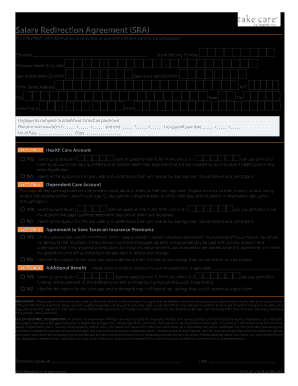
Filling out the Salary Redirection Agreement is an essential step in managing your benefits effectively. This guide will walk you through the process of completing the form online, ensuring that you understand each section and field required for enrollment.
Follow the steps to successfully complete your agreement.
- Press the ‘Get Form’ button to access the Salary Redirection Agreement and open it in the designated online editor.
- Begin by entering your employer's name and the last four digits of your Social Security number to help identify your record.
- Your employer will need to complete the plan year start and end dates, the number of pays, and the department code for processing your request.
- In OPTION 3, indicate whether you wish to save taxes on insurance premiums by selecting ‘YES’ or ‘NO’. If opting in, confirm that you understand how this affects your taxable income.
- Read the important section regarding the agreement terms and the use of your personal information. Ensure you comprehend how your data will be used.
- Finally, save your changes in the online editor. You may choose to download, print, or share the completed Salary Redirection Agreement as needed.
Complete your Salary Redirection Agreement online to ensure your benefits are processed correctly.
When requesting a salary increment, prepare a list of your accomplishments and contributions to the team. Schedule a meeting specifically focused on this topic, and bring up the Salary Redirection Agreement as a framework for discussing compensation. This format shows professionalism and indicates that you value a transparent discussion.