Loading
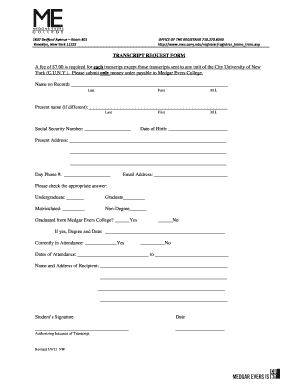
Get Medgar Evers Transcript Request
How it works
-

Open form follow the instructions
-

Easily sign the form with your finger
-

Send filled & signed form or save
How to fill out the Medgar Evers Transcript Request online
This guide will help you through the process of completing the Medgar Evers Transcript Request online. Follow the detailed steps to ensure that you provide all necessary information accurately and efficiently.
Follow the steps to complete your transcript request form
- Press the ‘Get Form’ button to access the transcript request form and open it in your browser or preferred document editor.
- Begin by entering your name as it appears on your academic records. Fill in your last name, first name, and middle initial.
- If your current name differs from the one on record, provide your present name details in the designated fields.
- Enter your Social Security number, as it is necessary for identification purposes.
- Indicate your date of birth to further verify your identity.
- Fill in your current address completely, including street, city, state, and zip code.
- Provide your daytime phone number and a valid email address where you can be contacted.
- Select your academic status by checking the appropriate box for undergraduate, graduate, matriculated, or non-degree.
- Indicate whether you graduated from Medgar Evers College by checking 'Yes' or 'No.' If 'Yes,' specify your degree and the date earned.
- State whether you are currently attending the institution by selecting 'Yes' or 'No.' If applicable, fill in your dates of attendance.
- Provide the name and complete address of the recipient for your transcript.
- Sign and date the form in the designated areas to authorize the issuance of your transcript.
- After filling in all the fields, review your form for accuracy. Save the changes, and then you can download, print, or share the completed form as needed.
Complete your Medgar Evers Transcript Request online today!
Downloading a transcript from Aspen is a straightforward process. First, log into your account on the Aspen site. Locate the transcript section, and you will find options for downloading or viewing your transcript. If you conduct a Medgar Evers Transcript Request through the right channels, you can often download your document directly to your device.