Loading
Get Gid 103
How it works
-

Open form follow the instructions
-

Easily sign the form with your finger
-

Send filled & signed form or save
How to fill out the Gid 103 online
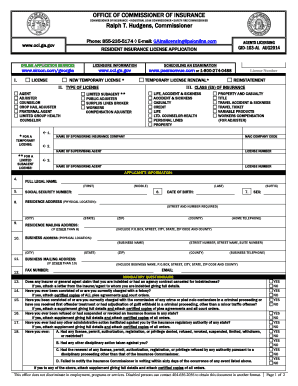
The Gid 103 form is a critical document for individuals seeking a resident insurance license. This guide provides detailed, step-by-step instructions on how to complete the form online, ensuring you provide all necessary information accurately.
Follow the steps to successfully complete the Gid 103 online.
- Use the ‘Get Form’ button to access the Gid 103 form and open it in your online editor.
- Select the type of license you are applying for from the provided options, such as agent, adjuster, or counselor. Make sure to check any applicable temporary or limited categories.
- Fill out the class(es) of insurance you wish to be licensed for. This may include life, property, or casualty, among others.
- Provide your full legal name in the designated fields, which include first, middle, and last name.
- Enter your social security number accurately as it is essential for processing your application.
- Complete your residence address, making sure to include the full physical location, including any requisite details such as street number and county.
- If your mailing address differs from your residence address, fill in the business mailing address section with your business details.
- Answer all mandatory questions in the questionnaire honestly, including any past issues regarding licensing or criminal history.
- Attach any required documents, such as certified copies related to legal matters, a notarized citizenship affidavit, or a clearance letter from another state if applicable.
- Confirm that all necessary documents are attached by checking the appropriate box before submission.
- Review your application one last time for accuracy, then submit it. You may have options to save any changes, download, print, or share the completed form.
Complete your Gid 103 application online today to ensure a smooth licensing process.
GID 1000 typically refers to a specific identifier within a system where it designates a standard user or administrative role. The exact implications can vary depending on the context in which it is used. To gain more insight into specific GID numbers, consider visiting our US Legal Forms platform, where we provide detailed explanations on various GID-related queries.