Loading
Get Gen 58
How it works
-

Open form follow the instructions
-

Easily sign the form with your finger
-

Send filled & signed form or save
How to fill out the Gen 58 online
Filling out the Gen 58 form is a vital step in designating a power of attorney for tax matters in North Carolina. This guide provides clear, step-by-step instructions for users who need assistance in completing this online form effectively.
Follow the steps to fill out the Gen 58 form online:
- Click ‘Get Form’ button to obtain the form and open it in the online editor.
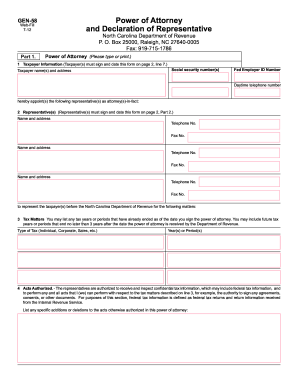
- In Part 1, enter the taxpayer information, including the taxpayer name(s), address, social security number(s), federal employer ID number, and daytime telephone number. Ensure this information is accurate, as it is critical for processing.
- List the representative(s) who will serve as attorney(s)-in-fact. For each representative, provide their name, address, telephone number, and fax number as required. Each representative must also sign and date the form on page 2, Part 2.
- Specify the tax matters for which the representatives are authorized to act. This includes listing any tax years or periods that are already ended, along with future tax years or periods lasting no longer than three years from the date the form is submitted.
- Detail the acts authorized under this power of attorney. Representatives are allowed to receive and inspect confidential tax information and perform all acts related to the specified tax matters. If there are specific additions or restrictions to these acts, list them in the provided space.
- If applicable, indicate whether your representative will create an e-Business Center account to perform online services on your behalf. Check the corresponding box provided.
- When ready, move to the Retention/Revocation section. The new power of attorney will revoke any prior powers of attorney unless you opt to retain them by checking the appropriate box and attaching a copy.
- Ensure all taxpayer(s) sign and date the form on page 2, confirming the designation of the power of attorney. Verify that the form is signed and dated; otherwise, it will be returned.
- In Part 2, representatives must complete the Declaration of Representative. They need to confirm their authority to represent the taxpayer and select their designation by marking one of the provided options.
- Finally, have the representative sign and date the Declaration of Representative. Officials in this section must provide their jurisdiction or enrollment card number.
- Once all sections are complete, you can save changes, download, print, or share the filled-out form as needed.
Complete the Gen 58 form online today to ensure your tax representation is properly established.
The time it takes to get a power of attorney in North Carolina can vary based on how quickly you finalize and execute the document. Typically, if you are using templates from US Legal Forms, the process can be completed in a few hours. However, if legal advice is needed, it may take longer. Overall, an organized approach will help expedite the process.