Get Ghana Revenue Authority Forms
How it works
-

Open form follow the instructions
-

Easily sign the form with your finger
-

Send filled & signed form or save
How to fill out the Ghana Revenue Authority forms online
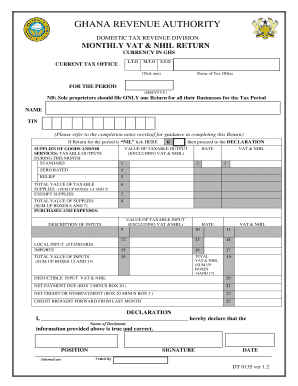
This guide aims to provide clear and concise instructions on how to successfully complete the Ghana Revenue Authority forms, specifically the Monthly VAT & NHIL Return, in an online environment. By following these steps, users will ensure accurate submissions for their tax obligations.
Follow the steps to fill out the Ghana Revenue Authority forms online effectively.
- Click ‘Get Form’ button to obtain the form and open it in the editor.
- Select the relevant current tax office by ticking the appropriate option from the choices provided.
- Provide your name and Taxpayer Identification Number (TIN) accurately as these are critical for identification.
- For taxable outputs during the month, fill in the values for standard supplies in Box 1 and any zero-rated supplies in Box 4.
- Complete Boxes 2 and 3 to detail the applicable VAT & NHIL rates and the total VAT & NHIL charged based on your inputs.
- Proceed to report your local purchases and inputs in Boxes 12 to 18, ensuring accurate inputs on applicable rates and VAT charges.
- Complete the declaration section with your name, designation, signature, and date, ensuring all provided information is truthful.
Complete your Ghana Revenue Authority forms online today to maintain compliance with tax regulations.
Filing taxes late in Ghana results in financial penalties that the Ghana Revenue Authority levies based on several factors, including the amount owed and the time elapsed since the deadline. Being aware of these consequences can motivate you to file your returns on time. If you find yourself behind, it is critical to complete your Ghana Revenue Authority Forms as soon as possible to minimize the penalties you face. Always keep track of tax timelines to stay ahead.