Loading
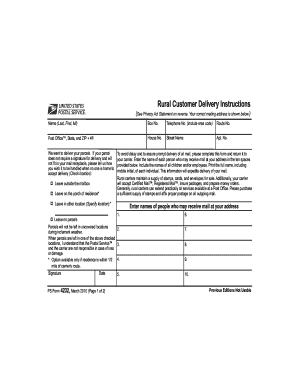
Get Rural Customer Delivery Instructions
How it works
-

Open form follow the instructions
-

Easily sign the form with your finger
-

Send filled & signed form or save
How to fill out the Rural Customer Delivery Instructions online
This guide provides clear and supportive instructions on how to fill out the Rural Customer Delivery Instructions online. By following these steps, users can ensure their parcel delivery preferences are properly communicated to their postal carrier.
Follow the steps to complete your Rural Customer Delivery Instructions form online.
- Press the ‘Get Form’ button to access the Rural Customer Delivery Instructions form and open it in your chosen editor.
- Begin by filling in your name in the format: Last, First, Middle Initial.
- Enter your box number in the designated field.
- Provide your telephone number, ensuring to include the area code.
- Input your route number in the specified section.
- Fill in your post office, state, and ZIP + 4 code accurately.
- Complete the house number and street name fields.
- If applicable, include your apartment number.
- Indicate your preferred delivery handling instructions by checking the appropriate box: 'Leave outside the mailbox', 'Leave on the porch of residence', or 'Leave in other location' (specify the location).
- List the names of each person who may receive mail at your address in the ten spaces provided, ensuring to include children and employees with full names.
- Acknowledge the delivery terms regarding parcels not being left in uncovered locations during inclement weather.
- Sign and date the form in the designated areas.
- Lastly, save your changes, download a copy, print, or share the completed form as needed.
Complete your Rural Customer Delivery Instructions online today to ensure your parcel delivery preferences are met.
USPS rural delivery is a service that provides mail and package delivery to residents in rural settings. This service can include unique delivery methods tailored to the needs of rural communities. Proper rural customer delivery instructions can greatly enhance your experience with USPS rural delivery, ensuring your packages arrive safely.