Loading
Form preview
  • US Legal Forms
  • Other Templates
  • More Forms
  • More Uncategorized Forms
  • Customs Form P 8210

Get Customs Form P 8210

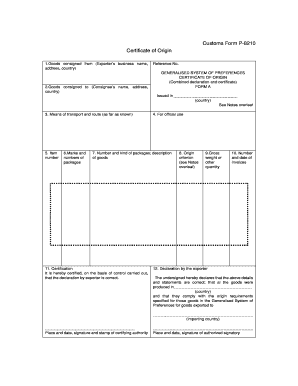
Customs Form P-8210 Certificate of Origin 1. Goods consigned from Exporter s business name address country country Reference No. GENERALISED SYSTEM OF PREFERENCES CERTIFICATE OF ORIGIN Combined declaration and certificate FORM A Issued in See Notes overleaf 3. Means of transport and route as far as known 5. Item number 6. Marks and numbers of packages 4. For official use 7. Number and kind of packages description of goods 11. Certification It is hereby certified on the basis of control carried out that the declaration by exporter is correct. 8. Origin criterion see Notes overleaf 9. Gross weight or other quantity 10. Number and date of invoices 12. Declaration by the exporter The undersigned hereby declares that the above details and statements are correct that al the goods were produced in and that they comply with the origin requirements specified for those goods in the Generalised System of Preferences for goods exported to importing country Place and date signature and stamp of cer....

How it works

  1. Open form

    Open form follow the instructions

  2. Easily sign form

    Easily sign the form with your finger

  3. Share form

    Send filled & signed form or save

How to fill out the Customs Form P 8210 online

Filling out the Customs Form P 8210 online can seem daunting, but with the right guidance, it becomes a straightforward task. This guide will provide clear, step-by-step instructions to help you complete the form accurately.

Follow the steps to complete the Customs Form P 8210 effectively.

  1. Click ‘Get Form’ button to obtain the form and access it in the relevant online platform.
  2. In the 'Goods consigned from' section, provide the exporter’s business name, complete address, and country of origin.
  3. In the 'Goods consigned to' section, enter the consignee’s name, address, and country.
  4. Record the reference number in the designated field to track the form.
  5. Describe the means of transport and route in the applicable section, including any details you might know.
  6. In the item number field, indicate the item numbers as they relate to the description of goods.
  7. List the marks and numbers of the packages in the corresponding section.
  8. Fill out the number and kind of packages, as well as a description of the goods in the designated area.
  9. Provide the origin criterion, referencing the notes provided on the form for accuracy.
  10. Indicate the gross weight or other quantities as specified for your shipment.
  11. Record the number and date of the invoices associated with the goods.
  12. Certify the form by signing and dating it in the designated ('Certification') area, ensuring you declare that all information is correct and that the goods comply with origin requirements.
  13. Finally, save your changes, and choose to download, print, or share the form as necessary.

Start completing your Customs Form P 8210 online today for a streamlined process.

Get form

Experience a faster way to fill out and sign forms on the web. Access the most extensive library of templates available.
Get form

Related content

U.S. Customs Service
PROPOSED COLLECTION; COMMENT REQUEST. RECORD OF VESSEL FOREIGN REPAIR OR EQUIPMENT...
Learn more
International Student Welcome Guide
This guide is intended to provide resources and helpful information for new international...
Learn more
Commercial Audio Series - 180MAx ...
8210 and order new pack material. (Do not ship your unit in a wood or metal ... When this...
Learn more

Related links form

Patient Agreement Form - Animal Ortho Care, LLC Flip-Flop Gymnastics Registration Form PEP Drug Replacement Form. Form To Request Replacement Post Exposure Prophylaxis Drugs. - Health Black Pond Vet

Questions & Answers

Get answers to your most pressing questions about US Legal Forms API.

Contact support

Yes, you need to fill out a Customs Form P 8210 if you are entering or leaving the U.S. with items that require declaration. This form helps customs officials monitor the movement of goods and ensure compliance with regulations. Even if you think your items do not need declaration, it's best to fill out the form for peace of mind. Using platforms like uslegalforms can clarify any uncertainties you may have.

When filling out your Customs Form P 8210 at the airport, ensure you have all necessary information easily accessible. You will need to include your travel details and a description of items you are bringing into the country. Take a moment to read through the form carefully to avoid mistakes. Most airports also provide assistance if you encounter any questions during the process.

There are several apps available to fill out your Customs Form P 8210, designed to enhance user experience. These applications often offer step-by-step guidance and real-time support as you complete the form. By using an app, you not only streamline the filling process but also have a checklist to ensure you do not miss any critical sections. Check your app store for recommended customs form applications.

Absolutely, you can complete your Customs Form P 8210 online. Many online platforms allow you to interactively fill out the form, making the process quicker and more efficient. By opting for an online method, you can easily correct any mistakes before submission. This convenience can save you time and effort at the airport.

When completing your Customs Form P 8210, you need to declare items such as gifts, food, currency, and personal belongings that exceed certain limits. It's crucial to accurately list all items to avoid any issues. Be honest and thorough in your declarations, as customs officers will inspect your luggage. Consulting uslegalforms can help clarify what needs to be declared.

Yes, US citizens must fill out a Customs Form P 8210 when traveling internationally. This form is essential for declaring any items you bring back into the country. Failing to complete this form can result in delays or penalties when passing through customs. It is important to understand the requirements to ensure a smooth re-entry.

Yes, you can fill out your Customs Form P 8210 online. Various platforms allow you to securely complete this form from the comfort of your home. Utilizing user-friendly interfaces, these services guide you through the required information seamlessly. This option simplifies the process while ensuring accuracy in your submission.

The customs form, including the Customs Form P 8210, should be placed in a visible location upon your arrival in the US. Typically, you will present this form to customs officials at your port of entry. Be sure to keep it accessible in your carry-on luggage for easy access during the customs process.

Yes, you can fill out a Japan customs form online in a similar way to the Customs Form P 8210. Various resources offer digital options for filling out customs documentation for Japan. This ensures that you meet the requirements of both the US and Japanese authorities efficiently.

To correctly fill out a customs form, such as the Customs Form P 8210, ensure you provide complete and precise information regarding your items. Start by listing your goods accurately and declare their value honestly. For detailed guidance, consider using platforms like USLegalForms, which offer tips and templates for successful completion.

Get This Form Now!

Use professional pre-built templates to fill in and sign documents online faster. Get access to thousands of forms.
Get form
If you believe that this page should be taken down, please follow our DMCA take down processhere.
Get Customs Form P 8210
Get form
  • Adoption
  • Bankruptcy
  • Contractors
  • Divorce
  • Home Sales
  • Employment
  • Identity Theft
  • Incorporation
  • Landlord Tenant
  • Living Trust
  • Name Change
  • Personal Planning
  • Small Business
  • Wills & Estates
  • Packages A-Z
  • Affidavits
  • Bankruptcy
  • Bill of Sale
  • Corporate - LLC
  • Divorce
  • Employment
  • Identity Theft
  • Internet Technology
  • Landlord Tenant
  • Living Wills
  • Name Change
  • Power of Attorney
  • Real Estate
  • Small Estates
  • Wills
  • All Forms
  • Forms A-Z
  • Other Templates
  • Legal Hub
  • About Us
  • Help Portal
  • Legal Resources
  • Blog
  • Affiliates
  • Contact Us
  • Delete My Account
  • Site Map
  • Industries
  • Forms in Spanish
  • Localized Forms
  • State-specific Forms
  • Forms Kit
  • Real Estate Handbook
  • All Guides
  • Notarize
  • Incorporation services
  • For Consumers
  • For Small Business
  • For Attorneys
  • USLegal
  • FormsPass
  • pdfFiller
  • signNow
  • altaFlow
  • DocHub
  • Instapage
Form Packages
  • Adoption
  • Bankruptcy
  • Contractors
  • Divorce
  • Home Sales
  • Employment
  • Identity Theft
  • Incorporation
  • Landlord Tenant
  • Living Trust
  • Name Change
  • Personal Planning
  • Small Business
  • Wills & Estates
  • Packages A-Z
Form Categories
  • Affidavits
  • Bankruptcy
  • Bill of Sale
  • Corporate - LLC
  • Divorce
  • Employment
  • Identity Theft
  • Internet Technology
  • Landlord Tenant
  • Living Wills
  • Name Change
  • Power of Attorney
  • Real Estate
  • Small Estates
  • Wills
  • All Forms
  • Forms A-Z
  • Other Templates
Customer Service
  • Legal Hub
  • About Us
  • Help Portal
  • Legal Resources
  • Blog
  • Affiliates
  • Contact Us
  • Delete My Account
  • Site Map
  • Industries
  • Forms in Spanish
  • Localized Forms
  • State-specific Forms
  • Forms Kit
Legal Guides
  • Real Estate Handbook
  • All Guides
Prepared for you
  • Notarize
  • Incorporation services
Our Customers
  • For Consumers
  • For Small Business
  • For Attorneys
Our Sites
  • USLegal
  • FormsPass
  • pdfFiller
  • signNow
  • altaFlow
  • DocHub
  • Instapage
Social Media
Call us now toll free:
+1 833 426 79 33
As seen in:
© Copyright 1999-2026 airSlate Legal Forms, Inc. 17 Station Street, Suite 303, Brookline, MA 02445
  • Your Privacy Choices
  • Terms of Service
  • Privacy Notice
  • Content Takedown Policy
  • Bug Bounty Program