Loading
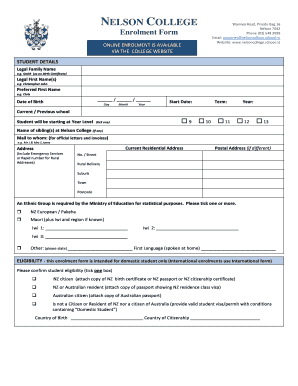
Get 11-nmmu-application-form-2018 - School Of Ict - Nelson Mandela...
How it works
-

Open form follow the instructions
-

Easily sign the form with your finger
-

Send filled & signed form or save
How to fill out the 11-NMMU-Application-Form-2018 - School Of ICT - Nelson Mandela online
Filling out the 11-NMMU-Application-Form-2018 online can be a straightforward process with the right guidance. This document provides a clear, step-by-step approach to ensure that users can complete their application efficiently and accurately.
Follow the steps to correctly complete your application form.
- Press the ‘Get Form’ button to retrieve the application form and open it in your online editor.
- Begin by entering your legal family name, as stated on your birth certificate, in the applicable field.
- Proceed to fill in your legal first name(s) in the designated area, ensuring all names are accurately represented.
- Indicate your preferred first name, if different from your legal first name, for personal identification.
- Input your date of birth by selecting the day, month, and year from the provided date fields.
- Specify the start date for your studies, including the term and year, in the corresponding fields.
- Provide the name of your current or previous school and indicate the year level you will be starting at by ticking one of the provided options (Year 9, 10, 11, 12, or 13).
- List any siblings who are currently enrolled at the institution, if applicable.
- Complete the current residential address section, ensuring you include all necessary details for emergency services.
- Indicate your postal address, if it differs from your residential address.
- Select your ethnic group, as required by the Ministry of Education for statistical purposes, and provide your first language.
- Confirm your eligibility as a domestic student by selecting the appropriate response and attaching the necessary documentation.
- Fill in the primary and secondary caregiver details, ensuring all contact information is accurate.
- Provide emergency contact information, making sure that the individual listed is someone who can be reached in case of an emergency.
- Answer any health information questions honestly. Include details about existing conditions, allergies, and any medications that may be required.
- Complete the learning support section if applicable, providing relevant details that the school should be aware of.
- Tick the boxes confirming that you have included all required documents with your enrolment form.
- Review the enrolment terms and conditions, and ensure that all sections are completed accurately. Sign where required.
- Once completed, save your changes, download a copy for your records, and submit the form as required.
Complete your 11-NMMU-Application-Form-2018 online today to secure your place!
If you find yourself unable to access your Nelson Mandela University account, unlocking it is a straightforward process. You can usually reset your password through the university's website by following the guided steps. Additionally, if you encounter issues, consider reaching out to the university support team for assistance. They can provide you with specific instructions to regain access to your account.
Industry-leading security and compliance
US Legal Forms protects your data by complying with industry-specific security standards.
-
In businnes since 199725+ years providing professional legal documents.
-
Accredited businessGuarantees that a business meets BBB accreditation standards in the US and Canada.
-
Secured by BraintreeValidated Level 1 PCI DSS compliant payment gateway that accepts most major credit and debit card brands from across the globe.