Loading
Get Paperlessemployee
How it works
-

Open form follow the instructions
-

Easily sign the form with your finger
-

Send filled & signed form or save
How to fill out the Paperlessemployee online
Filling out the Paperlessemployee form for direct deposit authorization is a straightforward process. This guide provides you with detailed instructions to ensure that you complete the form accurately and efficiently.
Follow the steps to complete your direct deposit authorization form online.
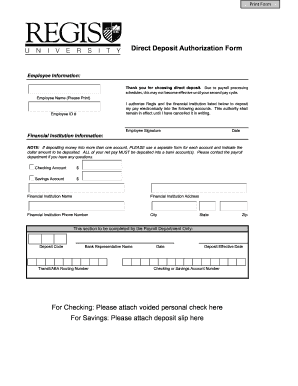
- Click ‘Get Form’ button to obtain the direct deposit authorization form and open it in your preferred digital editor.
- Begin by entering your employee information. Provide your name clearly, as you would like it to appear on official records. Include your Employee ID number, as this helps identify your payroll record.
- Next, authorize the financial institution by filling in the name of the bank or credit union where you want your pay deposited. Make sure to include the financial institution's address, phone number, city, state, and zip code.
- Indicate the amounts you want to deposit into each account. For checking and savings accounts, specify the dollar amount in the provided fields. Note that if you intend to deposit money into more than one account, you must complete a separate form for each account.
- Review the dropdown menu to select whether your deposit will go into a checking account or a savings account. Ensure that you attach the relevant documents: a voided check for checking accounts, or a deposit slip for savings accounts.
- Sign the form in the designated area to authorize the deposit. By signing, you confirm that you authorize your employer and the financial institution to electronically deposit your pay.
- Finally, enter the date of your signature. After completing all fields accurately, save your changes. You can then download, print, or share the completed form as needed.
Complete your direct deposit authorization form online today to ensure a smooth payroll experience.
To use the Paperlessemployee system, start by registering your account with your employer's platform, such as USLegalForms. After registration, you can easily access documents, receive notifications about updates, and manage your employment records all in one place. This user-friendly solution streamlines the entire process, making it easier for you to stay organized.