Loading
Get Cbdm Pathway Iii & V Cdm Credentialing Exam Application Employment Verification Form 2020
How it works
-

Open form follow the instructions
-

Easily sign the form with your finger
-

Send filled & signed form or save
How to fill out the CBDM Pathway III & V CDM Credentialing Exam Application Employment Verification Form online
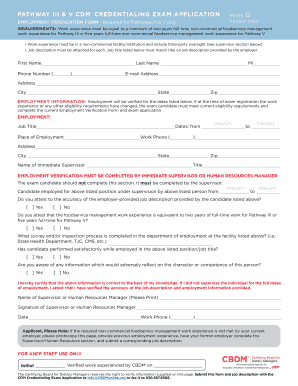
Completing the CBDM Pathway III & V CDM Credentialing Exam Application Employment Verification Form is a critical step in your credentialing journey. This guide provides detailed, step-by-step instructions to help you fill out the form accurately and efficiently.
Follow the steps to complete the Employment Verification Form successfully.
- Click ‘Get Form’ button to obtain the form and open it in the online editor.
- Begin by filling in your personal information in the designated fields, including your first name, last name, middle initial, phone number, email address, and address details.
- Proceed to the employment information section where you need to provide details about your work experience that meets the requirements for Pathway III or V. This includes your job title, employment dates, place of employment, and the work phone number.
- Your immediate supervisor or Human Resources manager must complete the verification section. Ensure that they fill in their name, title, and any relevant details regarding your employment and the accuracy of your job description.
- The supervisor must attest to the work experience, confirming if it meets the necessary criteria for Pathway III or V. They should respond to the questions related to your satisfactory performance and provide any inspection processes from the facility.
- Once the form is completed, ensure that all sections are filled out accurately and that your supervisor has signed and dated the form.
- After making sure all information is correct, you can save your changes, download the form, print it, or share it as required.
Complete your Employment Verification Form online today to move forward in your credentialing process.