Loading
Form preview
  • US Legal Forms
  • Form Library
  • Foreign Forms
  • Foreign Australia Other Forms
  • Au Dva D9166 2019

Get Au Dva D9166 2019

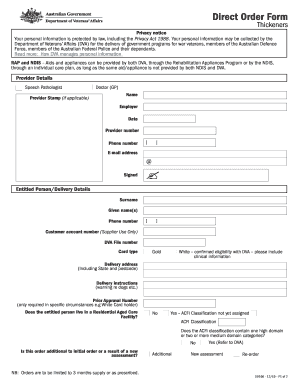
Terans Affairs (DVA) for the delivery of government programs for war veterans, members of the Australian Defence Force, members of the Australian Federal Police and their dependants. Read more: How DVA manages personal information RAP and NDIS Aids and appliances can be provided by both DVA, through the Rehabilitation Appliances Program or by the NDIS, through an individual care plan, as long as the same aid/appliance is not provided by both NDIS and DVA. Provider Details Speech Patholog.

How it works

  1. Open form

    Open form follow the instructions

  2. Easily sign form

    Easily sign the form with your finger

  3. Share form

    Send filled & signed form or save

How to fill out the AU DVA D9166 online

The AU DVA D9166 form is crucial for individuals seeking assistance with aids and appliances through the Department of Veterans’ Affairs. This guide will provide you with clear instructions on how to effectively complete this form online to ensure a smooth submission process.

Follow the steps to complete the AU DVA D9166 form online.

  1. Press the ‘Get Form’ button to obtain the AU DVA D9166 form and open it in your preferred editor.
  2. Begin with the provider details section. Fill in the name of the speech pathologist or doctor, their employer details, provider number, and phone number. If applicable, include the provider's stamp.
  3. Next, proceed to the entitled person and delivery details section. Enter the surname, given names, and relevant contact information for the entitled person, along with the customer account number and DVA file number.
  4. Indicate the card type by selecting either Gold or White and provide the delivery address, including state and postcode, along with any specific delivery instructions.
  5. Answer the questions regarding the entitled person’s residency status in a Residential Aged Care Facility, and if they require a specific ACFI classification.
  6. Clarify if this order is additional to an initial order or if it results from a new assessment, selecting one of the options as necessary.
  7. In the recommendations section, specify the item and level of thickness needed for the aids, daily usage, and the quantity required per month. Ensure the supply does not exceed a three-month period.
  8. Delete or adjust the follow-up plan as needed, ensuring any review dates are included.
  9. Once all sections are filled out, review the information for accuracy. You can then save your changes, download the completed form, print it, or share it with the required provider.

Begin filling out your AU DVA D9166 form online today to ensure you receive the assistance you need.

Get form

Experience a faster way to fill out and sign forms on the web. Access the most extensive library of templates available.

Related content

0001193125-15-414652.txt
... AU]$O:CAOCNURI^7)4:(1PW#2 M%,9["PE #HO A'Q_ ... DVA=*\+="\ZV+2%...
Learn more

Related links form

Professional Indemnity Insurance Proposal Form For Members Of The Institute Of Information APPLICATION FORM FOR ELECTION OF MANAGING COUNCIL - BPOGSb - Pogs Microsoft Prime Personal Development Seminar #1 - Father Peffley's Website - Fatherpeffley

Questions & Answers

Get answers to your most pressing questions about US Legal Forms API.

Contact support

To set up DVA, start by visiting the relevant government site and filling out initial forms that apply to your situation. Following the setup, you may need to gather additional documentation for verification. If you want a smoother experience dealing with AU DVA D9166, consider using US Legal Forms to ensure you have the right forms and guidance at every step.

DVA paperwork refers to the various forms and documents required by the Department of Veterans Affairs. This paperwork helps veterans apply for benefits, file claims, and access services related to their service. If you're navigating your DVA requirements, consider looking into the AU DVA D9166 to streamline the process and clarify any needed paperwork.

A DVA file number usually consists of a mix of letters and numbers, structured in a specific way. Typically, it starts with the letter 'D', followed by a combination of digits that identify your record. Ensuring you have the correct DVA file number is crucial for accessing services like AU DVA D9166 efficiently.

Opening a DVA account involves visiting the official Department of Veterans Affairs (DVA) website. You will need to provide basic information like your name and contact details. After submitting your application, you'll receive confirmation of your account. This DVA account will be essential for accessing the AU DVA D9166 features.

To set up an Nidirect account, visit the Nidirect website and click on the registration link. Fill in your personal details, including email and password. Once you submit your information, verify your account through the email they send you. This account will help you manage services like AU DVA D9166 easily.

Get This Form Now!

Use professional pre-built templates to fill in and sign documents online faster. Get access to thousands of forms.
If you believe that this page should be taken down, please follow our DMCA take down processhere.

Industry-leading security and compliance

US Legal Forms protects your data by complying with industry-specific security standards.
  • In businnes since 1997
    25+ years providing professional legal documents.
  • Accredited business
    Guarantees that a business meets BBB accreditation standards in the US and Canada.
  • Secured by Braintree
    Validated Level 1 PCI DSS compliant payment gateway that accepts most major credit and debit card brands from across the globe.
Get AU DVA D9166
  • Adoption
  • Bankruptcy
  • Contractors
  • Divorce
  • Home Sales
  • Employment
  • Identity Theft
  • Incorporation
  • Landlord Tenant
  • Living Trust
  • Name Change
  • Personal Planning
  • Small Business
  • Wills & Estates
  • Packages A-Z
  • Affidavits
  • Bankruptcy
  • Bill of Sale
  • Corporate - LLC
  • Divorce
  • Employment
  • Identity Theft
  • Internet Technology
  • Landlord Tenant
  • Living Wills
  • Name Change
  • Power of Attorney
  • Real Estate
  • Small Estates
  • Wills
  • All Forms
  • Forms A-Z
  • Form Library
  • Legal Hub
  • About Us
  • Help Portal
  • Legal Resources
  • Blog
  • Affiliates
  • Contact Us
  • Delete My Account
  • Site Map
  • Industries
  • Forms in Spanish
  • Localized Forms
  • State-specific Forms
  • Forms Kit
  • Real Estate Handbook
  • All Guides
  • Notarize
  • Incorporation services
  • For Consumers
  • For Small Business
  • For Attorneys
  • USLegal
  • FormsPass
  • pdfFiller
  • signNow
  • altaFlow
  • DocHub
  • Instapage
Form Packages
  • Adoption
  • Bankruptcy
  • Contractors
  • Divorce
  • Home Sales
  • Employment
  • Identity Theft
  • Incorporation
  • Landlord Tenant
  • Living Trust
  • Name Change
  • Personal Planning
  • Small Business
  • Wills & Estates
  • Packages A-Z
Form Categories
  • Affidavits
  • Bankruptcy
  • Bill of Sale
  • Corporate - LLC
  • Divorce
  • Employment
  • Identity Theft
  • Internet Technology
  • Landlord Tenant
  • Living Wills
  • Name Change
  • Power of Attorney
  • Real Estate
  • Small Estates
  • Wills
  • All Forms
  • Forms A-Z
  • Form Library
Customer Service
  • Legal Hub
  • About Us
  • Help Portal
  • Legal Resources
  • Blog
  • Affiliates
  • Contact Us
  • Delete My Account
  • Site Map
  • Industries
  • Forms in Spanish
  • Localized Forms
  • State-specific Forms
  • Forms Kit
Legal Guides
  • Real Estate Handbook
  • All Guides
Prepared for you
  • Notarize
  • Incorporation services
Our Customers
  • For Consumers
  • For Small Business
  • For Attorneys
Our Sites
  • USLegal
  • FormsPass
  • pdfFiller
  • signNow
  • altaFlow
  • DocHub
  • Instapage
Social Media
Call us now toll free:
+1 833 426 79 33
As seen in:
© Copyright 1999-2026 airSlate Legal Forms, Inc. 3720 Flowood Dr, Flowood, Mississippi 39232
  • Your Privacy Choices
  • Terms of Service
  • Privacy Notice
  • Content Takedown Policy
  • Bug Bounty Program
AU DVA D9166
This form is available in several versions.
Select the version you need from the drop-down list below.
2020 AU DVA D9166
Select form
  • 2020 AU DVA D9166
  • 2019 AU DVA D9166
  • 2014 AU DVA D9166
Select form