Loading
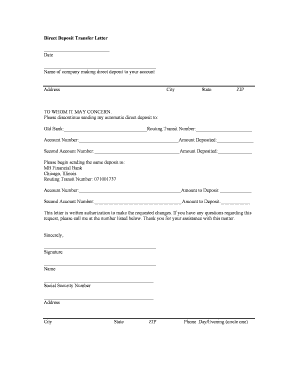
Get Mb Financial Direct Deposit
How it works
-

Open form follow the instructions
-

Easily sign the form with your finger
-

Send filled & signed form or save
How to fill out the Mb Financial Direct Deposit online
Filling out the Mb Financial Direct Deposit form is an important step in ensuring that your deposits are correctly directed to your preferred account. This guide provides clear and concise instructions to help you complete the form successfully.
Follow the steps to complete the form accurately.
- Click ‘Get Form’ button to obtain the form and open it in the editor.
- Enter the date at the top of the form in the designated field. This should reflect the current date when you are filling out the document.
- In the next section, specify the name of the company that makes automatic deposits to your account. This must be clearly written to ensure proper identification.
- Fill out the company’s address, including the street address, city, state, and ZIP code. Accurate details help in seamlessly processing your request.
- Under the header 'To whom it may concern,' indicate that you want to discontinue your direct deposit to your old bank. Fill in the old bank name along with the routing transit number and account number.
- List the amounts being deposited into the specified old account(s). If there are multiple accounts, include all relevant information.
- Next, provide the information for the new direct deposit at MB Financial Bank. Fill in the routing transit number (071001737) and your account number for this new deposit.
- Specify the amount to be deposited into your MB Financial account. If you have a second account, repeat the entry for that account as well.
- Sign the form in the designated field. Your signature authorizes the changes requested within this document.
- Enter your name, social security number, address, city, state, ZIP code, and a contact phone number, indicating whether it is a daytime or evening number.
- Once all fields are completed, review the document for accuracy. Save changes to the form, and if necessary, download, print, or share it to submit your request.
Complete your documents online for efficient processing and management.
In the context of the Mb Financial Direct Deposit form, 'calculation' typically refers to determining the amounts you wish to deposit into different accounts if you are splitting your deposit. This could mean allocating a certain percentage to savings and the rest to checking. Understanding how to calculate these amounts can help you manage your finances more effectively, ensuring you meet your savings goals.