Loading
Form preview
  • US Legal Forms
  • Form Library
  • More Forms
  • More Uncategorized Forms
  • Efirstbank Login

Get Efirstbank Login

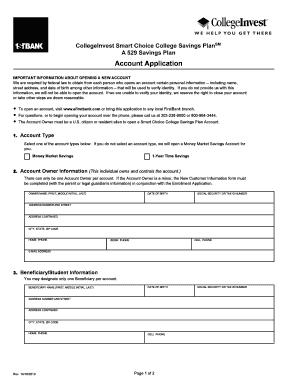
Account Application IMPORTANT INFORMATION ABOUT OPENING A NEW ACCOUNT We are required by federal law to obtain from each person who opens an account certain personal information -- including name,.

How it works

  1. Open form

    Open form follow the instructions

  2. Easily sign form

    Easily sign the form with your finger

  3. Share form

    Send filled & signed form or save

How to fill out the Efirstbank Login online

Understanding how to properly fill out the Efirstbank Login form is essential for users opening a new account. This guide will help you navigate through each section of the form, ensuring you provide the necessary information clearly and accurately.

Follow the steps to fill out the Efirstbank Login form successfully.

  1. Click 'Get Form' button to obtain the form and open it in the editor.
  2. Select the account type by checking one of the options provided. If no selection is made, a Money Market Savings Account will be opened automatically.
  3. Fill in the Account Owner information. Ensure the following fields are completed: owner name (first, middle initial, last), date of birth, social security or tax ID number, address (number and street), address continued, city, state, ZIP code, home phone, cell phone, work phone, and e-mail address.
  4. Designate a Beneficiary for the account. Fill in the required beneficiary's information: name (first, middle initial, last), date of birth, address (number and street), address continued, city, state, ZIP code, home phone, cell phone, and social security or tax ID number.
  5. (Optional) Provide information for a Successor Account Owner. Include their name (first, middle initial, last), date of birth, and social security or tax ID number. Remember that only one Successor Account Owner can be designated.
  6. Indicate the type of contribution by checking the applicable sources. Specify the amount for each type of contribution, whether it be a regular contribution, direct transfer, or indirect rollover.
  7. Read through the authorization section carefully. By signing the form, you confirm that all information provided is true, complete, and that you agree to the terms set forth in the Plan Disclosure Statement. Ensure that the signature is included along with the date, and if the account owner is under 18, a parent or legal guardian must sign.
  8. After completing all sections, review the form for accuracy. Finally, save changes, download, print, or share the form as necessary.

Start filling out your documents online now for an efficient experience.

Get form

Experience a faster way to fill out and sign forms on the web. Access the most extensive library of templates available.
Get form

Related content

OCC Appoints Seven New Members to Minority...
Mar 18, 2021 — The Office of the Comptroller of the Currency (OCC) today named seven new...
Learn more
COMMERCIAL AND RETAIL BANKING ASSOCIATIONS, ...
With more than 4,800 ATMS, 3,088 branch locations, 24-hour phone support and mobile and...
Learn more
Citigroup - Global Energy Monitor
Jun 7, 2021 — Global Energy Monitor. Log in.Read more
Learn more

Related links form

State V Alexander Trial Advocacy Building Specifications And Allowances - Frontier Custom Builders BW-9b Vendor Registration For Business - Tulsa Public Schools - Tulsaschools Transformation Homework

Questions & Answers

Get answers to your most pressing questions about US Legal Forms API.

Contact support

To access open banking, you typically need to check if your bank, like Efirstbank, offers this option. Visit the Efirstbank Login section and look for information about their open banking services. You can also explore additional options through platforms like uslegalforms, where you can find relevant tools and support incorporating open banking into your financial management.

To find your First National Bank user ID, head to the Efirstbank Login page and click on the recovery options available. Input the required personal details to verify your account ownership. Once you've completed this step, your user ID will be sent to you via your registered communication channel.

You can find your FirstBank username by visiting the Efirstbank Login area and selecting the 'Forgot Username?' link. Enter the necessary personal information as requested to validate your identity. Once verified, you will receive your username through email or text.

To recover your FNB online banking username, navigate to the Efirstbank Login portal and select the recovery option. You may need to enter your email address or phone number associated with your account for verification. After this, you will receive instructions on how to retrieve your username securely.

If you forget your bank username, you can typically recover it by going to the Efirstbank Login page and selecting the 'Forgot Username' link. Follow the prompts and provide any required identification details. This process usually involves verifying your identity to ensure your account's security.

To create a net banking login, navigate to the FirstBank website and find the online banking registration section. Here, follow the instructions carefully, providing your personal and banking information. You’ll be prompted to create your login credentials, including a username and password. After successful registration, you can enjoy online banking features.

Logging in to IDFC FirstBank is simple. Visit the IDFC FirstBank homepage and look for the login section, which typically features the Efirstbank Login link. Enter your customer ID and password. If the credentials are accurate, you will successfully access your account and all associated services.

Creating a login ID for net banking is straightforward with Efirstbank Login. Start by visiting the FirstBank website and locating the net banking enrollment section. Fill in the required information, and during this process, you will be prompted to create a unique login ID. Once completed, you will have your login ID ready for future access.

Creating a username for online banking starts with accessing the Efirstbank Login page. During the registration process, you will have the option to choose your username. Make it unique but easy to remember, while adhering to any specified guidelines. After creating your username, you'll use it alongside your password to log in.

If you need to reset your FirstBank user ID, begin by visiting the FirstBank online banking site. Look for the 'Forgot User ID' link associated with Efirstbank Login. Follow the instructions provided, which will guide you through verifying your identity and obtaining your user ID. If you encounter any issues, reach out to customer support for assistance.

Get This Form Now!

Use professional pre-built templates to fill in and sign documents online faster. Get access to thousands of forms.
Get form
If you believe that this page should be taken down, please follow our DMCA take down processhere.
Get Efirstbank Login
Get form
  • Adoption
  • Bankruptcy
  • Contractors
  • Divorce
  • Home Sales
  • Employment
  • Identity Theft
  • Incorporation
  • Landlord Tenant
  • Living Trust
  • Name Change
  • Personal Planning
  • Small Business
  • Wills & Estates
  • Packages A-Z
  • Affidavits
  • Bankruptcy
  • Bill of Sale
  • Corporate - LLC
  • Divorce
  • Employment
  • Identity Theft
  • Internet Technology
  • Landlord Tenant
  • Living Wills
  • Name Change
  • Power of Attorney
  • Real Estate
  • Small Estates
  • Wills
  • All Forms
  • Forms A-Z
  • Form Library
  • Legal Hub
  • About Us
  • Help Portal
  • Legal Resources
  • Blog
  • Affiliates
  • Contact Us
  • Delete My Account
  • Site Map
  • Industries
  • Forms in Spanish
  • Localized Forms
  • State-specific Forms
  • Forms Kit
  • Real Estate Handbook
  • All Guides
  • Notarize
  • Incorporation services
  • For Consumers
  • For Small Business
  • For Attorneys
  • USLegal
  • FormsPass
  • pdfFiller
  • signNow
  • altaFlow
  • DocHub
  • Instapage
Form Packages
  • Adoption
  • Bankruptcy
  • Contractors
  • Divorce
  • Home Sales
  • Employment
  • Identity Theft
  • Incorporation
  • Landlord Tenant
  • Living Trust
  • Name Change
  • Personal Planning
  • Small Business
  • Wills & Estates
  • Packages A-Z
Form Categories
  • Affidavits
  • Bankruptcy
  • Bill of Sale
  • Corporate - LLC
  • Divorce
  • Employment
  • Identity Theft
  • Internet Technology
  • Landlord Tenant
  • Living Wills
  • Name Change
  • Power of Attorney
  • Real Estate
  • Small Estates
  • Wills
  • All Forms
  • Forms A-Z
  • Form Library
Customer Service
  • Legal Hub
  • About Us
  • Help Portal
  • Legal Resources
  • Blog
  • Affiliates
  • Contact Us
  • Delete My Account
  • Site Map
  • Industries
  • Forms in Spanish
  • Localized Forms
  • State-specific Forms
  • Forms Kit
Legal Guides
  • Real Estate Handbook
  • All Guides
Prepared for you
  • Notarize
  • Incorporation services
Our Customers
  • For Consumers
  • For Small Business
  • For Attorneys
Our Sites
  • USLegal
  • FormsPass
  • pdfFiller
  • signNow
  • altaFlow
  • DocHub
  • Instapage
Social Media
Call us now toll free:
+1 833 426 79 33
As seen in:
© Copyright 1999-2026 airSlate Legal Forms, Inc. 17 Station Street, Suite 303, Brookline, MA 02445
  • Your Privacy Choices
  • Terms of Service
  • Privacy Notice
  • Content Takedown Policy
  • Bug Bounty Program