Loading
Form preview
  • US Legal Forms
  • Other Templates
  • More Forms
  • More Uncategorized Forms
  • Usaa Title Department

Get Usaa Title Department

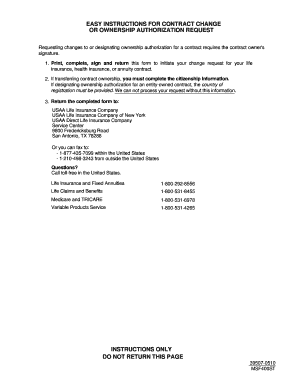
Complete, sign and return this form to initiate your change request for your life insurance, health insurance, or annuity contract. 2. If transferring contract ownership, you must complete the citizenship information. If designating ownership authorization for an entity-owned contract, the country of registration must be provided. We can not process your request without this information. 3. Return the completed form to: USAA Life Insurance Company USAA Life Insurance Company of New York USAA Di.

How it works

  1. Open form

    Open form follow the instructions

  2. Easily sign form

    Easily sign the form with your finger

  3. Share form

    Send filled & signed form or save

How to fill out the Usaa Title Department online

Filling out the Usaa Title Department form is a straightforward process designed to help you request changes for your life insurance, health insurance, or annuity contract. This guide aims to provide you with clear and concise steps to complete the form efficiently.

Follow the steps to successfully complete your form submission.

  1. Click ‘Get Form’ button to obtain the form and open it in your preferred format for editing.
  2. Begin by filling in your current contract information, including your name as the contract owner, contract number, daytime phone number, date of birth, and your USAA number. Ensure that all fields are completed accurately.
  3. If you are adding a successor owner, provide their details, including their name, mailing address, physical address, date of birth, and taxpayer identification number if applicable. Be sure to mark their citizenship status as U.S., resident alien, or non-resident alien.
  4. In the revised contract information section, state the specific changes you wish to request regarding the contract ownership. If the successor is an entity, submit the Ownership Authorization Form as required.
  5. Complete the certification section by providing your taxpayer identification number and confirming that you are not subject to backup withholding, if applicable. Read the certification instructions carefully.
  6. Ensure all required signatures are included. The current contract owner, successor owner, and any irrevocable beneficiary or collateral assignee must sign and date the form.
  7. Once all information is accurate and complete, you can save the changes you made. You may then download, print, or share the completed form as necessary.

Get started and complete your documents online today.

Get form

Experience a faster way to fill out and sign forms on the web. Access the most extensive library of templates available.
Get form

Related content

e-Title Certified Lienholders*
USAA Federal Savings Bank. 74639373900. PO Box 25145. Lehigh Valley. PA. 180025145...
Learn more
Education at Work for USAA Employees
USAA employees now have the opportunity to earn a college degree online at the University...
Learn more
Annual Report
Apr 25, 2007 — We offer investors a contemporary, full-service approach to build and...
Learn more

Related links form

Motor Baccidentb Claim Bformb - MRA Insurance Brokers - Mrabrokers Co SOLLICITUD REGISTRO DE ENTRADA REGISTRE DENTRADA SOLICITUD - Chguv San Gva Kalim Resort RESERVATION FORM - Bcdd2016bbpharmacybbpsubbacbbthb - Cdd2016 Pharmacy Psu Ac PERSON SPECIFICATION And ASSESSMENT FORM Candidate Name Post Title Care Assistant Service Social

Questions & Answers

Get answers to your most pressing questions about US Legal Forms API.

Contact support

The fax number for the USAA Title Department is 210-531-2282. If you need to send documents or inquiries, you can use this number to ensure your materials reach the right place. For additional assistance or to streamline your title-related tasks, you might want to explore uslegalforms, as they offer various solutions to simplify your title needs.

An F rating on the BBB suggests significant issues with customer satisfaction and responsiveness. While this is concerning, it’s essential to recognize that the USAA Title Department is working to enhance its reputation and resolve outstanding issues. To ensure positive outcomes, customers may want to consider using uslegalforms, which can guide you through any challenges you may face.

USAA has faced downgrades due to increased complaints and service challenges. The USAA Title Department is making efforts to turn this around by prioritizing customer feedback and implementing necessary reforms. These changes are designed to improve trust and satisfaction among their users.

An F rating from the Better Business Bureau generally indicates a company has a history of unresolved complaints. However, the USAA Title Department aims to provide the best service possible, working diligently to address any issues that may arise. If you have concerns about your service, consider reaching out to uslegalforms, which can assist in navigating any complications.

Recently, USAA has been undergoing organizational changes to improve customer service and streamline operations. The USAA Title Department is also a part of these changes, focusing on enhancing efficiency and quicker processing times. As a result, customers may notice improved services and enhanced communication.

USAA currently holds an A++ rating from A.M. Best, highlighting their financial strength and reliability in the industry. When it comes to the USAA Title Department, their commitment to customer service reflects this strong rating. Customers can trust that their title needs will be handled with expertise and professionalism.

The time it takes for USAA to review documents can vary based on the type of document submitted. Typically, you can expect a response within a few business days. To expedite the process, ensure that your documents are complete and submitted via the USAA Title Department's preferred channels.

Verifying your identity with USAA is essential for accessing your account securely. You can complete the process through their online platform by providing necessary personal information and answering security questions. Once confirmed, you can efficiently access services related to the USAA Title Department and enjoy all member benefits.

Sending documents through USAA is straightforward. You can upload them directly in your online account or mobile app, which is a fast and secure method. Alternatively, you may also choose to mail or fax your documents if you prefer traditional methods. Just ensure you follow USAA's requirements for document submissions.

USAA does not provide a standard email address for general inquiries. Instead, they encourage members to utilize their secure messaging system for questions. By using this feature, your message finds its way to the appropriate department, such as the USAA Title Department, for a faster response.

Get This Form Now!

Use professional pre-built templates to fill in and sign documents online faster. Get access to thousands of forms.
Get form
If you believe that this page should be taken down, please follow our DMCA take down processhere.
Get Usaa Title Department
Get form
  • Adoption
  • Bankruptcy
  • Contractors
  • Divorce
  • Home Sales
  • Employment
  • Identity Theft
  • Incorporation
  • Landlord Tenant
  • Living Trust
  • Name Change
  • Personal Planning
  • Small Business
  • Wills & Estates
  • Packages A-Z
  • Affidavits
  • Bankruptcy
  • Bill of Sale
  • Corporate - LLC
  • Divorce
  • Employment
  • Identity Theft
  • Internet Technology
  • Landlord Tenant
  • Living Wills
  • Name Change
  • Power of Attorney
  • Real Estate
  • Small Estates
  • Wills
  • All Forms
  • Forms A-Z
  • Other Templates
  • Legal Hub
  • About Us
  • Help Portal
  • Legal Resources
  • Blog
  • Affiliates
  • Contact Us
  • Delete My Account
  • Site Map
  • Industries
  • Forms in Spanish
  • Localized Forms
  • State-specific Forms
  • Forms Kit
  • Real Estate Handbook
  • All Guides
  • Notarize
  • Incorporation services
  • For Consumers
  • For Small Business
  • For Attorneys
  • USLegal
  • FormsPass
  • pdfFiller
  • signNow
  • altaFlow
  • DocHub
  • Instapage
Form Packages
  • Adoption
  • Bankruptcy
  • Contractors
  • Divorce
  • Home Sales
  • Employment
  • Identity Theft
  • Incorporation
  • Landlord Tenant
  • Living Trust
  • Name Change
  • Personal Planning
  • Small Business
  • Wills & Estates
  • Packages A-Z
Form Categories
  • Affidavits
  • Bankruptcy
  • Bill of Sale
  • Corporate - LLC
  • Divorce
  • Employment
  • Identity Theft
  • Internet Technology
  • Landlord Tenant
  • Living Wills
  • Name Change
  • Power of Attorney
  • Real Estate
  • Small Estates
  • Wills
  • All Forms
  • Forms A-Z
  • Other Templates
Customer Service
  • Legal Hub
  • About Us
  • Help Portal
  • Legal Resources
  • Blog
  • Affiliates
  • Contact Us
  • Delete My Account
  • Site Map
  • Industries
  • Forms in Spanish
  • Localized Forms
  • State-specific Forms
  • Forms Kit
Legal Guides
  • Real Estate Handbook
  • All Guides
Prepared for you
  • Notarize
  • Incorporation services
Our Customers
  • For Consumers
  • For Small Business
  • For Attorneys
Our Sites
  • USLegal
  • FormsPass
  • pdfFiller
  • signNow
  • altaFlow
  • DocHub
  • Instapage
Social Media
Call us now toll free:
+1 833 426 79 33
As seen in:
© Copyright 1999-2026 airSlate Legal Forms, Inc. 17 Station Street, Suite 303, Brookline, MA 02445
  • Your Privacy Choices
  • Terms of Service
  • Privacy Notice
  • Content Takedown Policy
  • Bug Bounty Program