Loading
Get First Script Gallagher Bassett
How it works
-

Open form follow the instructions
-

Easily sign the form with your finger
-

Send filled & signed form or save
How to fill out the First Script Gallagher Bassett online
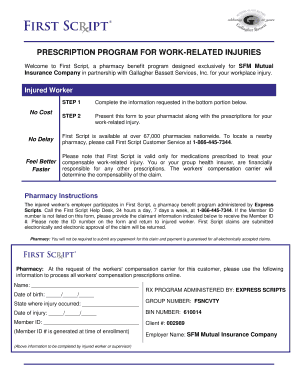
This guide provides clear instructions on how to efficiently complete the First Script Gallagher Bassett online form, which is essential for managing prescription benefits for work-related injuries. Follow the detailed steps to ensure accurate and timely submission.
Follow the steps to complete the First Script Gallagher Bassett form online
- Click the ‘Get Form’ button to access and open the First Script Gallagher Bassett form.
- Fill in the required information in the designated fields, including your date of birth and details about your work-related injury.
- Enter the state where the injury occurred and the date of injury in the appropriate sections of the form.
- Input your Member ID and the Group Number (FSNCVTY) as instructed. This information is essential for processing your claim.
- If needed, provide any other details requested by the form, and double-check for accuracy to avoid any processing delays.
- Once you have completed the form, save the changes and download a copy for your records.
- Present the completed form to your pharmacist along with any prescriptions related to your work-related injury.
- You may choose to print or share the form as necessary, ensuring you have a copy for your documentation.
Complete your First Script Gallagher Bassett form online today to expedite your prescription processing.
To send an invoice to Gallagher Bassett, you'll typically need to follow their designated submission process. Ensure that your documents are correctly formatted and complete to avoid any delays. If you are unsure, First Script Gallagher Bassett can provide guidance on how to submit invoices properly, ensuring smooth transactions.