Loading
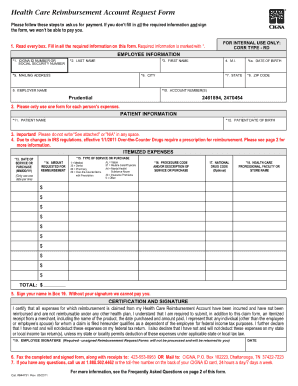
Get Cigna Reimbursement Form
How it works
-

Open form follow the instructions
-

Easily sign the form with your finger
-

Send filled & signed form or save
How to fill out the Cigna Reimbursement Form online
The Cigna Reimbursement Form allows users to request reimbursement for eligible medical expenses. Filling out the form accurately is crucial to ensure a smooth reimbursement process.
Follow the steps to complete your form effectively.
- Press the ‘Get Form’ button to access the Cigna Reimbursement Form and open it in your chosen editor.
- Begin by entering your personal information, including your full name, address, and contact details. This ensures your request is processed correctly and efficiently.
- Next, provide your Cigna member ID number. This number is essential for identifying your account and processing your reimbursement.
- In the expense details section, list the services you are requesting reimbursement for. Be specific and include dates, descriptions, and amounts for each expense.
- Attach any required documentation, such as receipts or explanation of benefits (EOB). Ensure that these documents are clear and legible to avoid delays.
- Review all the information you have provided for accuracy. Double-check that your member ID and expense details are correct to prevent processing issues.
- Finally, save your changes. You can download, print, or share the completed form as needed to submit your reimbursement request.
Start your online process today by filling out the Cigna Reimbursement Form.
Filling out a reimbursement claim form requires precision. Start with the Cigna Reimbursement Form, writing your personal details clearly. Itemize the services provided, detailing costs and dates. Double-check your information before submission, as accurate forms lead to faster processing and reimbursement.