Loading
Form preview
  • US Legal Forms
  • Form Library
  • More Forms
  • More Uncategorized Forms
  • Immunization Record Form

Get Immunization Record Form

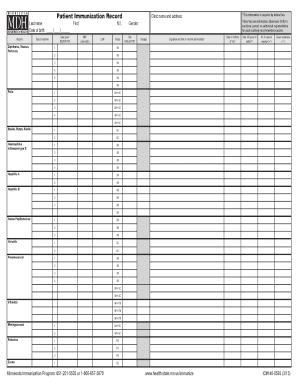
Last name: First: Date of birth: / / Vaccine Diphtheria, Tetanus, Pertussis: DTaP/DTP DTaP-Hib/DTP-Hib DTaP-IPV DTaP-IPV-Hep B DTaP-IPV-Hib DT-pediatric (10 yrs) Td ( 7 yrs) TT ( 7 yrs) Polio: IPV.

How it works

  1. Open form

    Open form follow the instructions

  2. Easily sign form

    Easily sign the form with your finger

  3. Share form

    Send filled & signed form or save

How to fill out the Immunization Record Form online

The Immunization Record Form is an essential document for tracking vaccinations. Filling it out online can streamline the process, ensuring accurate and organized record-keeping. This guide provides you with step-by-step instructions to complete the form effectively.

Follow the steps to fill out the Immunization Record Form online.

  1. Press the ‘Get Form’ button to access the Immunization Record Form, and open it in the online editor.
  2. Begin by entering the last name and first name of the individual receiving the immunization. Ensure accuracy in spelling to maintain a reliable record.
  3. Input the date of birth in the required format (MM/DD/YYYY). This information helps verify the age and eligibility for specific vaccines.
  4. For each vaccine administered, indicate the type of vaccine given, such as Diphtheria, Tetanus, or Pertussis. Include the date the vaccine was administered in the corresponding field.
  5. Fill out the site of administration by specifying which arm or leg was used, using the appropriate abbreviations (e.g., RA for right arm, LA for left arm).
  6. Record the dosage administered as required. Each vaccine field will have a space for this; please ensure it corresponds with the number of vaccines received.
  7. Provide the name, title, and clinic address of the vaccine administrator. This ensures proper accreditation and record-keeping.
  8. Indicate if the patient has a history of vaccine reactions by checking the appropriate box. If the patient has received vaccinations elsewhere, be sure to note this as well.
  9. Once all fields are filled out, review the entire form for completeness and accuracy. Ensuring all information is correct avoids future complications.
  10. Finally, save changes to the document. You can then download, print, or share the Immunization Record Form as needed.

Start completing your Immunization Record Form online today for easy management of vaccination records.

Get form

Experience a faster way to fill out and sign forms on the web. Access the most extensive library of templates available.
Get form

Related content

REQUEST FOR COPY OF NJIIS IMMUNIZATION RECORD
I hereby authorize the New Jersey Department of Health to release a copy of the NJIIS...
Learn more
AAMC Standardized Immunization Form
Results of the last two TSTs or one IGRA blood test are required regardless of prior BCG...
Learn more
White Paper on Studying the Safety of the...
In contrast, lack of vaccination records in the EHR may also be due to missing...
Learn more

Related links form

Bangla Sec Assemblage Syllabique Oxidation Reduction Worksheet Darling Primary School

Questions & Answers

Get answers to your most pressing questions about US Legal Forms API.

Contact support

An example of immunization includes vaccinations like the measles, mumps, and rubella (MMR) vaccine or the flu vaccine. Each of these immunizations helps protect individuals and communities from infectious diseases. When you receive an immunization, it is critical to document it in the immunization record form for future reference and health tracking.

After administering a vaccine, the nurse should include the details in the medication administration record along with the completed Immunization Record Form. This documentation should capture the date, type of vaccine, dosage, and any specific observations made during the administration. This thorough record-keeping enhances patient safety and supports ongoing healthcare management.

To document injection administration, utilize the Immunization Record Form to capture key information. Include the vaccine type, administration date, your signature, and any relevant comments about the patient’s response. Proper documentation ensures a clear vaccination record and provides essential information for future healthcare decisions.

The quickest way to obtain your immunization records is to request them directly from the healthcare provider who administered the vaccinations. You can often do this online through patient portals. If your immunization records are in the form of an official Immunization Record Form, you should receive them promptly to meet your needs.

You document the administration of an immunization on the Immunization Record Form, which is available at various healthcare facilities and online. This form should be kept in the patient's health file for easy access and referencing in the future. Additionally, this documentation might also be submitted to local or state health departments if required.

You can document the administration of the immunization using the Immunization Record Form, which serves as an official record. Make sure to include your title, the patient's information, and the vaccine details. This formal documentation helps track vaccination history and ensures compliance with health regulations.

To submit your Immunization Record Form to UNG, you typically need to upload the completed form via the online portal provided by the university. Ensure that all sections are filled correctly before submission. If you have questions or need assistance during this process, reach out to their health services team for guidance.

After administering an injection, it is essential to complete the Immunization Record Form. You should include the date of administration, the type of vaccine given, the dosage, and the site of injection. Additionally, document the name of the individual who administered the vaccine and any adverse reactions observed. This information helps maintain accurate health records.

Option 1: Sign up for MyIR to View, Download, and Print Your Family's Immunization Information. ... Option 2: Sign up for MyIRmobile.com. ... Option 3: Visit Your Local Pharmacy, Clinic, or School. ... Option 4: Request a Complete Immunization Record from Your Healthcare Provider.

Mandatory Immunization Requirements for the 2022-2023 School Year Students entering Kindergarten Fall 2022 must obtain the 2nd MMR (Mumps Measles and Rubella) and the 2nd Varicella vaccine. Students entering the 7th grade Fall 2022 must obtain the Tdap booster (tetanus diphtheria pertussis) vaccine.

Get This Form Now!

Use professional pre-built templates to fill in and sign documents online faster. Get access to thousands of forms.
Get form
If you believe that this page should be taken down, please follow our DMCA take down processhere.
Get Immunization Record Form
Get form
  • Adoption
  • Bankruptcy
  • Contractors
  • Divorce
  • Home Sales
  • Employment
  • Identity Theft
  • Incorporation
  • Landlord Tenant
  • Living Trust
  • Name Change
  • Personal Planning
  • Small Business
  • Wills & Estates
  • Packages A-Z
  • Affidavits
  • Bankruptcy
  • Bill of Sale
  • Corporate - LLC
  • Divorce
  • Employment
  • Identity Theft
  • Internet Technology
  • Landlord Tenant
  • Living Wills
  • Name Change
  • Power of Attorney
  • Real Estate
  • Small Estates
  • Wills
  • All Forms
  • Forms A-Z
  • Form Library
  • Legal Hub
  • About Us
  • Help Portal
  • Legal Resources
  • Blog
  • Affiliates
  • Contact Us
  • Delete My Account
  • Site Map
  • Industries
  • Forms in Spanish
  • Localized Forms
  • State-specific Forms
  • Forms Kit
  • Real Estate Handbook
  • All Guides
  • Notarize
  • Incorporation services
  • For Consumers
  • For Small Business
  • For Attorneys
  • USLegal
  • FormsPass
  • pdfFiller
  • signNow
  • altaFlow
  • DocHub
  • Instapage
Form Packages
  • Adoption
  • Bankruptcy
  • Contractors
  • Divorce
  • Home Sales
  • Employment
  • Identity Theft
  • Incorporation
  • Landlord Tenant
  • Living Trust
  • Name Change
  • Personal Planning
  • Small Business
  • Wills & Estates
  • Packages A-Z
Form Categories
  • Affidavits
  • Bankruptcy
  • Bill of Sale
  • Corporate - LLC
  • Divorce
  • Employment
  • Identity Theft
  • Internet Technology
  • Landlord Tenant
  • Living Wills
  • Name Change
  • Power of Attorney
  • Real Estate
  • Small Estates
  • Wills
  • All Forms
  • Forms A-Z
  • Form Library
Customer Service
  • Legal Hub
  • About Us
  • Help Portal
  • Legal Resources
  • Blog
  • Affiliates
  • Contact Us
  • Delete My Account
  • Site Map
  • Industries
  • Forms in Spanish
  • Localized Forms
  • State-specific Forms
  • Forms Kit
Legal Guides
  • Real Estate Handbook
  • All Guides
Prepared for you
  • Notarize
  • Incorporation services
Our Customers
  • For Consumers
  • For Small Business
  • For Attorneys
Our Sites
  • USLegal
  • FormsPass
  • pdfFiller
  • signNow
  • altaFlow
  • DocHub
  • Instapage
Social Media
Call us now toll free:
+1 833 426 79 33
As seen in:
© Copyright 1999-2026 airSlate Legal Forms, Inc. 3720 Flowood Dr, Flowood, Mississippi 39232
  • Your Privacy Choices
  • Terms of Service
  • Privacy Notice
  • Content Takedown Policy
  • Bug Bounty Program