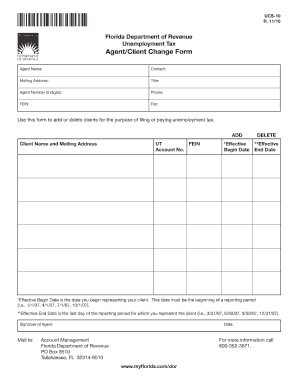
UCS-10 R. 11/10 Florida Department of Revenue Unemployment Tax Agent/Client Change Form Agent Name: Mailing Address: Agent Number (5 digits): FEIN: Contact: Title: Phone: Fax: Use this form to add.
Open form follow the instructions
Easily sign the form with your finger
Send filled & signed form or save
How to fill out the Demand Letter Ucs 124 Dc 292 online
Filling out the Demand Letter Ucs 124 Dc 292 is essential for effectively communicating your requests. This guide will provide you with clear, step-by-step instructions to help you complete the form online with confidence.
Follow the steps to fill out the Demand Letter Ucs 124 Dc 292 online.
- Click ‘Get Form’ button to obtain the document and open it in your preferred editor.
- Begin by entering your full name and contact information in the designated fields. This provides a clear identification of the sender.
- In the recipient's section, fill in the name and address of the individual or organization to whom the demand letter is addressed. Ensure accuracy to avoid any delays.
- Clearly state the purpose of the demand letter in the next section. Be concise and direct about what you are requesting.
- Provide a detailed description of any relevant background information. This helps the recipient understand the context of your demand.
- Include any supporting evidence or documentation that reinforces your demand. Attach these as indicated.
- Review all the information carefully to ensure there are no errors or omissions. This is vital for the effectiveness of the letter.
- Once you are satisfied with the content, save your changes. You can then download, print, or share the Demand Letter Ucs 124 Dc 292 as needed.
Complete your documents online now to ensure timely and efficient processing!
Experience a faster way to fill out and sign forms on the web. Access the most extensive library of templates available.
Related content
The companion to this document, the 2025-26 Summary of the Budget Request, provides a...
Designations used by companies to distinguish their products are often claimed as...
Get answers to your most pressing questions about US Legal Forms API.
What is the maximum amount for small claims court in NY?
The maximum amount for small claims court in New York, including Suffolk County, is generally $5,000. This amount aims to facilitate simpler dispute resolutions. For larger claims, different courts will handle the case. Including a Demand Letter Ucs 124 Dc 292 with your filing can help establish a clear understanding of your demands.
What is the maximum threshold for small claims court?
The maximum threshold for small claims court in Suffolk County stands at $5,000. This limit helps individuals seek resolution without lawyers and complex processes. If your claim surpasses this figure, you may have to file in another court. Additionally, a Demand Letter Ucs 124 Dc 292 can enhance your chances by articulating your demands effectively.
How to file Small Claims in Suffolk County, NY?
To file Small Claims in Suffolk County, NY, you must fill out the necessary forms and submit them to the court clerk. It's essential to gather all relevant documents and evidence related to your case. After filing, you’ll receive a court date to present your claim. Utilizing a Demand Letter Ucs 124 Dc 292 can streamline this process by clearly presenting your grievances.
What is the maximum you can take someone to small claims court?
The maximum you can take someone to small claims court in Suffolk County is $5,000. This limit ensures that small claims court remains accessible for minor disputes. Cases above this amount will require different court procedures. For a solid foundation to your claim, consider drafting a Demand Letter Ucs 124 Dc 292.
What is the limit for small claims court in Suffolk County?
The limit for small claims court in Suffolk County is $5,000. This cap applies to most disputes between individuals or businesses. If you have a claim exceeding this limit, you must explore other legal avenues. Remember, including a Demand Letter Ucs 124 Dc 292 may clarify your position before going to court.
What is the Small Claims limit in Suffolk County?
In Suffolk County, the Small Claims limit is set at $5,000. This means that you can file a claim for any amount up to this limit. If your claim exceeds this amount, you may need to pursue your case in a different court. For effective claims, consider using a Demand Letter Ucs 124 Dc 292 to outline your case clearly.
How to compose a demand letter?
To compose a demand letter, start with a clear subject line that indicates the purpose. Include an introduction stating your position, followed by a detailed account of the matter at hand. Don’t forget to mention the specific remedy you are seeking in your Demand Letter Ucs 124 Dc 292, along with a deadline for a response, ensuring everything is concise and organized.
How to write demand for explanation?
Writing a demand for explanation involves clearly stating what you seek clarification on. Begin by outlining the context of the issue, then specify any relevant details. When crafting your Demand Letter Ucs 124 Dc 292, ensure your language is straightforward, as you want the recipient to understand your request fully.
How do you write a demand letter?
To write a demand letter, start by clearly stating the purpose of the letter. Include important details such as the amount owed and any prior communications. Make your expectations clear, and specify a deadline for response. The Demand Letter Ucs 124 Dc 292 format can assist in ensuring all necessary information is included.
What is considered small claims in NY?
In New York, small claims refer to cases where an individual seeks financial compensation of up to $10,000. These can involve various disputes, such as unpaid debts or damages. Knowing how to prepare a Demand Letter Ucs 124 Dc 292 is vital, as it can serve as a formal notification about your claim before escalating to court.
Use professional pre-built templates to fill in and sign documents online faster. Get access to thousands of forms.
If you believe that this page should be taken down, please follow our DMCA take down process here.