Loading
Get Florida Form Dr 600
How it works
-

Open form follow the instructions
-

Easily sign the form with your finger
-

Send filled & signed form or save
How to fill out the Florida Form DR-600 online
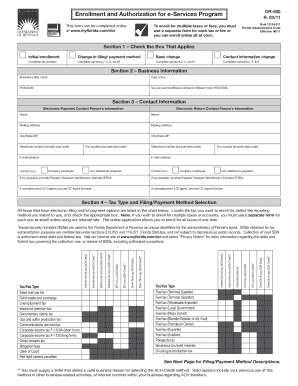
Filling out the Florida Form DR-600 is essential for enrolling in the e-Services Program for tax management. This guide will provide clear and detailed instructions to assist users in completing the form efficiently and effectively online.
Follow the steps to complete the Florida Form DR-600 online
- Click ‘Get Form’ button to access the form and open it in your preferred online editor.
- Begin by selecting the appropriate box in Section 1 that applies to your situation: Initial enrollment, Change in filing/payment method, Bank change, or Contact information change.
- Move to Section 2 and provide your business information including the Business entity name, Type of tax, FEIN/SSN, and Tax account/certificate number if it differs from your FEIN/SSN.
- In Section 3, enter the contact information for the electronic payment and return contact persons. This includes names, mailing addresses, phone numbers, email addresses, and indicating if the contact is a company employee or non-related tax preparer.
- For Section 4, locate and check the appropriate boxes for your desired tax types and filing/payment method selection from the provided chart. Note that a separate form is needed for multiple tax enrollments unless completing this online.
- If completing Section 5, provide your banking information. Include the Bank Name, ABA Routing/Transit number, Bank Account number, and select your Account Type.
- In Section 6, read and acknowledge the Enrollee Authorization and Agreement, providing the required signatures, titles, print names, and contact information where necessary.
- Finally, review all entries for accuracy and completeness, saving your changes. You can then download, print, or share the completed form as necessary.
Take the next step and complete your Florida Form DR-600 online today.
Yes, Florida offers an e-file authorization form, which helps streamline the electronic filing process. This form is essential if you are using a tax preparer and allows them to submit your tax return on your behalf. Be sure to complete this form if e-filing to facilitate a smooth and timely submission. For guidance, you can refer to resources like US Legal Forms that simplify access to necessary documents.