Loading
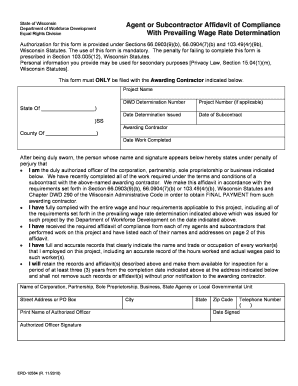
Get Erd 10584 Form
How it works
-

Open form follow the instructions
-

Easily sign the form with your finger
-

Send filled & signed form or save
How to fill out the Erd 10584 Form online
This guide provides a comprehensive overview of how to complete the Erd 10584 form online. With clear, step-by-step instructions, users can efficiently navigate through the required fields and submit their information accurately.
Follow the steps to successfully complete the Erd 10584 Form online.
- Click the ‘Get Form’ button to obtain the Erd 10584 form and open it in your preferred online form editor.
- Enter the project name in the designated field at the top of the form. Ensure that this name matches the project for which you are submitting the affidavit.
- Fill in the DWD determination number, project number (if applicable), the date determination was issued, and the date of subcontract. These details are crucial for your submission.
- Provide the awarding contractor's name along with the date work was completed. This information helps identify the specific job related to this affidavit.
- Read and acknowledge the statements regarding your authority and compliance under penalty of perjury. Ensure you understand your obligations as stated.
- List the names and addresses of your agents and subcontractors in the allocated section. Complete this information accurately and thoroughly.
- Print your name and signature in the designated fields of authorized officer. This step is essential for the validation of the form.
- Include your corporation, partnership, sole proprietorship, business, or agency name, the corresponding address, and telephone number.
- Once all fields are completed, review the form for accuracy. Make any necessary corrections before you proceed.
- You can now save your changes, download a copy of the form, print it for your records, or share it with the appropriate awarding contractor as required.
Start completing your Erd 10584 Form online today to ensure timely submission and compliance.