Loading
Get Fws 3 - 2224 -a
How it works
-

Open form follow the instructions
-

Easily sign the form with your finger
-

Send filled & signed form or save
How to fill out the FWS 3 - 2224 -A online
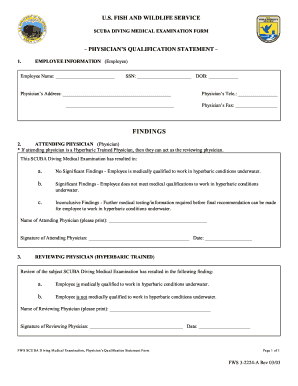
This guide provides step-by-step instructions for filling out the FWS 3 - 2224 -A form online. By following these instructions, you will easily complete the SCUBA Diving Medical Examination form to ensure compliance and thoroughness in your medical assessments.
Follow the steps to successfully complete the form online:
- Press the ‘Get Form’ button to access the FWS 3 - 2224 -A form and open it in your editing tool.
- Begin by entering the employee's full name in the designated field under 'Employee Information'.
- Provide the employee's Social Security Number (SSN) in the specified field.
- Enter the employee's date of birth (DOB) in the appropriate format.
- Fill in the physician’s address completely, ensuring all lines are utilized for clarity.
- Input the physician's telephone number and fax number where indicated.
- In the findings section, select the appropriate option regarding the employee's medical status: 'No Significant Findings', 'Significant Findings', or 'Inconclusive Findings'.
- Print the name of the attending physician clearly in the designated area.
- The attending physician should sign and date the form in the provided spaces.
- If applicable, the hyperbaric trained reviewing physician should review the examination results and indicate their findings by selecting the relevant option.
- The reviewing physician must print their name, sign, and date the form accordingly.
- Once all fields are completed, download, save, or print the form as needed. You can also share it with the necessary parties.
Complete your documents online today for a streamlined experience.