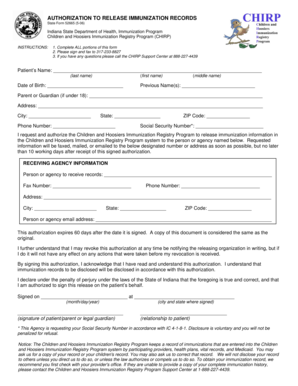
Get Children And Hoosiers Immunization Registry Program - Chirp In
How it works
-

Open form follow the instructions
-

Easily sign the form with your finger
-

Send filled & signed form or save
How to fill out the Children And Hoosiers Immunization Registry Program - Chirp In online
The Children And Hoosiers Immunization Registry Program provides an efficient way to manage immunization records. This guide will help you navigate the online form, ensuring that you accurately complete each section to request the release of immunization records.
Follow the steps to successfully fill out the immunization record release form.
- Click ‘Get Form’ button to obtain the form for release authorization. This action will open the form in your chosen editor for further completion.
- Begin by entering the patient’s name in the designated fields. Ensure that you provide the last name, first name, and middle name, as applicable.
- Input the patient’s date of birth in the specified format to confirm their identity accurately.
- If applicable, list any previous names the patient may have used in the appropriate field.
- If the patient is under 18 years of age, complete the section for the parent or guardian's name.
- Fill in the full address of the patient, including street address, city, state, and ZIP code.
- Enter a valid phone number for the patient or guardian for any follow-ups regarding the form.
- Provide the patient's Social Security Number in the indicated field. Note that this disclosure is voluntary.
- Designate the person or agency that will receive the immunization records by filling in the receiving agency information fields.
- Provide the fax number, phone number, and full address of the designated person or agency that you wish to receive the records.
- If applicable, add the email address of the receiving agency to ensure they receive electronic communications.
- Review the authorization expiration terms and understand that it will remain effective for 60 days from the date of signing.
- Sign the form on the designated line, confirming your acknowledgement and understanding of the authorization terms.
- Include the date and location of signing as required.
- Finally, after reviewing all entries for accuracy, save the changes, and choose to download, print, or share the completed form as needed for submission.
Complete the Children And Hoosiers Immunization Registry Program form online today for seamless management of your immunization records.
When submitting your immunization records to the University of North Carolina at Charlotte, you have the option to do this online through their admissions portal. Ensure your documents meet their requirements. Utilizing the Children And Hoosiers Immunization Registry Program - Chirp In makes it easier to gather the necessary documentation quickly and accurately.
Industry-leading security and compliance
-
In businnes since 199725+ years providing professional legal documents.
-
Accredited businessGuarantees that a business meets BBB accreditation standards in the US and Canada.
-
Secured by BraintreeValidated Level 1 PCI DSS compliant payment gateway that accepts most major credit and debit card brands from across the globe.