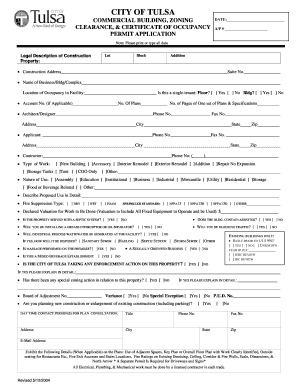
Get Commercial Building
How it works
-

Open form follow the instructions
-

Easily sign the form with your finger
-

Send filled & signed form or save
How to fill out the COMMERCIAL BUILDING online
Filling out the COMMERCIAL BUILDING permit application is a crucial step for ensuring compliance with local regulations and securing the necessary permits for your construction project. This guide will walk you through each section of the form to help you complete it efficiently and accurately.
Follow the steps to fill out the form correctly.
- Click 'Get Form' button to access the electronic version of the COMMERCIAL BUILDING application.
- Begin by entering the date and A/P number at the top of the form to record when you are applying.
- Provide a legal description of the property, including the lot number, block, and addition, to ensure precise identification of the location.
- Fill in the construction address and suite number, including the name of your business or building complex. Indicate whether it is a single-tenant building by checking 'Yes' or 'No' in the appropriate box.
- Outline the location of occupancy within the facility and include the account number if applicable. Specify the number of plans you are submitting and list the architect or designer's name along with their contact details.
- Identify the contractor's information, including their phone number and address, to ensure all parties are aware of the project details.
- Indicate the type of work to be performed by selecting options such as 'New Building', 'Interior Remodel', or 'Exterior Remodel' and provide any additional details.
- Describe the nature of use for the building by selecting from categories such as 'Assembly', 'Education', 'Residential', etc., and include a detailed description of the proposed use.
- Provide information regarding fire suppression types and selected standards, as well as the declared valuation for the work to be done.
- Answer the questions about septic systems, asbestos, and traffic interruptions, ensuring to provide explanations where required.
- If the building was constructed before January 1, 1994, check the relevant box and answer questions related to its condition and any previous construction permits.
- Complete the certification section by declaring your authority regarding the application, including providing the names and addresses of relevant individuals such as business owners or lessees.
- Finally, review all entered information for accuracy, save any changes, download, print, or share the completed form as necessary.
Complete your COMMERCIAL BUILDING document online today to ensure your permit application is processed efficiently.
For a commercial property, the minimum downpayment often falls between 15% and 25%. This range largely depends on the lender, the property type, and the borrower's creditworthiness. Understanding these parameters can help you navigate financing options more effectively. If you're focusing on acquiring a COMMERCIAL BUILDING, consider discussing your goals with a mortgage broker for tailored insights.
Industry-leading security and compliance
-
In businnes since 199725+ years providing professional legal documents.
-
Accredited businessGuarantees that a business meets BBB accreditation standards in the US and Canada.
-
Secured by BraintreeValidated Level 1 PCI DSS compliant payment gateway that accepts most major credit and debit card brands from across the globe.