Loading
Form preview
  • US Legal Forms
  • Other Templates
  • More Forms
  • More Uncategorized Forms
  • Louisiana Form Drc 20

Get Louisiana Form Drc 20

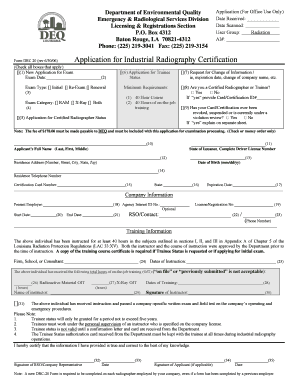
O. Box 4312 Baton Rouge LA 70821-4312 Phone 225 219-3041 Fax 225 219-3154 Form DRC 20 rev 6/30/06 Application For Office Use Only Date Received Date Scanned User Group Radiation AI Check all boxes that apply 1 New Application for Exam Exam Date 2 Status Exam Type Initial Re-Exam Renewal Exam Category RAM X-Ray Both Minimum Requirements 1 40 Hour Course 2 40 Hours of on-the-job training 7 Request for Change of Information / ie expiration date .

How it works

  1. Open form

    Open form follow the instructions

  2. Easily sign form

    Easily sign the form with your finger

  3. Share form

    Send filled & signed form or save

How to fill out the Louisiana Form Drc 20 online

The Louisiana Form Drc 20 is an essential document for individuals seeking certification in industrial radiography. This guide provides step-by-step instructions to help users fill out the form online efficiently and accurately.

Follow the steps to complete the Louisiana Form Drc 20 online.

  1. Click ‘Get Form’ button to obtain the form and open it in the editor.
  2. Begin by checking all applicable boxes under the application type. Specify whether this is a new application for examination or if you are applying for trainee status. Enter the exam date where necessary.
  3. Indicate the exam type by selecting either 'Initial', 'Re-Exam', or 'Renewal', and specify the exam category such as 'RAM', 'X-Ray', or 'Both'.
  4. Ensure you meet the minimum requirements for certification, which include completing a 40-hour course and 40 hours of on-the-job training.
  5. If applicable, fill in your certification details including whether you are a certified radiographer or trainee, providing your certification ID if you responded 'yes'.
  6. Answer the question regarding any previous revocation or suspension of any certification and provide an explanation on a separate sheet if necessary.
  7. Complete your personal information including your full name, date of birth, address, and telephone number.
  8. Fill out your current employer's details and optional information concerning your employment start and end dates.
  9. Provide your training information, including the firm, school, or consultant details, the dates of instruction, and total hours of on-the-job training for radioactive materials and x-rays.
  10. Include the name and signature of your instructor, along with the statement of passing a company-specific exam.
  11. Review the information you have provided for accuracy, and ensure you sign the form both as the applicant and the company representative if applicable.
  12. Once completed, save your changes, and you may choose to download, print, or share the form as needed.

Take the first step towards your certification by completing the Louisiana Form Drc 20 online.

Get form

Experience a faster way to fill out and sign forms on the web. Access the most extensive library of templates available.
Get form

Related content

DRC-20-10-2024.pdf
Note: A new DRC-20 Form is required to be completed on each radiographer employed by your...
Learn more
Top line of doc
... Form of Records ... 20. Radiation Safety Requirements for Wireline Service Operations...
Learn more
Regulatory Procedures Manual, Chapter 7: Recall...
Request Form available on Inside FDA. Submit the form via the preferred method of...
Learn more

Related links form

Bcps Mathematics Science And Gifted Department Martin Luther King Jr. Day - ESL Holiday Lessons Cinco De Mayo Esl Carolinas HealthCare System - Carolinashealthcare

Questions & Answers

Get answers to your most pressing questions about US Legal Forms API.

Contact support

If you are wondering where your Louisiana state taxes are, you can check the status through the Louisiana Department of Revenue's online services. They provide updates on tax returns and payments. Keep your Louisiana Form Drc 20 information available to help streamline your inquiry.

To obtain a Louisiana sales tax certificate, you must register with the Louisiana Department of Revenue. Completing the online application process allows you to receive your sales tax certificate quickly. During registration, be sure to keep your Louisiana Form Drc 20 handy, as it may be required.

To get a copy of your Louisiana state tax return, visit the Louisiana Department of Revenue's online portal. You will need to provide some personal information for verification. Make sure to have your Louisiana Form Drc 20 at hand if you need to refer to your previous filings.

The non-resident form for Louisiana is typically referred to as the Louisiana Income Tax Form for Non-Residents. This form allows non-residents, who earn income from Louisiana sources, to accurately report their earnings. It's important to include necessary documents like the Louisiana Form Drc 20 when filing.

You can find Louisiana state tax forms online at the Louisiana Department of Revenue's official website. There, you will locate the Louisiana Form Drc 20, along with other essential tax forms. Additionally, many libraries and tax preparation offices also provide printed copies.

To obtain Louisiana state tax forms, you can visit the Louisiana Department of Revenue website. They offer a comprehensive collection of tax forms, including the Louisiana Form Drc 20. Alternatively, you can request forms by contacting their office directly.

Get This Form Now!

Use professional pre-built templates to fill in and sign documents online faster. Get access to thousands of forms.
Get form
If you believe that this page should be taken down, please follow our DMCA take down processhere.
Get Louisiana Form Drc 20
Get form
  • Adoption
  • Bankruptcy
  • Contractors
  • Divorce
  • Home Sales
  • Employment
  • Identity Theft
  • Incorporation
  • Landlord Tenant
  • Living Trust
  • Name Change
  • Personal Planning
  • Small Business
  • Wills & Estates
  • Packages A-Z
  • Affidavits
  • Bankruptcy
  • Bill of Sale
  • Corporate - LLC
  • Divorce
  • Employment
  • Identity Theft
  • Internet Technology
  • Landlord Tenant
  • Living Wills
  • Name Change
  • Power of Attorney
  • Real Estate
  • Small Estates
  • Wills
  • All Forms
  • Forms A-Z
  • Other Templates
  • Legal Hub
  • About Us
  • Help Portal
  • Legal Resources
  • Blog
  • Affiliates
  • Contact Us
  • Delete My Account
  • Site Map
  • Industries
  • Forms in Spanish
  • Localized Forms
  • State-specific Forms
  • Forms Kit
  • Real Estate Handbook
  • All Guides
  • Notarize
  • Incorporation services
  • For Consumers
  • For Small Business
  • For Attorneys
  • USLegal
  • FormsPass
  • pdfFiller
  • signNow
  • altaFlow
  • DocHub
  • Instapage
Form Packages
  • Adoption
  • Bankruptcy
  • Contractors
  • Divorce
  • Home Sales
  • Employment
  • Identity Theft
  • Incorporation
  • Landlord Tenant
  • Living Trust
  • Name Change
  • Personal Planning
  • Small Business
  • Wills & Estates
  • Packages A-Z
Form Categories
  • Affidavits
  • Bankruptcy
  • Bill of Sale
  • Corporate - LLC
  • Divorce
  • Employment
  • Identity Theft
  • Internet Technology
  • Landlord Tenant
  • Living Wills
  • Name Change
  • Power of Attorney
  • Real Estate
  • Small Estates
  • Wills
  • All Forms
  • Forms A-Z
  • Other Templates
Customer Service
  • Legal Hub
  • About Us
  • Help Portal
  • Legal Resources
  • Blog
  • Affiliates
  • Contact Us
  • Delete My Account
  • Site Map
  • Industries
  • Forms in Spanish
  • Localized Forms
  • State-specific Forms
  • Forms Kit
Legal Guides
  • Real Estate Handbook
  • All Guides
Prepared for you
  • Notarize
  • Incorporation services
Our Customers
  • For Consumers
  • For Small Business
  • For Attorneys
Our Sites
  • USLegal
  • FormsPass
  • pdfFiller
  • signNow
  • altaFlow
  • DocHub
  • Instapage
Social Media
Call us now toll free:
+1 833 426 79 33
As seen in:
© Copyright 1999-2026 airSlate Legal Forms, Inc. 17 Station Street, Suite 303, Brookline, MA 02445
  • Your Privacy Choices
  • Terms of Service
  • Privacy Notice
  • Content Takedown Policy
  • Bug Bounty Program