Loading
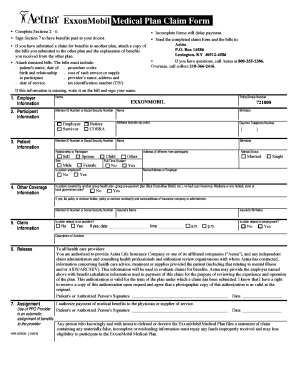
Get Exxonmobil Family Forms
How it works
-

Open form follow the instructions
-

Easily sign the form with your finger
-

Send filled & signed form or save
How to fill out the Exxonmobil Family Forms online
Completing the Exxonmobil Family Forms accurately is essential for ensuring timely benefits. This guide provides a clear analysis of the form components and step-by-step instructions to assist users in navigating the process effectively.
Follow the steps to complete the Exxonmobil Family Forms smoothly.
- Press the ‘Get Form’ button to access and open the Exxonmobil Family Forms. This allows you to begin the filling process.
- Complete Sections 2 through 6 of the form. Ensure all fields are filled out with accurate information, as incomplete forms will delay payment.
- In Section 7, sign the form to authorize benefits payment to your healthcare provider if applicable.
- Attach all necessary itemized bills. These should include the patient’s name, birthdate, provider’s details, cost of services, and procedure codes.
- If there are claims submitted to another plan, include copies of bills submitted and the explanations of benefits received from that plan.
- Once all required sections have been completed and the necessary documents attached, save your changes and prepare to download, print, or share the form as needed.
Complete your documentation online to ensure you receive your benefits without delay.
The email domain for ExxonMobil is typically '@exxonmobil.' This domain is used for official company communications, ensuring that correspondence comes from verified sources. For those engaging with the Exxonmobil Family Forms, utilizing the correct email domain can streamline inquiries and support requests, enhancing your overall experience.