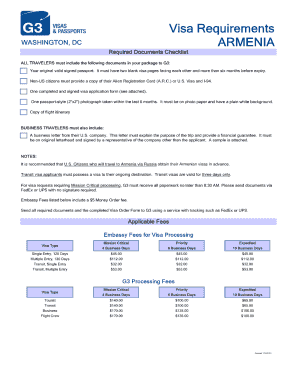
WASHINGTON, DC ALL TRAVELERS must include the following documents in your package to G3: Visa Requirements ARMENIA Required Documents Checklist Your original valid signed passport. It must have two.
Open form follow the instructions
Easily sign the form with your finger
Send filled & signed form or save
How to fill out the See Attached Armenia Visa Application Form online
Completing the See Attached Armenia Visa Application Form online can be a straightforward process when guided step-by-step. This comprehensive guide offers clear instructions to assist users in submitting their visa application accurately.
Follow the steps to complete your visa application form efficiently.
- Click ‘Get Form’ button to obtain the form and open it in the editor.
- Begin by entering your personal information in the designated fields. This typically includes your full name, date of birth, and nationality. Ensure that all details match your official documents.
- Provide your contact details. Fill in your email and phone number. It is important to use an active email address, as it may be used for communication regarding your application.
- Next, enter your travel information. Include details such as your intended arrival date in Armenia and the duration of your stay. Be accurate to avoid any processing delays.
- Submit any required documentation, if asked. This may involve uploading files like a passport copy or travel itinerary. Check the application's guidelines on accepted file formats.
- Review all entered information for accuracy. Ensure that no fields are left blank unless specified as optional. Correct any errors before final submission.
- Once you have confirmed the accuracy of your application, proceed to save your changes. Options typically include downloading, printing, or sharing the form as needed.
Complete your Armenia Visa Application Form online today to ensure a smooth visa request process.
Experience a faster way to fill out and sign forms on the web. Access the most extensive library of templates available.
Related content
To apply for a nonimmigrant visa, please first complete and submit DS-160 online visa...
Student visa application forms and requirements can be found here through the Embassy in...
Using features integrated with Broadsoft UC-One, refer to the following two guides to have...
Get answers to your most pressing questions about US Legal Forms API.
How do I check the status of my Armenia eVisa application?
To check the status of your Armenia eVisa application, go to the official eVisa portal and enter your application number along with your personal details. This will provide you with live updates. If you utilized US Legal Forms, consider their resources for additional insights on tracking your Armenia visa application form.
Why did the Armenian E-visa decline?
An Armenian E-visa can decline for several reasons, including incorrect information or failure to meet specific eligibility criteria. Review your application carefully, focusing on every detail. If you have used the US Legal Forms platform, you can often identify common issues related to your Armenia visa application form before submitting.
How long does it take for an Armenian E-visa?
The processing time for an Armenian E-visa typically ranges from three to seven business days. However, this timeframe can vary based on the accuracy of your application form and the specific requirements. To ensure a smooth process, ensure your Armenia visa application form is complete and correct.
How to check Azerbaijan e-visa status?
To check your Azerbaijan e-visa status, visit the official Azerbaijan visa application website. You will need to input your details, including your application number. If you compare this process with the Armenia visa application form, you will find it similarly straightforward when using the US Legal Forms platform.
What is the minimum bank balance for Armenia visa?
The minimum bank balance for an Armenia visa often depends on the duration and type of visa you are applying for. Typically, applicants should show sufficient funds to cover their expenses while in Armenia. It's advisable to check the specific requirements listed on the Armenia visa application form for the most accurate information.
Where can I see the status of my visa application?
You can see the status of your visa application on the official government immigration website. Simply enter your application number and personal details to access your status. Alternatively, using US Legal Forms provides easy tracking options linked to your Armenia visa application form.
How to check visa application form?
To check your visa application form, navigate to the site where you submitted your application. There should be a section for checking submitted forms. If you used US Legal Forms for your Armenia visa application, you can log in to your account to access and review your application details.
How to check visa status after submission?
You can check your visa status after submission by visiting the official immigration website. Enter your application details and follow the prompts to view your status. Additionally, if you submitted your application through US Legal Forms, you may receive updates via email regarding your Armenia visa application form.
Why did the Armenia E-visa decline?
An Armenia E-visa application may decline due to several reasons, such as insufficient documentation or incorrect information. Reviewing the specific reasons provided in your application portal can help clarify matters. It's crucial to ensure all details are accurate in your attached Armenia visa application form prior to submission for the best chance of approval.
How to check visa submission?
You can check your visa submission status by accessing the website where you submitted your application. Log in to your user account and navigate to the application status section for updates. If you need assistance with the attached Armenia visa application form, explore resources on the US Legal Forms platform, which offers guides tailored for your needs.
Use professional pre-built templates to fill in and sign documents online faster. Get access to thousands of forms.
If you believe that this page should be taken down, please follow our DMCA take down process here.