Loading
Get Formular De Raportare 2020-2025
How it works
-

Open form follow the instructions
-

Easily sign the form with your finger
-

Send filled & signed form or save
How to fill out the Formular De Raportare online
This guide provides a step-by-step approach to completing the Formular De Raportare online. Designed for both experienced users and those new to digital document management, this guide will assist you in efficiently navigating and filling out the form.
Follow the steps to successfully complete the form.
- Click the ‘Get Form’ button to access the document in your preferred online editor.
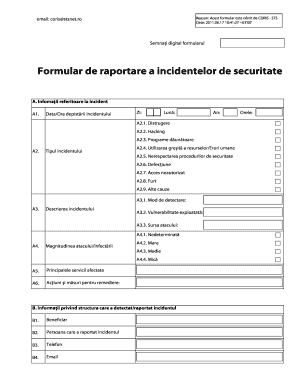
- Begin by filling out Section A, which includes information about the incident. Start with A1, where you will enter the date and time the incident was detected. Specify the day, month, and year accordingly.
- In Section A2, select the type of incident. You can choose from various options such as hacking, malware, unauthorized access, and more. Mark the relevant boxes as they pertain to the incident.
- Proceed to Section A3 to provide a description of the incident. In A3.1, describe how the incident was detected, including any tools used. In A3.2, specify if the vulnerability exploited is known or unknown. In A3.3, indicate the source of the attack, including any identifiable information.
- Move to Section A4 to assess the magnitude of the attack. Choose from categories labeled 'undetermined,' 'large,' 'medium,' or 'small' in A4.1 through A4.4.
- In Section A5, list the main services affected by the incident. This should include any critical systems that were impacted.
- In Section A6, outline the actions and measures taken to remedy the situation. Provide a brief overview of what steps were implemented and the outcomes, if any.
- Section B requires information about the individual or organization that detected the incident. Fill out fields for the beneficiary's name, the person reporting the incident, their phone number, and email.
- In Section C, provide details about the affected system. Include the system name, compromised information, operating system/version, destination IP address, destination port, and affected components.
- In C7, include any additional relevant data regarding the incident that could assist in its resolution.
- Finally, if any information is not available, leave those fields blank. Once you have filled out all applicable sections, remember to digitally sign the form by clicking in the designated area at the beginning of the first page.
Complete your Formular De Raportare online today for efficient incident reporting.
Industry-leading security and compliance
US Legal Forms protects your data by complying with industry-specific security standards.
-
In businnes since 199725+ years providing professional legal documents.
-
Accredited businessGuarantees that a business meets BBB accreditation standards in the US and Canada.
-
Secured by BraintreeValidated Level 1 PCI DSS compliant payment gateway that accepts most major credit and debit card brands from across the globe.