Loading
Open form follow the instructions
Easily sign the form with your finger
Send filled & signed form or save
How to fill out the Buyer's Information Sheet - Pag-IBIG Fund online
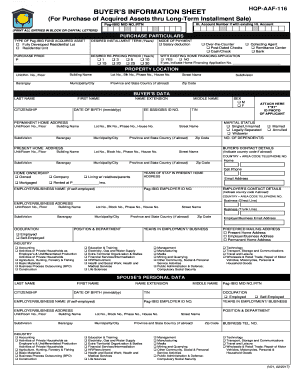
The Buyer's Information Sheet is an important document required for purchasing acquired assets through the Pag-IBIG Fund. This guide provides detailed, step-by-step instructions on how to complete the form online, ensuring a smooth and efficient application process.
Follow the steps to effectively complete your Buyer's Information Sheet.
- Click the ‘Get Form’ button to access the Buyer's Information Sheet and open it in your preferred editor.
- Begin filling out the personal information section. Ensure that you PRINT ALL ENTRIES IN BLOCK OR CAPITAL LETTERS, including your full name, date of birth, and citizenship.
- Fill out the purchase particulars, including the type of asset you intend to acquire, the desired installment term in years, and your preferred mode of payment, selecting from options such as salary deduction or cash/check.
- Provide your property location details. Enter specific information like unit or room number, building name, street name, barangay, municipality/city, and zip code.
- In the buyer’s data section, complete all fields concerning your personal data, including your address, contact information, and employment details.
- Indicate your marital status and number of dependents. If applicable, provide spouse's personal data using the same format as outlined for your own details.
- Complete the sections for bank accounts, credit cards owned, real estate owned, and outstanding credits/loan availments. Ensure accuracy in figures and descriptions.
- Answer the miscellaneous section with a 'Yes' or 'No' where applicable, providing detailed information for any affirmative responses.
- Fill out references, both loan and trade references if self-employed. Include details such as bank names, purposes, and amounts.
- Review the certification section and confirm your understanding and agreement to the terms outlined before signing.
- Save your changes to the document. Depending on your needs, download, print, or share the filled form as necessary.
Complete your Buyer's Information Sheet online today to facilitate your asset acquisition process.
Experience a faster way to fill out and sign forms on the web. Access the most extensive library of templates available.
Related content
This Information Statement is being sent to Stockholders of record as of the 23 January...
Paano Bumili Ng Pag-IBIG Foreclosed Properties 2025 | Step-by-Step Online Bidding Guide!...
Get answers to your most pressing questions about US Legal Forms API.
How can I get my Pag-IBIG number online?
Send an email to contactus@pagibigfund.gov.ph. They might ask for a valid ID to verify your identity. Alternatively, you can fill out the Email Us form on the Pag-IBIG Fund website. Remember to fill up the code correctly at the end of the form before clicking the “SEND” button.
How can I see my Pag-IBIG information online?
Using just your smartphone or computer with internet connection, you can easily access the Virtual Pag-IBIG by visiting .pagibigfund.gov.ph, and clicking on the Virtual Pag-IBIG, For Members link on the main menu. You may also click .pagibigfundservices.com/virtualpagibig/ to directly access Virtual Pag-IBIG.
How can I check my Pag-IBIG data?
Using just your smartphone or computer with internet connection, you can easily access the Virtual Pag-IBIG by visiting .pagibigfund.gov.ph, and clicking on the Virtual Pag-IBIG, For Members link on the main menu. You may also click .pagibigfundservices.com/virtualpagibig/ to directly access Virtual Pag-IBIG.
How can I get my MDF copy online?
How can I check my pag ibig MDF online? How to find my unprint MDF form of Pag IBIG using tracking number Go to their online member registration website. Select the "View Registration Information" and then click on "Continue". Enter the required information (Last and first name, and Registration Tracking Number).
How can I print my Pag-IBIG membership data?
After submitting the online form, a page will appear indicating successful registration. This is a confirmation that the member's Pag-IBIG online registration exercise is complete and successful. The owner should read the instruction carefully, and after that, hit the print button to receive a hard copy.
Can I view my Pag-IBIG contribution online?
Yes! You can view your Pag-IBIG Regular Savings online, via Virtual Pag-IBIG. Simply create your Virtual Pag-IBIG account for you to view your Regular Savings, including the annual dividends it has earned.
How can I get my Pag-IBIG data record?
To request a hard copy of your Pag-IBIG MDF indicating your Pag-IBIG MID number, just visit any Pag-IBIG branch and bring the following: Original and photocopy of valid ID acceptable by the Pag-IBIG Fund, and. Duly accomplished Pag-IBIG Fund Request Slip (HQP-PFF-369).
Can I withdraw my Pag-IBIG contribution after 5 years?
When can a Pag-IBIG member registered under the Mandatory Coverage (Pag-IBIG 1), withdraw his/her contributions? A member may claim his Total Accumulated Value (TAV) after 20 years of membership with the Fund and after having made a total of 240 monthly contributions.
Use professional pre-built templates to fill in and sign documents online faster. Get access to thousands of forms.
If you believe that this page should be taken down, please follow our DMCA take down process here.