Loading
Get Teacher/employee Individual Record Form 2020-2026
How it works
-

Open form follow the instructions
-

Easily sign the form with your finger
-

Send filled & signed form or save
How to fill out the TEACHER/EMPLOYEE INDIVIDUAL RECORD FORM online
This guide provides step-by-step instructions on how to accurately complete the Teacher/Employee Individual Record Form online. By following these instructions, users can ensure that all required information is submitted correctly and efficiently.
Follow the steps to fill out the form successfully
- Press the ‘Get Form’ button to retrieve the form and open it for editing.
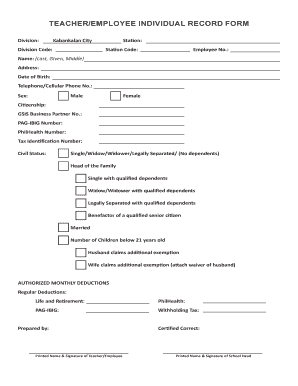
- Begin by filling in the division name as 'Kabankalan City' and the division code immediately following.
- Enter your assigned station and its corresponding station code in the designated fields.
- Input your Employee Number in the provided space.
- Complete the Name section with your last name, first name (given), and middle name as appropriate.
- Provide your full address in the address field.
- Enter your date of birth using the prescribed format.
- Fill in your telephone or cellular phone number accurately.
- Select your sex by marking either 'Male' or 'Female'.
- Indicate your citizenship in the corresponding field.
- List your GSIS Business Partner Number, PAG-IBIG Number, PhilHealth Number, and Tax Identification Number as required.
- Choose your civil status from the options provided, ensuring to include details if claiming dependents.
- If applicable, fill in the number of children under the age of 21.
- Indicate if your husband or wife claims additional exemption, and attach the waiver if needed.
- Complete the authorized monthly deductions section, specifying expenses for PhilHealth, PAG-IBIG, and withholding tax.
- Finalize the form with your printed name and signature in the 'Prepared by' section.
- Have the school head print their name and sign in the 'Certified Correct' space.
- Review all entries for accuracy, then proceed to save your changes, download the completed form, and print or share it as necessary.
Complete your documents online today for a seamless experience.