Loading
Get Burs1 2020-2026
How it works
-

Open form follow the instructions
-

Easily sign the form with your finger
-

Send filled & signed form or save
How to fill out the Burs1 online
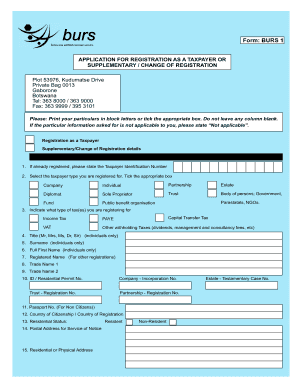
This guide provides comprehensive instructions on completing the Burs1 form online for taxpayer registration or changes in registration. The Burs1 form is essential for individuals and organizations seeking to comply with tax obligations in Botswana.
Follow the steps to successfully complete the Burs1 form online.
- Click the ‘Get Form’ button to access the Burs1 form and open it in the designated editor.
- Indicate whether you are registering as a new taxpayer or if this is a supplementary/change of registration by ticking the relevant box.
- If you have previously registered, provide your Taxpayer Identification Number in the specified field.
- Select your taxpayer type by ticking the appropriate box from the provided options, such as Company, Individual, or Sole Proprietor.
- Specify the type of tax you are registering for by ticking the relevant boxes, including Income Tax, VAT, or other applicable taxes.
- For individual applicants, provide your title, surname, and full first name in the required fields, ensuring they are printed in block letters.
- If applicable, complete fields for Registered Name and Trade Names, and provide identification numbers or documentation as required.
- Fill in your residential status, postal address, and physical address, including contact numbers for office and mobile.
- In Section B, tick the type of organization and provide relevant details about directors, nature of business, and sources of income.
- Provide details of any major shareholders, including their residential addresses and contact details.
- Complete information in Section C regarding business information, including accounting year and taxable turnover.
- Provide particulars for your tax agent, if applicable, including their contact details and address.
- Fill out the bank account details section by providing the name and branch of your bank, account number, and account holder information.
- Attach all required documents as listed in Section G, ensuring all relevant copies are included.
- Review all the information for accuracy; then declare that the information provided is true by signing and dating the declaration.
- Save your changes, and if needed, download, print, or share the form once completed.
Complete your Burs1 form online today to ensure you meet your tax registration requirements.
Filling up a BIR form requires you to carefully input your tax information and ensure accuracy in every detail. Familiarize yourself with the specific requirements set forth under Burs1 to avoid mistakes. US Legal Forms can offer templates and guided instructions, making the process more manageable.
Industry-leading security and compliance
US Legal Forms protects your data by complying with industry-specific security standards.
-
In businnes since 199725+ years providing professional legal documents.
-
Accredited businessGuarantees that a business meets BBB accreditation standards in the US and Canada.
-
Secured by BraintreeValidated Level 1 PCI DSS compliant payment gateway that accepts most major credit and debit card brands from across the globe.