Loading

Open form follow the instructions

Easily sign the form with your finger

Send filled & signed form or save
How to fill out the Dr 8453 online
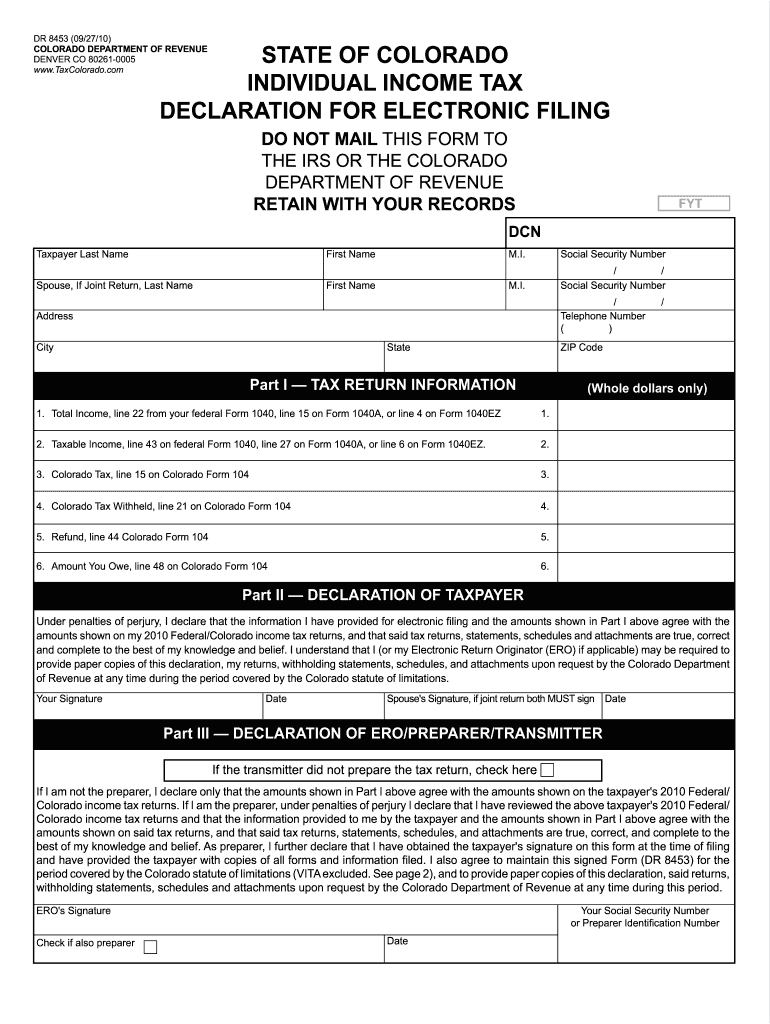
The Dr 8453 is a vital document for individuals filing their Colorado state income tax electronically. This guide will help you understand how to complete the form accurately and efficiently online.
Follow the steps to fill out the Dr 8453 with ease.
- Press the ‘Get Form’ button to obtain the Dr 8453 and open it in the online editor.
- Begin by entering your last name, first name, and middle initial in the designated fields.
- Input your Social Security number accurately to ensure proper identification.
- If you are filing a joint return, provide your spouse's last name, first name, and middle initial along with their Social Security number.
- Fill in your telephone number and your complete address, including city, state, and ZIP code.
- In Part I, input the total income from line 22 of your federal Form 1040, line 15 on Form 1040A, or line 4 on Form 1040EZ in the appropriate box.
- Next, enter your taxable income from line 43 of federal Form 1040, line 27 on Form 1040A, or line 6 on Form 1040EZ.
- Fill in the Colorado tax from line 15 on Colorado Form 104.
- Input the total Colorado tax withheld from line 21 on Colorado Form 104.
- Enter the refund amount from line 44 of Colorado Form 104.
- Finally, provide the amount you owe from line 48 on Colorado Form 104.
- In Part II, affirm the accuracy of your information by signing and dating the declaration.
- In Part III, if you did not prepare your own return, check the appropriate box. If you are the preparer, enter your Social Security number and date accordingly.
- Review all entries to ensure accuracy before saving your changes, downloading, printing, or sharing the completed Dr 8453.
Complete your Dr 8453 online today for a streamlined tax filing experience.
Experience a faster way to fill out and sign forms on the web. Access the most extensive library of templates available.
Related content
All Taxpayers are required to sign and date the. DR 8453 at the time of filing. If the tax...
Feb 21, 2025 — Course Description. The purpose of this course is to develop one's...
Each unique NPC model has an in-game ID associated with it which can be used by tools such...
Get answers to your most pressing questions about US Legal Forms API.
How are the majority of tax returns submitted to the IRS?
Most tax returns are now submitted electronically through various software platforms. This includes using programs such as Dr 8453, which streamline the filing process. Electronic submission is faster and more efficient, reducing the chances of errors.
How do I attach documents to my tax return?
To attach documents, you must follow the instructions provided by your e-filing software. Typically, you can upload or include necessary documents electronically when using software like Dr 8453. Ensure all required documents are in the correct format before submission.
What is the difference between 8879 and 8453?
The main difference lies in the type of returns they authenticate. Form 8879 is for individual income tax returns, while form 8453 supports various forms, including returns for trusts. Both forms, including Dr 8453, require signatures to validate electronic submissions.
What is a 8453 form for form 1041?
The 8453 form for form 1041 serves as a declaration for fiduciary tax returns filed electronically. It allows you to authenticate the return you are filing for estates or trusts. When utilizing Dr 8453, this form ensures compliance and secure submission to the IRS.
How to use form 8453?
Form 8453 is used to authenticate your electronic tax return. To use Dr 8453, fill out the appropriate sections based on your tax information and follow your tax software’s instructions. This form facilitates the electronic submission of your tax return, ensuring IRS acceptance.
How to get Colorado state tax forms?
You can obtain Colorado state tax forms online through the Colorado Department of Revenue's website. They provide a comprehensive list of available forms, including any necessary for your state tax filing. Use Dr 8453 alongside any state forms as required for a complete tax submission.
How to suppress form 8453?
To suppress form 8453, you need to ensure that your tax software is configured correctly. Most programs offer an option to suppress certain forms when filing electronically. When using Dr 8453, verify your settings to confirm that the form will not be included in your submission but is still available for record-keeping.
What does 8453 mean?
The Dr 8453 form functions as an authorization document for electronic tax submissions, primarily relating to forms like 1040, 1041, and others. Essentially, it establishes permission for a tax professional or software provider to file your return electronically on your behalf. Understanding its meaning aids in navigating the intricacies of tax filing.
What is PA form 8453?
PA form 8453 is a specific version of the Dr 8453 form, tailored for use in Pennsylvania tax filings. This form assists taxpayers in authorizing the electronic submission of their state tax returns. By using PA form 8453, you can streamline your filing process and ensure compliance with state tax regulations.
Why do I have to send form 8453?
Forms and Supporting Documents Requiring a Federal Tax Signature Form. You'll need to file this federal tax signature form if you're attaching the following forms and documents: Form 1098-C, Contributions of Motor Vehicles, Boats, and Airplanes. Form 2848, Power of Attorney and Declaration of Representative.
Use professional pre-built templates to fill in and sign documents online faster. Get access to thousands of forms.
If you believe that this page should be taken down, please follow our DMCA take down process here.